Supplier Management Suite
App · Procurement
Supplier Management Suite is supplier onboarding software and a source-to-pay app for procurement teams, built on Joget DX 9, that manages supplier registration, document verification, bid evaluation, contract tracking, invoice processing, and conflict-of-interest checks. Today, procurement teams find vendor data spread across spreadsheets, emails, and the ERP. The Finance team spends time resolving price variances, partial deliveries, and invoices received before goods receipts. Procurement officers struggle to manage onboarding through scattered emails and manual entry. Key Features Supplier Management Suite registers a supplier on Register Supplier, verifies documents and screens the supplier side by side, then runs a risk assessment and final approval before the supplier is Active. Supplier Management Suite screens each supplier against the Watchlist (sample) table, which you replace with your own list. Supplier Management Suite runs tenders on Tenders and Bids, scores bids with Scoring Weights and drafts an AI bid comparison that never picks a winner. Supplier Management Suite checks every invoice by three-way match against its purchase order and received value, approves it within 2% and sends the rest to Finance on Exceptions with the difference shown. Supplier Management Suite opens a COI case for Compliance when a staff declaration matches the director of a bidding supplier. Frequently Asked Questions What is the supplier onboarding process in Supplier Management Suite? Supplier Management Suite guides vendor onboarding through a structured workflow. The process begins with supplier registration, followed by document verification and screening against a watchlist. Then, a risk assessment is performed, and a final approval is needed before a supplier becomes Active. The Onboarding Progress screen tracks the status of each supplier. How does Supplier Management Suite do a three-way match between purchase order, goods receipt and invoice? Supplier Management Suite automatically compares the invoice total with the purchase order total and the received value. The calculation uses a fixed rule; AI is not involved. If the difference is within 2%, the invoice is approved automatically. Otherwise, the invoice, along with the difference, goes to the Finance team for review. Does Supplier Management Suite check suppliers against real sanctions or AML lists? No. Supplier Management Suite does not perform real sanctions or AML screening. It uses a sample watchlist. You must replace this "Watchlist (sample)" with your own reference data for compliance checks. How does Supplier Management Suite find conflicts of interest between staff and suppliers? Supplier Management Suite identifies conflicts of interest by matching staff declarations on Declare an Interest against the directors of bidding suppliers. If a match is found, a COI case is opened for Compliance to investigate the potential conflict. AI does not make this determination. Which Joget version does Supplier Management Suite run on, and what does the AI need? Supplier Management Suite runs on Joget DX 9.1.1. The AI functionality uses your own key to draft notes for document checks, risk narratives, bid comparisons, and invoice exceptions, but a person makes the final decision on each.
Well Investment Proposal
App · Finance & Accounting
Well Investment Proposal is a drilling authorization for expenditure (AFE) and capex approval app for oil and gas asset teams, built on Joget DX 9.1.1, that captures well proposal details, calculates financial metrics, and routes proposals through a capex approval workflow. Oil and gas asset teams currently manage well proposals and AFEs using spreadsheets and email. Proposals often sit unnoticed in an inbox. It is difficult for Asset Managers to see which cost estimate is current, who holds the proposal, and how one well ranks against others when competing for the drilling budget. Key Features Well Investment Proposal totals drilling, completion, facilities, and contingency cost lines on the New Proposal. Well Investment Proposal calculates NPV, profitability index and average payback from the yearly cash flow table on the proposal. Well Investment Proposal sends each proposal to the Asset Manager and then Engineering, who approve, reject or return it from My Tasks, and emails the requester at each outcome. Well Investment Proposal ranks every proposal by profitability index on Portfolio Ranking. Well Investment Proposal drafts an AI review with a Strong, Marginal or Weak verdict, the investment case, risks and gaps, and questions for the author, while the Asset Manager decides. Frequently Asked Questions What is an AFE in oil and gas, and where does Well Investment Proposal fit? An AFE (authorization for expenditure) is the document an operator uses to estimate drilling costs and secure approval before spending money. Well Investment Proposal covers the internal half: the cost estimate, the economics, and the approval chain. How does Well Investment Proposal calculate NPV, payback and profitability index without code? Well Investment Proposal uses Joget's standard Calculation Field and Spreadsheet elements. The formulas for NPV, average payback, and profitability index are configured directly within the app, avoiding the need for custom scripts or plugins. Does Well Investment Proposal handle partner AFE balloting or actual-versus-AFE cost tracking? No. Well Investment Proposal focuses on the proposal creation and approval process. It does not include functionality for partner (non-operator) AFE balloting or tracking actual costs against the original AFE. Does Well Investment Proposal need a live oil price feed? No. The user picks a Price Deck record on the proposal. There is no need for a live price feed or an API key for accessing price information. Which Joget version does Well Investment Proposal run on, and what does the AI need? Well Investment Proposal is built on Joget DX 9.1.1. The AI functionality requires your own AI configuration and key. The reviewer steps are mapped to your own users or groups.
Chart.js Showcase App
App · Demo for Joget Features
Chart.js Showcase is a Joget DX 9 app of 26 working chart pages for developers who build dashboards with the ChartJs menu. A business user asks for a stacked bar, a target line or a second axis, and the developer opens the Chart.js docs to work out how it fits inside a Joget userview menu. Chart.js Showcase answers that on one dataset. Part A: Basics shows what the menu settings alone produce. Part B: Advanced shows what a footer script adds, and the note on each page names the gap that script fills. Key Features Draws Bar, Line, Area, Pie, Donut, Polar Area, Radar, Bubble and Scatter charts in Part A, each with a table, filter and PDF and CSV download set in the menu. Runs Bar, Line and Area with no footer script; Pie, Donut, Polar Area and Radar carry a one-line footer, and Bubble and Scatter a footer that builds the points. Shows 17 Part B demos, one per menu, including stacked, horizontal and two-axis charts, currency labels and brand colours. Adds waterfall, target line, SLA band, range band and centre-total donut charts on core Chart.js, with no add-on library. Gives every Part B footer a way to find its own chart, so a Custom Footer copies into another app without editing an id. Reads every chart from a Joget list on one fictional manufacturer, Aurelia Industries: 10 forms and 2,291 seed rows. Frequently Asked Questions Which Joget version does Chart.js Showcase need? Chart.js Showcase was built and checked on Joget DX 9.1.1 with ChartJs Menu 8.0.3 and the Datalist Number Formatter plugin. Do I need to write a script to draw a chart in a Joget userview? Not for Bar, Line and Area. Pie, Donut, Polar Area, Radar, Bubble and Scatter need a short footer, and all 17 Part B demos use one. Does Chart.js Showcase need internet access? No. Every chart runs on the Chart.js that the ChartJs Userview Menu Plugin ships. No add-on library is loaded.
Onboarding Checklist App
App · Human Resources
Onboarding Checklist is a Joget app that keeps one checklist for each person who joins, moves to a new team or leaves. Every step goes to the team that does it, with a due date, and HR can see which team is running late.A new hire arrives and the laptop does not. Most HR teams run a start date from an email thread or a spreadsheet, and an email thread does not show which team is late. At the other end, someone resigns on Friday and their accounts are still open on Monday. Key Features Opens one case per person. HR presses New case, says whether the person is joining, moving or leaving, enters the start, move or last day, and picks a checklist. Each step becomes a task for the team that does it, due a set number of days before or after that date. Gives each team lead their own list. On My tasks, a lead sees only the open tasks of the teams they lead, soonest first. When a task is finished, they tick it and press Mark done. Shows HR who is behind. The Home page shows how many cases are open, how many are overdue and how many people start in the next 7 days, and a chart shows each team's late work in red. Puts a leaver's last day on IT's and Facilities' lists. On the standard leaver checklist, IT has a task to turn off all of the person's accounts at the close of business, and Facilities has a task to collect the laptop and access card, both due on the last day. Lets HR change the steps. HR can add or remove a step, change which team does it, and change how many days before or after the date it is due. Ten sample checklists come with the app. Frequently Asked Questions What should an employee offboarding checklist include? Onboarding Checklist's standard leaver checklist has six steps: hand over open work, exit interview, laptop and access card returned, accounts disabled at close of business on the last day, experience certificate, and final pay settlement three days later. Each step names the team that does it and the date it is due, so anyone reviewing a leaver later can open the case and see when the accounts were due to be turned off. Does Onboarding Checklist disable accounts or send email by itself? No. Onboarding Checklist sends no email and has no connection to payroll, an HR system or a user directory. IT disables the accounts and marks the task done. What does Onboarding Checklist need? Joget DX 9 Enterprise, tested on 9.1.1, and the EChart Menu plugin for the Home charts. Optional step suggestions use the Joget AI Agent Builder and your own AI key.
Dispatch Desk App
App · Logistics
Delivery Dispatch Board and Route Stop Tracker is a shift-level delivery dispatch application built for transport coordinators and logistics supervisors to track daily delivery routes, assigned drivers, and individual stop progress. Key Features Opens delivery route details in a side-by-side panel showing driver assignments, vehicle details, duration, and complete stop lists without covering the main dispatch board. Displays stop completion progress through visual progress bars, completion percentages, and numerical stop counts. Compares promised estimated arrival times against actual delivered timestamps for every delivery stop. Reassigns drivers and updates route statuses directly from the open route panel controls. Visualizes active shift status and regional open stop counts using integrated dashboard charts. Exports route, stop, driver, and vehicle data lists directly to CSV, Excel, XML, and PDF file formats. Frequently Asked Questions Does Dispatch Desk replace a transport management system? No. A transport management system plans the network — what ships, on which lane, at what cost. Dispatch Desk is the shift-level board underneath it: the routes going out today, the drivers on them, and the stops still open. Operations teams that already run a TMS use Dispatch Desk as the screen a coordinator actually works in during the shift. Can our own team change Dispatch Desk without a vendor? Yes. Dispatch Desk is native Joget DX 9 configuration — forms, datalists and a userview, with no custom plugin. A team that administers Joget adds a field, renames a route status or changes which columns the board shows in the Form Builder and Datalist Builder, without a code release. What version of Joget does Dispatch Desk need? Dispatch Desk runs on Joget DX 9.1.1 Enterprise. Dispatch Desk uses Enterprise datalist components for the status formatting, the progress column, the charts and the route panel, so a Community Edition install will not render the board as shown. What does a coordinator see when Dispatch Desk opens? Four counts and the route table. Routes on the board, dispatched now, running late, and planned, then every route with its status, driver, region, vehicle, progress, stop count and finish time. Request a walkthrough at https://joget.com/contact-us/ or write to sales@joget.org. Bring a day's worth of routes and stops to the call and they can be loaded into Dispatch Desk during it.
ECharts Studio
App · Utilities
ECharts Studio is a chart theme builder for Joget DX 9: a reporting analyst pastes two-column CSV or a JSON list, previews the chart on the form across 14 chart types, sets the theme, and saves it as a record the whole team can reopen. No code is written at any step. Reporting teams rebuild the same small charts in spreadsheets every month and lose the figures behind them. When the analyst who built the chart leaves the team, nobody knows which rows produced it or what question it was meant to answer. ECharts Studio keeps the title, the question, the chart type, the palette and the pasted data together in one chart project. Key Features Saves each chart as a chart project with a status of Draft, In review or Published, and the question the chart answers stored beside it. Offers 14 chart types, including bar, grouped bar, horizontal bar, stacked area, line, pie, donut, radar and funnel. Reads two-column CSV with a `label,value` header, or a JSON list of label and value pairs, up to 500 rows, and accepts extra value columns for grouped, stacked, multi-line and radar charts. Names the row to fix when a value is blank or not a number, and asks for JSON when a CSV label contains a comma. Generates the chart as a whole options JSON object that copies once into the Additional Customization field on the Advanced tab of a Joget Chart, and generates the palette on its own as an ECharts Custom Theme JSON. Opens a saved chart project with the chart already drawn, and redraws it with Preview chart after a change. Opens on a Dashboard with four counts and two charts taken from the same chart project records, and filters the list by title, chart type and status. Frequently Asked Questions How do I build a chart in Joget with no code? Open ECharts Studio, go to Chart projects, press New chart project, paste the CSV into Chart data and press Preview chart. The chart draws under the button. Press Save to keep the project. Can I use an ECharts Studio chart on a page in my own Joget app? Yes. Press Export options JSON, with this data in ECharts Studio, then copy the whole object into the Additional Customization field on the Advanced tab of a Chart on your own page. Use Export options JSON, structure only when the Chart's own list supplies the figures, and Export theme JSON for the colours. The in-app Guide names each location. Which Joget version and plugins does ECharts Studio need? ECharts Studio was built and checked on Joget DX 9.1.1 Enterprise. ECharts Studio needs no marketplace plugin. The Chart that generates JSON is a Joget DX Enterprise component, and the preview uses the chart library Joget ships. Request a walkthrough at https://joget.com/contact-us/ or write to sales@joget.org.
Lead Management System
App · Sales & Marketing
Lead Management System is an internal lead tracking app for sales teams managing enquiries across products and services. Maintain your product list, capture each contact and keep follow-ups, custom values and review decisions with the lead. The app runs on Joget DX 9. Sales officers record conversations and next actions. Managers review the enquiry, return it for more work or record an outcome. Administrators maintain the product choices, shared metrics and team assignments. Key Features Capture the enquiry. Record the contact, product and source. Keep one lead number throughout the process. Follow up with context. Record activities, outcomes, notes and next action dates. Open Follow ups due today to find scheduled work. Review and decide. Convert the lead, send it back with a comment or drop it with a reason. Find completed outcomes in Converted and Dropped. The dashboard links work counts to their underlying records. Filter leads by contact, product, source or stage. The in-app Guide walks the team through setup and its first enquiry. Frequently Asked Questions Can we use our own products and metrics? Yes. Administrators maintain products and one shared list of Number or Text metrics with optional units. Users add optional values and notes to individual leads. Number metrics reject nonnumeric input. Calculated KPIs and custom dashboard metrics are outside this version. What does Convert do? It records the Converted stage and date. Creating an order, service case or application in another system requires a separate integration. Can customers submit enquiries directly? This version is an internal workspace. A public product catalogue, customer intake page and outbound messaging are not included. Talk to Joget about licensing and your team's lead workflow.
Northstar Treasury App
App · Finance & Accounting
Northstar Treasury is a cash position and weekly cash flow forecast application on Joget DX 9.1.1 Enterprise for finance and treasury leads at small and mid-size companies who track several bank accounts on spreadsheets. Northstar Treasury is built with Joget's form, list and userview builders. No code. Finance managers in logistics, trading and distribution companies keep the daily cash position in a spreadsheet that one person updates. Bank movements sit on one tab and the weekly cash flow forecast in a second file that never agrees with the bank account register. When a director asks how much cash the company holds today, the answer has to be rebuilt from both. Key Features Registers each bank account with its bank, account reference, currency, account type, opening balance and an Active or Archived status. Records every transaction with date, account, direction, amount, counterparty and a Draft or Confirmed status. Draft rows stay out of the cash position. Calculates the cash position for one selected currency as Active opening balances plus Confirmed inflows less Confirmed outflows, each time the Dashboard opens. Shows cash flow by week and the current balance of each Active account under Liquidity by account. Filters transactions by Direction and Status, and totals Confirmed inflow, outflow and net movement. Projects the balance week by week from planned movements, each marked Contracted, Expected or Indicative by the person who entered it. Frequently Asked Questions Does Northstar Treasury convert currencies or show one consolidated total? No. Northstar Treasury holds no exchange rates and never adds one currency to another. The Dashboard, Forecast and Transactions totals show one currency at a time. Does Northstar Treasury connect to a bank or predict cash flow? No. Northstar Treasury has no bank feed and no forecasting model. Finance staff type every record into Joget forms, and the Forecast page adds the planned movements to the Confirmed position. No confidence percentage is calculated. Which Joget DX version does Northstar Treasury need? Northstar Treasury was verified on Joget DX 9.1.1 Enterprise with the EChart Menu and Column Template Formatter plugins installed. Request a walkthrough at https://joget.com/contact-us/ or write to sales@joget.org. A Joget administrator can change a field, a filter or a page in the builders, with no code, once the app is imported.
Product Insights App
App · Analytics & Reporting
Product Insights is a ready-made product analytics application for Joget DX 9, built for product managers and growth leads at software and subscription businesses. Product Insights holds six record types: acquisition channels, product features, signup cohorts, revenue months, experiments and metric alerts. Product teams at subscription businesses usually keep these numbers in separate files. Signup counts sit in one spreadsheet, feature adoption in another, cohort retention in a third, and monthly recurring revenue in whatever the finance team last exported. Answering a question from a founder or a board member means reopening last month's workbook and rebuilding the figure by hand. The alternative, a dedicated product analytics platform, needs a licence, an SDK shipped inside the product and an engineer to keep the pipeline running. Key Features Records acquisition channels with source type, signups, paid customers and customer acquisition cost, then charts signups against paid customers for organic, paid, referral and social sources. Tracks product features with active users, adoption percent and a rising, steady or watch trend, grouped by feature area. Stores weekly signup cohorts with cohort size and week 1, week 2, week 4 and week 8 retention percentages, and plots the three retention horizons on one chart. Keeps each revenue month with monthly recurring revenue, annual recurring revenue, new business, expansion, contraction and churn percent on a single row. Logs experiments with variant lift percent, statistical confidence percent and a ship, hold, iterate or pending rollout decision. Raises metric alerts by type (drop, spike, anomaly or threshold breach) against an observed value, a threshold value and the team that owns the metric. Counts every information tile from the records underneath it, so the figure on the page and the table below it cannot disagree. Frequently Asked Questions Does Product Insights connect to an analytics tool like Amplitude or Mixpanel? Product Insights ships no analytics SDK and no built-in connector. Every page sits on an ordinary Joget form and table, so any method that can write to a Joget form can load it: the Joget API, a JSON or web service call from a data warehouse, or a scheduled import. This keeps product data on the same platform as the rest of an organisation's Joget applications. Can the fields be changed? Yes. Each of the six pages sits on a standard Joget form, so fields are added, renamed or removed in the Form Builder and the corresponding table and chart follow. Source types, feature areas, trends, severities and rollout decisions are fixed option lists on those forms and are edited the same way. What Joget version does Product Insights need? Product Insights runs on Joget DX 9. Product Insights uses standard forms, datalists and userview components, with charts drawn by the bundled chart element. Is the sample data included? Product Insights ships with example records on all six pages so the charts and tiles render on first open. Delete them and record your own figures, or import your history through the same forms. Getting started: The app's own Getting Started page walks the first record in five actions, naming the menu, the button and the fields at each step.
Team Meeting Action Tracker App
App · Office Tools
Team Meeting Action Tracker is a meeting record and task management application designed for small teams to track action item resolution across recurring meetings. Project teams lose track of commitments when action items remain buried inside static meeting notes. Meeting facilitators manually copy task lists into separate tools, causing missed completion dates and unassigned deliverables. Team members lack a single central view to monitor open tasks across weekly meetings. Key Features Logs meeting notes, attendee lists, file attachments, and linked action item rows on a single form. Filters action item records by status, owner, parent meeting title, and target due date. Proposes draft action items with suggested owners and completion dates using the Google Gemini API. Displays personal open tasks, items due today, and weekly action metrics on a Home dashboard. Records execution status logs for every AI draft generation run on a dedicated activity page. Frequently Asked Questions Does Team Meeting Action Tracker require an AI API key to function? Team Meeting Action Tracker operates standard manual meeting intake, task filtering, and dashboard views without an API key. Team Meeting Action Tracker only requires a Google Gemini API key if team members use automated action drafting. Does Team Meeting Action Tracker send automated email notifications? Team Meeting Action Tracker does not include email notifications or approval workflows. Team Meeting Action Tracker displays open deliverables directly on personal Home dashboards and filtered task lists. Talk to Joget about licensing, or write to sales@joget.org.
Clearway App
App · Governance & Compliance
Clearway app is a management of change software. Any alteration to equipment, a system or an operating procedure is raised as a work package, routed through review and approval before execution, and retained with its decision trail. MOC is mandatory in chemicals, pharma, F&B, oil and gas, utilities and mining, because a local change can propagate two systems away. Most sites run it on a form, a mailbox and recall. Clearway commits the package to record on raise, dispatches to review group and named approver in parallel, enforces return-with-reason, and computes per-row ageing. Key Features Work package form: scope, reviewers, safety case, affected systems, attachments Conditional safety case fields, rendered only on safety review determination or equipment outage Parallel dual review: group (any member decides; deciding member recorded) + named approver Return-to-requester with mandatory reason, from either reviewer Reviewer inbox: group and individual assignments in one list, with priority and days waited Decided-by-me: per-reviewer signed history All requests: status, group, approver, affected systems, ageing; filters on status and group Group workload by discipline Cleared-package PDF, one click from any closed row Review groups are configuration data, not code — rename or extend without a developer In-app Guide Frequently Asked Questions MOC or maintenance? MOC only. Known, scheduled work stays in your maintenance system. Who clears a group review? Any named member; identity is recorded. Can it be sent back? Yes — either reviewer, with a reason, to the requester's queue. What does the auditor see? Status, reviewers, decisions, dates, and the cleared-package PDF.
NAICS List
App · Office Tools
NAICS List is a central utility application that stores, updates, and serves North American Industry Classification System codes and descriptions for form lookups across Joget versions, from Joget v6 through the latest Joget DX9 release. Compliance teams and application developers often duplicate industry lookup tables across separate procurement, vendor management, and customer onboarding applications. Hardcoding classification codes or maintaining static spreadsheets across multiple systems leads to outdated industry data, mismatched reporting codes, and redundant administrative updates. Business establishments operating across Canada, Mexico, and the United States require a single authoritative database to maintain consistent 6-digit economic activity classifications. The NAICS data is gathered from http://www.census.gov/eos/www/naics/index.html. Key Features Populates a pre-built database of 6-digit North American Industry Classification System codes gathered from standard online registries. Serves centralized industry code lookup tables directly to form dropdown and autocomplete fields across external Joget applications. Filters classification records by exact numerical code values or descriptive text strings. Provides administrative forms to add, modify, or delete custom industry classifications and descriptions. Exports classification selections and master code lists to CSV, Excel, XML, and PDF formats. Displays responsive layout views for browsing industry categories on mobile devices. Frequently Asked Questions How does NAICS List integrate classification codes into other Joget applications?NAICS List stores 6-digit classification codes in a central database table, allowing form builders to pull standard industry dropdown menus and search fields into external Joget apps without duplicating data entries. What source data does NAICS List use for standard industry classifications?NAICS List incorporates 6-digit code data structured after official North American Industry Classification System standards used across Canada, Mexico, and the United States. Which Joget platform versions support NAICS List?NAICS List runs on Joget DX 7 and above, On-Premise and Cloud environments across Enterprise editions.
AI Expenses Claim App
App · AI Agents
AI Expenses Claim App is an automated expense reimbursement and compliance audit application that scans receipt images, extracts line-item totals, enforces category policy limits, and routes approval workflows on Joget DX 8 and Joget DX 9. Finance managers, corporate accountants, and HR expense administrators struggle to audit employee reimbursement requests when evaluating physical receipts and spreadsheet submissions. Manual expense processing leads to non-compliant claim submissions, unverified GST tax calculations, exceeded policy caps, and delayed manager approvals across business departments. Finance leaders lack unified visibility into monthly claim budgets, exception queues requiring manual review, and detailed receipt audit trails. Key Features Evaluates uploaded receipt files across four weighted compliance criteria comprising receipt quality, amount legitimacy, merchant credibility, and business purpose clarity. Extracts per-file line item details, item descriptions, quantities, and individual prices in SGD from multi-receipt image or PDF uploads. Validates tax consistency automatically by comparing entered GST amounts against extracted receipt tax line items. Routes submitted claims automatically through score-based workflow channels to auto-approve high-confidence claims, request resubmissions, hold items, or reject non-compliant requests. Enforces customizable category policy limits in SGD across airfare, ground transport, accommodation, overtime meals, internet reimbursements, office supplies, courier postage, and conference fees. Renders structured HTML compliance reports containing audit reasoning, overall scores out of 100, and itemized receipt breakdowns on manager review forms. Configures large language model (LLM) integrations inside the AI Agent Builder, supporting OpenAI, Anthropic, Google Gemini, IBM, and OpenRouter services for receipt vision analysis. Displays executive operations dashboards with KPI cards for monthly claimed totals, exception queues, approved claims, department distribution bar charts, and monthly budget trend graphs. Exports expense registers, AI compliance scores, and historical audit logs into CSV, Excel, XML, and PDF formats. Frequently Asked Questions How does AI Expenses Claim App evaluate uploaded receipts? AI Expenses Claim App connects to configured vision LLM services through the AI Agent Builder, analyzing uploaded PDF, JPG, or PNG receipt files across receipt quality, amount legitimacy, merchant credibility, and business purpose clarity to generate an overall compliance score from 0 to 100. Which large language model providers connect with AI Expenses Claim App? AI Expenses Claim App supports AI Agent Builder connections to OpenAI, Anthropic, Google Gemini, IBM, and OpenRouter, utilizing recommended models such as gpt-4.1 or claude-sonnet-4-20250514 for receipt vision analysis. Which Joget platform versions support AI Expenses Claim App? AI Expenses Claim App runs on Joget DX 8 and Joget DX 9, On-Premise and Cloud environments across Enterprise editions. Important Note: Please refer to the info page in the app to learn how to use the app. The app requires an LLM Key. For example, you can obtain one from OpenAI.
Invoice Flow App
App · Finance & Accounting
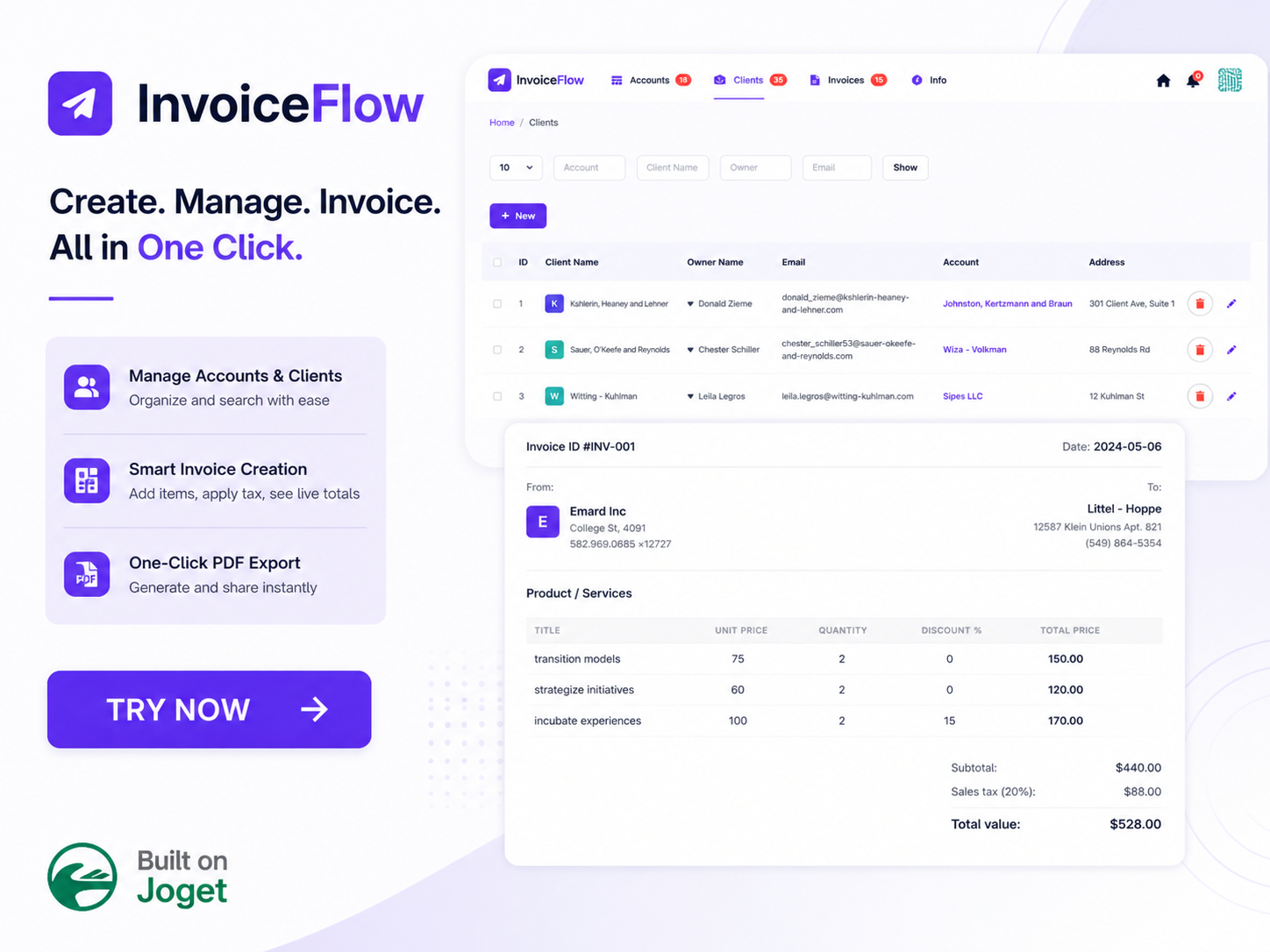
Invoice Flow App is a client billing and account management application that centralizes account records, client profiles, and itemized invoice calculations on Joget DX 8 and Joget DX 9. Finance teams and account managers manually calculate line items, discounts, and sales tax in spreadsheets before copying data into invoice documents. Manual calculations lead to incorrect total values, lost client contact details, and mismatched billing records across accounts. Disconnected invoicing processes make tracking account ownership and historical client billing history difficult for operations teams. Key Features Tracks company account profiles with uploaded corporate logos, owner contact emails, addresses, and phone numbers. Maintains searchable client directories linked directly to parent company account records. Calculates line-item total prices, subtotals, sales tax percentages, and final invoice values dynamically within the billing form interface. Displays itemized invoice preview screens with product descriptions, unit prices, quantities, and discount percentages. Exports completed billing records into formatted A4 PDF documents using a one-click export action. Provides an integrated information page accessible from the main navigation bar to guide users through application features and setup steps. Frequently Asked Questions How does Invoice Flow App calculate line items and final invoice totals? Invoice Flow App multiplies unit prices by quantities, applies line-item discount percentages, calculates the subtotal, and adds the specified sales tax percentage to generate the total invoice value automatically. Can users download PDF versions of invoices from Invoice Flow App? Invoice Flow App includes a dedicated export action button on the invoice view screen that generates and downloads an A4 formatted PDF document containing complete account and itemized billing data. Which Joget DX platform versions support Invoice Flow App? Invoice Flow App runs on Joget DX 8 and DX 9, On-Premise as well as Cloud environments across Enterprise editions. Important Note: Please refer to the info page in the app to learn how to use the app.
AI Budget Request Evaluator App
App · AI Agents
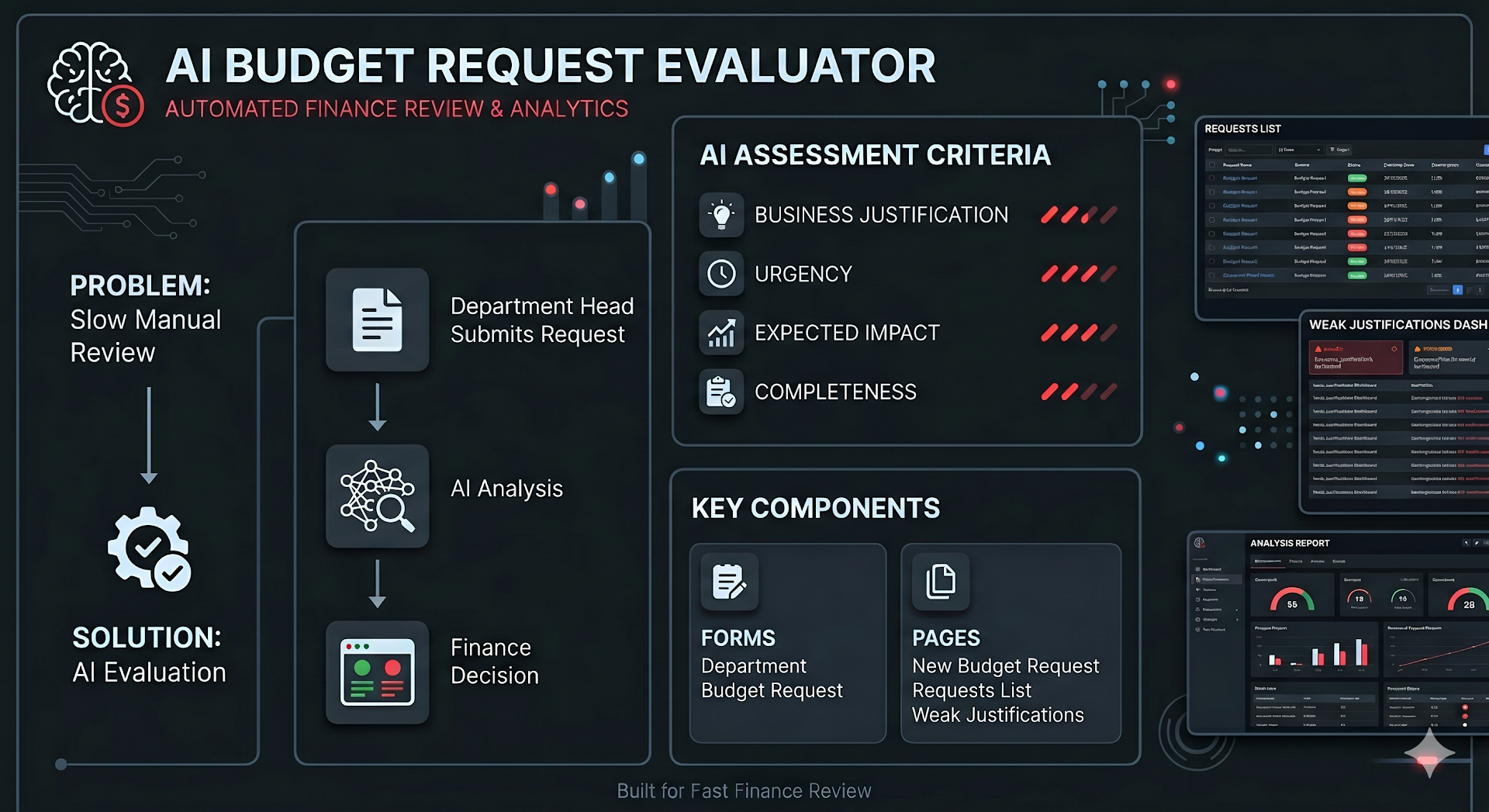
AI Budget Request Evaluator App is an AI-driven budget proposal evaluation and workflow routing application that analyzes business justifications, scores submission completeness, and manages multi-department expense requests on Joget DX 8 and Joget DX 9. Finance directors, budget analysts, and department heads struggle to evaluate departmental budget proposals when receiving unformatted email requests, missing ROI projections, and subjective urgency claims. Manual budget triage leads to unverified expenditure amounts, delayed approval decisions, missing vendor quotes, and unorganized CapEx or OpEx record trails. Corporate finance teams lack central executive dashboards to track monthly submission trends, evaluate department evaluation averages, or inspect detailed AI scoring reports before committing funds. Key Features Captures structured budget request details comprising request titles, department selections, budget categories, requested amounts in USD, required dates, business justifications, and supporting document uploads. Evaluates submitted requests automatically across four weighted scoring dimensions comprising Business Case (35 points), Urgency Validity (25 points), Expected Impact (25 points), and Submission Completeness (15 points). Categorizes proposals into automated recommendation tiers comprising Strong Case (80 to 100 points), Review Required (60 to 79 points), Weak Justification (40 to 59 points), and Insufficient (0 to 39 points). Routes high-value and critical budget requests through configured BPMN escalation workflows prior to final finance team authorization. Generates itemized evaluation reports detailing score breakdowns per criterion, identified justification gaps, and narrative improvement recommendations. Supports organizational budget categories including CapEx, OpEx, Compliance, IT & Tech, Facilities, HR & People, and Other classifications. Integrates with the Joget User Directory to map department ownership and auto-populate user profile credentials. Connects to external large language model services including OpenAI through configured API credentials. Displays executive dashboards featuring KPI metrics for open requests, urgent items, average turnaround times, auto-classification accuracy percentages, monthly trend lines, and average scores by department. Exports budget request ledgers, AI evaluation scores, and department approval records into CSV, Excel, XML, and PDF formats. Frequently Asked Questions How does AI Budget Request Evaluator App score submitted budget requests? AI Budget Request Evaluator App processes submissions through a background AI evaluation engine that awards up to 35 points for business case clarity, 25 points for urgency validity, 25 points for expected impact measurability, and 15 points for overall submission completeness. What LLM configuration is required to run AI Budget Request Evaluator App? AI Budget Request Evaluator App requires a valid large language model API key, such as an OpenAI API key, configured in the application setup settings to power the background evaluation engine. Which Joget platform versions support AI Budget Request Evaluator App? AI Budget Request Evaluator App runs on Joget DX 8 and Joget DX 9, On-Premise and Cloud environments across Enterprise editions. Important Note: Please refer to the welcome page in the app to learn how to use the app.
AI Maintenance Request App
App · AI Agents
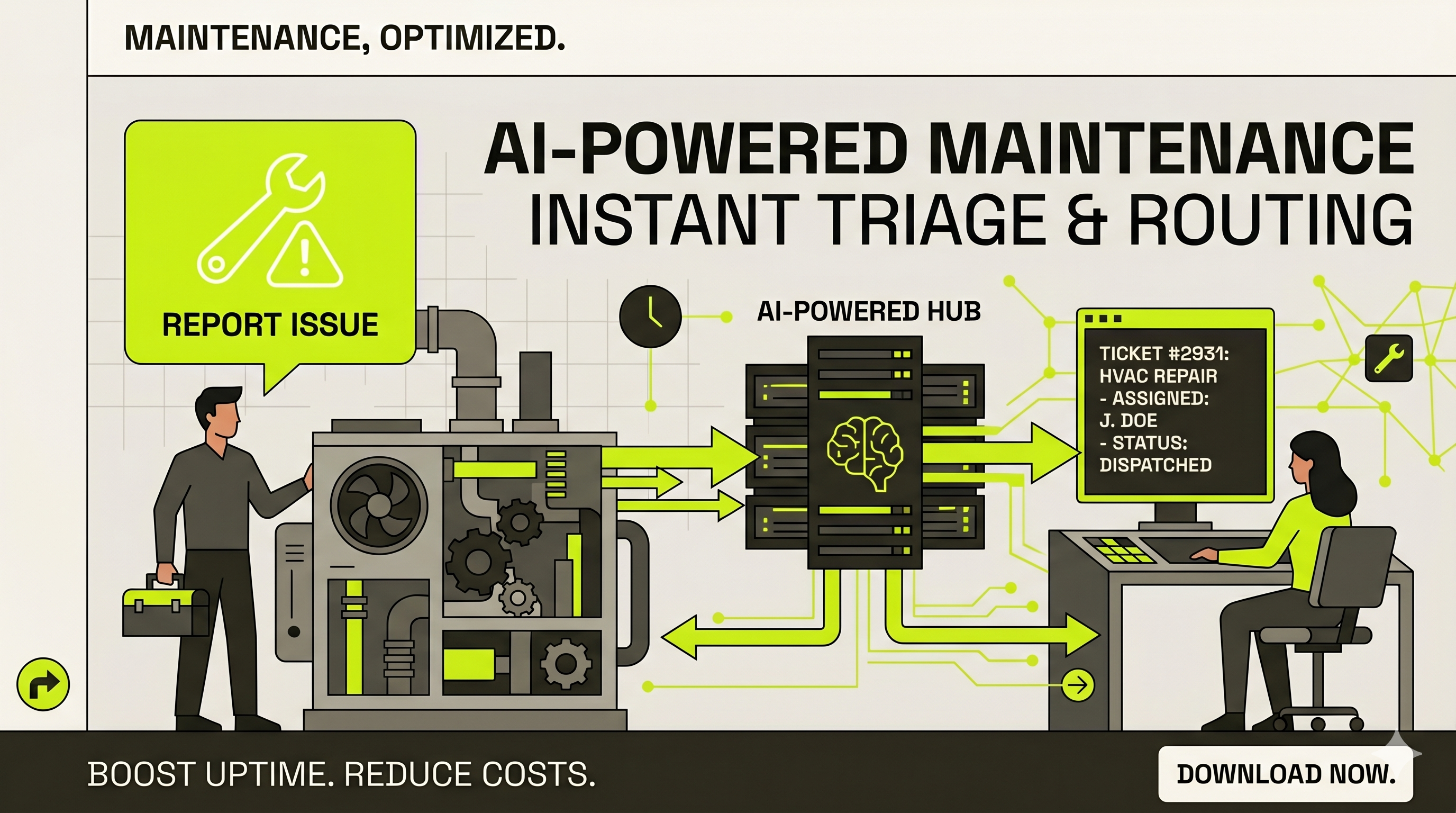
AI Maintenance Request App is an AI-powered facilities maintenance evaluator and work order triage application that classifies building fault reports, determines repair urgency levels, routes required technician skills, and maintains master asset registries on Joget DX 8 and Joget DX 9. Facilities managers, building operations teams, and corporate real estate departments in commercial, industrial, and mixed-use properties struggle to triage incoming maintenance tickets when relying on unmonitored email reports, paper work orders, or manual helpdesk routing. Manual maintenance triage leads to misclassified critical faults, delayed emergency responses, unassigned skilled trade technicians, and missing physical asset histories across multi-building facilities. Operations leaders lack real-time visibility into open request queues, high-urgency breakdown alerts, auto-classification accuracy metrics, and physical asset criticality levels. Key Features Captures maintenance requests with asset selections, building locations, floor zones, problem description symptoms, start timestamps, contact details, optional damage photos, and department allocations. Analyzes submitted problem descriptions, asset types, and asset criticality levels using an embedded AI agent to automate work order triage. Categorizes request urgency across Critical, High, Normal, or Pending levels to prioritize emergency building repairs. Identifies request categories across Breakdown, Preventive, Safety Hazard, Environmental, or Cosmetic classifications. Determines required maintenance trades comprising Mechanical, Electrical, Plumbing, Civil, Fire & Safety, IT Infrastructure, or General skill sets. Generates formatted HTML classification cards displaying AI evaluation results, confidence statuses, and narrative reasoning breakdowns directly on request records. Maintains master asset registries capturing asset IDs, asset names, model numbers, manufacturers, asset types, physical locations, department owners, active statuses, and criticality rankings. Displays operational dashboards featuring KPI counters for total open requests, critical emergency items, AI-classified totals, and filtered maintenance queues. Exports master asset directories, maintenance queues, and historical AI classification logs into CSV, Excel, XML, and PDF formats. Frequently Asked Questions How does AI Maintenance Request App classify incoming facility fault requests? AI Maintenance Request App uses an integrated AI agent that reads submitted problem descriptions, asset types, and asset criticality data to evaluate urgency, request type, and required trade skills within seconds. What trade skills does AI Maintenance Request App route work orders to? AI Maintenance Request App routes work orders across seven technical disciplines comprising Mechanical, Electrical, Plumbing, Civil, Fire & Safety, IT Infrastructure, and General maintenance. Which Joget platform versions support AI Maintenance Request App? AI Maintenance Request App runs on Joget DX 8 and Joget DX 9, On-Premise and Cloud environments across Enterprise editions. Important Note: Please refer to the welcome page in the app to learn how to use the app. The app requires an LLM Key. For example, you can obtain one from OpenAI.
AI Return Desk App
App · AI Agents
AI Return Desk App is an AI-driven return management and automated workflow application that evaluates product damage photos, enforces category-specific return policies, and routes customer claims on Joget DX8 and Joget DX9. Direct-to-consumer (D2C) accessory brands, e-commerce managers, and customer support leads struggle to process product returns efficiently when evaluating damaged items through manual email submissions and unorganized photo attachments. Manual return processing causes fraudulent refund approvals, delayed store manager reviews, inconsistent policy enforcement, and untracked customer dispute appeals. Customer service teams lack unified operational dashboards to analyze sentiment ratings, monitor auto-resolution percentages, and verify item conditions across active order categories. Key Features Evaluates customer-uploaded damage photos using Vision AI models to verify item conditions, detect defects, and match submitted evidence against stated return reasons. Calculates AI confidence scores across four evaluation criteria comprising Photo Verification, Damage Assessment, Return Policy Eligibility, and Evidence Quality. Routes return claims automatically to Auto-Approved, Sent for Human Review, or Denied decision states based on AI confidence scoring thresholds. Provides a customer dispute challenge workflow allowing buyers to contest rejected return decisions by submitting supplementary photo evidence and context. Enforces category-specific return policy rules automatically across watch bands, laptop sleeves, and accessory lines without manual rules setup. Captures customer sentiment feedback scores and tracks return reason distributions across defective, damaged on arrival, wrong item, not as described, changed mind, and wrong size categories. Displays an operations dashboard featuring real-time KPI metrics for total returns, auto-resolution percentages, average customer ratings, and pending store manager reviews. Captures order reference parameters including order numbers, delivery dates, customer names, delivery statuses, product categories, item prices in USD, and product names. Exports return ledgers, AI evaluation scores, and resolution status registers into CSV, Excel, XML, and PDF formats. Frequently Asked Questions How does AI Return Desk App evaluate customer product return photos? AI Return Desk App analyzes customer-submitted photos using Vision AI models, scoring submissions across Photo Verification (out of 30), Damage Assessment (out of 30), Return Policy Eligibility (out of 25), and Evidence Quality (out of 15) to calculate an overall confidence score. What happens when AI Return Desk App generates a borderline confidence score? AI Return Desk App flags borderline or ambiguous claims as Sent for Human Review, routing the return file directly to store manager inboxes for manual inspection and final determination within one business day. Which Joget platform versions support AI Return Desk App? AI Return Desk App runs on Joget DX8 and Joget DX9, On-Premise and Cloud environments across Enterprise editions. Important Note: Please refer to the info page in the app to prepare the app. The app requires an LLM Key. For example, you can obtain one from OpenAI.
AI Candidate Screener App
App · AI Agents
AI Candidate Screener App is a resume screening and candidate match evaluation application that analyzes candidate resumes, calculates skills match scores, identifies qualification gaps, and structures recruitment shortlist decisions on Joget DX 8 and Joget DX 9. Founders, hiring managers, and corporate recruiters struggle to evaluate applicant pools when relying on manual resume reading or bloated applicant tracking systems. Manual resume triage causes inconsistent candidate scoring, overlooked skills gaps, delayed shortlist decisions, and unorganized candidate review records across open vacancy positions. Recruitment leads lack single-desk operational dashboards to compare match scores side by side, monitor shortlist conversion rates, or inspect AI-generated candidate strength summaries. Key Features Captures candidate application records with full candidate names, sourcing channels, target role openings, and uploaded resume files in PDF format. Establishes role opening profiles with job titles, minimum required years of experience, active vacancy statuses, must-have skill requirements, and nice-to-have skill badges. Calculates automated candidate match scores from 0 to 100 based on resume analysis against defined job requirements. Identifies missing candidate requirements by generating itemized gap lists comparing applicant experience with mandatory skills such as Java 17+, Spring Boot, React 18+, TypeScript, or Docker and Kubernetes. Generates candidate strength summaries highlighting relevant technical proficiencies, microservices experience, cloud infrastructure skills, and CI/CD pipeline capabilities. Categorizes candidate recommendations across automated Shortlist, Maybe, and Reject decision statuses. Displays executive recruitment dashboards featuring KPI metrics for total reviews, AI reviewed counts, shortlisted candidate totals, shortlist percentage rates, and average match scores. Renders central review registries detailing candidate names, target roles, AI recommendations, match scores, resume links, and review workflow statuses. Exports candidate evaluation ledgers, shortlist registers, and match score summaries into CSV, Excel, XML, and PDF formats. Frequently Asked Questions How does AI Candidate Screener App evaluate candidate suitability? AI Candidate Screener App compares uploaded candidate resumes against the skills table defined in the selected Role Opening, calculating a numeric match score from 0 to 100 while generating bulleted missing requirements and strength summaries. What candidate recommendation statuses does AI Candidate Screener App generate? AI Candidate Screener App assigns automated recommendations comprising Shortlist, Maybe, and Reject, enabling hiring managers to record final recruitment decisions. Which Joget platform versions support AI Candidate Screener App? AI Candidate Screener App runs on Joget DX 8 and Joget DX 9, On-Premise and Cloud environments across Enterprise editions. Important Note: Please refer to the info page in the app to prepare the app. The app requires an LLM Key. For example, you can obtain one from OpenAI.
AI Contract Review App
App · AI Agents
AI Contract Review App is an artificial intelligence contract risk evaluator and legal agreement tracking application that analyzes contract text, scores liability exposure, detects missing legal clauses, and manages vendor registries on Joget DX 8 and Joget DX 9. Operations managers, procurement leads, and business founders struggle to review lengthy vendor agreements when spending over three hours evaluating individual contract terms manually. Manual contract reading causes unflagged auto-renewal traps, uncapped financial liabilities, missing data protection clauses, and delayed vendor onboarding decisions. Legal teams lack unified dashboards to monitor active agreement portfolios, track high-risk contracts, and log standardized approval decisions across corporate vendor networks. Key Features: Evaluates pasted agreement text or uploaded PDF and DOCX contract files using artificial intelligence analysis models. Calculates overall risk scores out of 100 across five weighted evaluation criteria comprising payment terms, termination provisions, confidentiality coverage, indemnity liability balance, and SLA obligations. Surfaces explicit risk flags for uncapped financial exposure, auto-renewal traps, missing mutual termination rights, and unlisted data breach notification timeframes. Detects missing legal clauses required for regulatory compliance and risk mitigation. Categorizes contracts across automated AI status levels comprising Clear to Proceed, Needs Review, and High Risk. Logs final executive approval decisions across Pending, Approved, Rejected, and Revision states while retaining complete decision audit trails. Maintains a master vendor registry detailing vendor names, business categories, contact person leads, phone numbers, email addresses, and active profile statuses. Displays executive overview dashboards featuring KPI metrics for total contracts, high-risk items, pending reviews, total portfolio values in USD, and workflow queue counts. Exports contract registries, vendor profiles, and AI risk reports into CSV, Excel, XML, and PDF formats. Frequently Asked Questions How does AI Contract Review App evaluate legal agreement risk? AI Contract Review App checks agreement text across five weighted scoring criteria totaling 100 points, evaluating payment clarity (25 points), exit provisions (25 points), data confidentiality (20 points), liability caps (20 points), and performance SLA definitions (10 points) to produce a numeric risk score and narrative risk breakdown. What contract document formats can users upload to AI Contract Review App? AI Contract Review App accepts pasted text inputs as well as direct PDF and DOCX document file uploads. Which Joget platform versions support AI Contract Review App? AI Contract Review App runs on Joget DX 8 and Joget DX 9, On-Premise and Cloud environments across Enterprise editions. Important Note: Please refer to the info page in the app to prepare the app. The app requires an LLM Key. For example, you can obtain one from OpenAI.
Training Evaluation
App · Education
Training Evaluation is a classroom course feedback collection and training effectiveness analytics application that manages event registries, captures trainee evaluation ratings, stores signed attendance records, and visualizes participant feedback metrics on Joget DX 8 and Joget DX 9. Human resource managers, learning and development (L&D) directors, and corporate trainers struggle to measure course impact when distributing paper feedback forms or disconnected online surveys. Manual evaluation tracking leads to delayed feedback aggregation, unorganized participant records, unverified trainer performance scores, and missing visual analytics across recurring workshop sessions. L&D leaders lack centralized reporting portals to link trainee ratings to specific event rosters or inspect individual feedback categories across ten dedicated graphical charts. Key Features Establishes master training event registries capturing event names, trainer names, start dates, end dates, target trainee counts, event descriptions, and attached signed attendance sheets. Tracks participant rosters within event records detailing trainee names, email addresses, and contact numbers. Captures online trainee evaluation questionnaires evaluating domain knowledge, course usefulness, expectation fulfillment, product competence, trainer preparedness, content organization, confidence gain, time allocation, and venue suitability. Applies a standardized 1-to-5 Likert rating scale across objective feedback questions to measure participant agreement and satisfaction. Collects subjective open-text comments to gather qualitative trainee suggestions and course improvement feedback. Dispatches automated email notifications to administrative users upon new feedback form submissions via configured SMTP settings. Displays ten dedicated feedback chart channels covering Product Knowledge, Usefulness, Expectation, Use More Competently, Trainers Knowledge, Training Contents, Confidence, Time Allocated, Conducive Venue, and Accessible Venue. Allows administrators to edit existing feedback questions or construct custom evaluation fields using the Joget Form Builder. Renders event management lists with direct action buttons to submit trainee feedback and edit event parameters. Exports training event registries, questionnaire responses, and evaluation summaries into CSV, Excel, XML, and PDF formats. Frequently Asked Questions How does Training Evaluation capture and measure trainee feedback? Training Evaluation presents trainees with structured online questionnaires rating core course dimensions on a 1-to-5 agreement scale, linking responses directly to specific training event records. What specific feedback chart categories does Training Evaluation visualize? Training Evaluation renders ten distinct graphical chart views covering Product Knowledge, Usefulness, Expectation, Use More Competently, Trainers Knowledge, Training Contents, Confidence, Time Allocated, Conducive Venue, and Accessible Venue. Which Joget platform versions support Training Evaluation? Training Evaluation runs on Joget DX 8 and Joget DX 9, On-Premise and Cloud environments across Enterprise editions. What's New Jan-9-2018 - Updated app's SQL statements to be compatible with Microsoft SQL Server. 27-Mar-2026 - Revamped for Joget DX8. Follow the five steps below to start using the system Set up your organization's email SMTP (Note: Admin users will be notified via email on any new feedback submissions). Create a new Training Event. Submit training feedbacks using the "Submit Feedback" link for the respective event. View the evaluation results and via graphical charts Zoom in to see a particular training event's feedbacks using the "Detail Feedbacks" link. This is an example of a sub-level userview menu feature of Joget Workflow.
Task Management and Tracking App
App · Education
Task Management and Tracking App is an operational workload monitoring application that tracks daily task assignments, progress statuses, deadline calendars, and monthly completion metrics across department teams on Joget DX 8 and Joget DX 9. Department managers and project team leaders often manage daily task assignments through manual email requests and unlinked status spreadsheets. Dispersed task communication leads to missed assignment deadlines, lack of visibility into pending team workloads, and unmonitored operational bottlenecks across department projects. Team members struggle to prioritize daily work items without automated deadline reminders or visual schedule calendars. Key Features Assigns daily tasks to team members with specific job titles, target department routing, assigned dates, and due dates. Updates task execution statuses through workflow transitions across To Do, Doing, On Hold, and Completed states. Sends automated email notifications to assignees 48 hours prior to scheduled task due dates. Visualizes task schedules and impending deadlines across interactive monthly, weekly, and daily calendar views. Tracks monthly department task volume and status distributions through filtered horizontal bar charts. Exports task logs and completion records to CSV, Excel, XML, and PDF formats. Frequently Asked Questions How does Task Management and Tracking App alert assignees about impending task deadlines? Task Management and Tracking App triggers automated email notification alerts to assigned employees 48 hours before task due dates to ensure timely completion. How does Task Management and Tracking App visualize team task progress? Task Management and Tracking App renders real-time workload metrics across status tracking lists, interactive calendar views, and monthly submission bar charts filtered by year and month. Which Joget DX platform versions support Task Management and Tracking App? Task Management and Tracking App runs on Joget DX 8 and DX 9, On-Premise and Cloud environments across Enterprise editions. What's New 7-Sep-2020 - The assigner will be able to assign a task to the assignee, based on different departments. 7-Sep-2020 - You can update your work progress based on the respective date with the "update section" in the Daily Update Submission Form. 7-Sep-2020 - You can use the Dashboard in the app to monitor the Work Progress, Calendar and Monthly Submission Chart. 27-Mar-2026 - Revamped for Joget DX8.
Simple Warranty
App · Finance & Accounting
Simple Warranty is a web-based product warranty registration and claim management application that structures customer coverage submissions, validates serial numbers, and executes administrative approval workflows on Joget DX8 and Joget DX9. Product manufacturers, retail distributors, and customer support managers struggle to track customer warranty coverage when relying on paper registration cards or unmonitored email submissions. Manual warranty processing leads to unverified serial numbers, missing purchase receipts, delayed claim approvals, and unorganized customer contact histories. Service teams lack centralized visibility into active product coverage records, warranty registration statuses, and historical customer claim decisions. Key Features Configures product category directories and specific product model catalogs with unique code identifiers and model names. Dispatches automated email notification alerts to purchasers and administrators by connecting to organization SMTP server settings. Captures purchaser warranty registrations including full names, physical addresses, email contacts, mobile phone numbers, product categories, model numbers, serial numbers, purchase dates, and online store purchase indicators. Routes submitted warranty claims to designated approver inboxes for administrative verification and eligibility review. Records approval decisions across approved and rejected status toggles to update warranty registration records. Displays central administrative registries to search, filter, and inspect pending and historical product warranty submissions. Exports warranty registration directories and customer claim registers into CSV, Excel, XML, and PDF formats. Frequently Asked Questions How do purchasers submit product coverage requests in Simple Warranty? Purchasers submit product coverage requests by filling out the online web-based warranty registration form in Simple Warranty, providing personal contact details, product serial numbers, model selections, and purchase dates. What setup steps are required before accepting warranty registrations in Simple Warranty? Organizations set up product categories, define product models per category, and configure email SMTP settings in Simple Warranty prior to publishing warranty registration forms to purchasers. Which Joget platform versions support Simple Warranty? Simple Warranty runs on Joget DX8 and Joget DX9, On-Premise and Cloud environments across Enterprise editions. What's New 23-Sep-2020: Fix hyperlink to background images. 26-Mar-2026 - Revamped for Joget DX8.
Simple Payroll
App · Finance & Accounting
Simple Payroll is an organizational payroll processing and payslip generation application that structures employee salary records, customizes allowance and deduction labels, executes payroll submission workflows, and captures manager approval e-signatures on Joget DX 8 and Joget DX 9. Human resource managers, payroll officers, and finance controllers struggle to manage monthly employee compensation when relying on manual spreadsheets or unlinked calculation documents. Manual payroll processing causes incorrect allowance calculations, unverified tax deductions, delayed approval endorsements, and missing historical payslip records across company departments. HR leaders lack centralized administrative setup tools to customize compensation labels, store employee banking details, or dispatch automated payslip notifications. Key Features Configures company identity settings, email SMTP server parameters, and custom allowance and deduction labels comprising claims, mobile allowances, notebook allowances, social security, and income tax fields. Registers detailed employee profiles capturing mapped Joget user accounts, employee names, department assignments, joining dates, resignation dates, social security numbers, income tax numbers, base salaries, bank names, and bank branch details. Captures monthly payroll requests specifying targeted employees, payroll start dates, payroll end dates, processing dates, designated approvers, and calculated basic salary amounts. Routes submitted payroll requests to designated approver inboxes for review, status assignment across Approved or Rejected choices, and digital e-signature authorization. Captures binding approver signatures using an integrated touch-enabled digital signature canvas. Generates printable employee payslips displaying custom allowance breakdowns, statutory deductions, net payment totals, and corporate branding headers. Dispatches automated email payslip notifications to employee mailboxes upon final approval authorization. Renders searchable payroll history registries to inspect previous compensation runs and employee payment details. Exports payroll registers, employee salary structures, and approval histories into CSV, Excel, XML, and PDF formats. Frequently Asked Questions How does Simple Payroll handle custom company allowances and statutory deductions? Simple Payroll provides a centralized administrative setup form where administrators customize up to four allowance labels and multiple deduction labels to match organizational compensation structures and local tax requirements. How do managers authorize submitted payroll requests in Simple Payroll? Simple Payroll routes pending payroll submissions to designated approver inboxes, where approving managers review salary details, select Approved or Rejected statuses, and sign using an integrated e-signature canvas. Which Joget platform versions support Simple Payroll? Simple Payroll runs on Joget DX 8 and Joget DX 9, On-Premise and Cloud environments across Enterprise editions. What's New 23-Sep-2020: Fix hyperlink to background images. 26-Mar-2026 - Revamped for Joget DX8.
Simple Purchasing
App · Finance & Accounting
Simple Purchasing is a corporate procurement and purchase order management application that structures vendor registries, captures purchase requisitions, and executes manager approval workflows with e-signatures on Joget DX 8 and Joget DX 9. Procurement clerks, purchasing managers, and finance controllers struggle to issue and track purchase orders when relying on unlinked word processor documents or manual spreadsheets. Manual procurement processes cause misplaced quotation references, delayed approval endorsements, unverified vendor contact details, and missing signature authorization logs across corporate departments. Finance teams lack central visibility into historical purchasing records, pending request approvals, and vendor contact directories. Key Features Captures purchase request details including selected vendors, contact persons, purchase justifications, quotation reference numbers, required delivery dates, purchase dates, designated approvers, currency symbols, and payment terms. Integrates an interactive e-signature form element allowing designated approvers to sign authorization forms using a computer mouse or touch screen stylus pen. Manages vendor profile registries detailing company names, email addresses, phone numbers, fax details, physical addresses, postal codes, and corporate websites. Stores company identity settings including corporate names, uploaded logo graphics, contact numbers, and office addresses to generate branded purchase orders. Routes pending purchase requests to designated approver inboxes for review, e-signature capture, approval endorsement, or order rejection. Configures organizational SMTP server credentials to transmit automated email notifications to approvers and requesters across approval stages. Renders searchable purchase request history registers detailing order numbers, approval statuses, total dollar values, requester names, approver names, and creation timestamps. Exports purchase order registers, vendor directories, and approval histories into CSV, Excel, XML, and PDF formats. Frequently Asked Questions How does Simple Purchasing capture approver signature authorizations? Simple Purchasing incorporates a touch-enabled e-signature form field within the approval workflow, enabling approvers to draw binding digital signatures using a touch screen stylus pen or desktop mouse. What setup steps are required before issuing purchase requests in Simple Purchasing? Organizations configure company profile details, upload corporate logos, register vendor contact directories, and input email SMTP server credentials in Simple Purchasing prior to submitting purchase requests. Which Joget platform versions support Simple Purchasing? Simple Purchasing runs on Joget DX 8 and Joget DX 9, On-Premise and Cloud environments across Enterprise editions. What's New 23-Sep-2020: Fix hyperlink to background images. 26-Mar-2026 - Revamped for Joget DX8.
Stationery Request App
App · Finance & Accounting
Stationery Request App is an office supply requisition application that manages employee stationery requests, managerial approvals, and requisition tracking on Joget DX 8 and Joget DX 9. Administrative assistants and office managers manually track paper supply requisitions and email requests for pens, paper, computer peripherals, and toner cartridges. Manual supply tracking causes unverified office supply orders, lost requisition records, and delayed approval decisions from department leads. Office managers lack central visibility into historical supply usage, making inventory planning and supply cost monitoring difficult across corporate departments. Key Features Submits supply requisitions with itemized lists, auto-generated request numbers, requester usernames, submission timestamps, and designated approver selections. Routes supply requests to designated approver inboxes for review, approval, or rejection. Configures platform SMTP email server settings to send automated notification alerts to employees upon request status changes. Displays personal request history datalists for employees to monitor pending and completed supply requisitions. Renders central administrative views for approvers to search, filter, and review all office supply requisitions across departments. Exports supply requisition ledgers and request histories to CSV, Excel, XML, and PDF formats. Frequently Asked Questions How does Stationery Request App process supply approvals? Stationery Request App routes submitted requisition forms directly to the selected manager's inbox, where the approver reviews the itemized supply list and marks the status as approved or rejected. How are employees notified about requisition status updates in Stationery Request App? Stationery Request App connects to configured organization SMTP email servers to send automated email notifications whenever an approver updates a requisition status. Which Joget platform versions support Stationery Request App? Stationery Request App runs on Joget DX 8 and Joget DX 9, On-Premise and Cloud environments across Enterprise editions.
Personal Expense Tracker App
App · Finance & Accounting
Personal Expense Tracker App is an individual finance management application that logs income, expenses, account transfers, and recurring transactions across personal bank accounts and digital wallets on Joget DX 8 and Joget DX 9. Individuals managing personal finances across multiple bank accounts, credit cards, and digital wallets struggle to monitor total net worth when using corporate reimbursement tools that require managerial approval steps. Recording personal transactions in unlinked spreadsheets causes uncalculated credit card dues and untracked monthly subscriptions. Without central transaction ledgers, individuals cannot visualize category spending patterns or automate recurring bill entries. Key Features Logs transaction entries across three distinct financial types comprising income earnings, category expenses, and inter-account transfers. Calculates real-time financial metrics for total income, total expenses, credit card dues, and net worth balances. Visualizes monthly earnings and spending breakdowns through interactive pie charts categorized by salary, investments, dining, apparel, and lifestyle expenses. Schedules automated recurring transaction entries using customizable cron expressions and form preset tools. Manages system configuration options for bank account groups, e-wallet lists, custom income categories, expense buckets, and currency types. Exports complete transaction histories and account balances to CSV, Excel, XML, and PDF formats. Frequently Asked Questions How does Personal Expense Tracker App differ from corporate expense reimbursement applications? Personal Expense Tracker App operates as an individual self-service ledger without routing submissions through department head approvals or finance verification steps. How does Personal Expense Tracker App schedule recurring income and expense transactions? Personal Expense Tracker App executes background transaction schedules using cron expressions to automatically populate recurring entries like monthly salaries, rent payments, and subscription fees. Which Joget DX platform versions support Personal Expense Tracker App? Personal Expense Tracker App runs on Joget DX 8 and Joget DX 9, On-Premise and Cloud environments across Enterprise editions. Important Note: This app is packaged with a few plugins and please note that these plugins will replace the plugins in your system when you install the app. List of plugins packaged in the app Datalist Number Formatter Echart Menu Scheduler Menu Toggle Switch Field What's New 24-Mar-2026 - Revamped for Joget DX8.
Simple Document Repository
App · Education
Simple Document Repository is a corporate document management and file sharing application that organizes file directories, manages document approval workflows, and dispatches submission status alerts on Joget DX 8 and Joget DX 9. Corporate teams and administrative managers frequently share company files across unmonitored email attachments and unorganized local hard drives. Uncentralized file storage causes lost document versions, unverified policy distribution, and untracked document approval cycles across departments. Executive leadership and compliance officers lack central visibility into pending file reviews, folder access structures, and historical approval decisions. Key Features Organizes company files into custom folder directories detailing creation dates, folder names, and modification timestamps. Supports over twenty file extension formats comprising text documents, spreadsheets, presentations, image files, audio tracks, and compressed archives. Submits document batches for managerial review complete with batch descriptions, folder assignments, and multi-file attachments. Routes file approval tasks to designated approver inboxes to endorse, reject, or request further clarification on submitted documents. Triggers automated email notification alerts to document requesters whenever an approver updates a submission review status. Renders administrative approval listings to filter, search, and inspect document batch statuses across all organizational departments. Exports document folder listings and approval review logs into CSV, Excel, XML, and PDF formats. Frequently Asked Questions What file formats are supported in Simple Document Repository? Simple Document Repository supports over twenty document and media formats including DOC, DOCX, XLS, XLSX, PPT, PPTX, PDF, JPG, PNG, GIF, MP3, AVI, MOV, RAR, ZIP, EPS, CDR, SVG, TXT, ISO, HLP, and SWF. How does Simple Document Repository process file approvals? Simple Document Repository routes submitted document batches to designated approver inboxes, enabling reviewing managers to approve the file, reject the submission, or return the document for further clarification. Which Joget platform versions support Simple Document Repository? Simple Document Repository runs on Joget DX 8 and Joget DX 9, On-Premise and Cloud environments across Enterprise editions. Notes to Joget Administrator: Input your Joget SMTP server configurations in Admin Bar > General Settings to send email messages. Input an email address for admin user in Admin Bar > Setup Users for email notification to work. What's New 24-Mar-2026 - Revamped for Joget DX8.
Simple Invoicing
App · Finance & Accounting
Simple Invoicing App is a customer billing and payment receipt management application that structures client invoices, tracks payment statuses, and issues payment receipts across four distinct billing layout templates on Joget DX 8 and Joget DX 9. Small business owners, independent contractors, and accounting clerks frequently issue customer billing statements using manual word processor files or unlinked financial spreadsheets. Manual invoice creation leads to uncalculated line-item discounts, missing payment due dates, untracked overdue accounts, and unrecorded payment receipts across client portfolios. Accounting teams lack centralized visibility into active invoice statuses and payment histories when customer contact details are stored in separate file locations. Key Features Generates customized commercial invoices using four distinct billing templates comprising General, Membership, Product, and Services layouts. Calculates line-item unit prices, discount percentages, service hours, billing rates, and line totals dynamically within invoice submission forms. Issues linked payment receipts directly from existing invoice records or generates standalone general receipts for unlinked payments. Sends automated overdue invoice notification alerts to administrative users upon payment deadline breaches. Shares a centralized customer contact directory containing company names, street addresses, phone numbers, and email contacts across the Simple app series. Exports invoice management logs, receipt registers, and customer directories to CSV, Excel, XML, and PDF formats. Frequently Asked Questions What billing templates are provided in Simple Invoicing App?Simple Invoicing App provides four billing template layouts including General (item descriptions and totals), Membership (start and end validity dates), Product (quantity, unit price, and line discount percentage calculations), and Services (hours/days and rate structures). How does Simple Invoicing App handle payment receipt creation? Simple Invoicing App allows users to generate payment receipts directly from existing invoice records by populating invoice parameters or issue standalone general receipts for non-invoice payments. Which Joget platform versions support Simple Invoicing App?Simple Invoicing App runs on Joget DX 8 and Joget DX 9, On-Premise and Cloud environments across Enterprise editions. All the "Simple" series of Joget apps are fully customizable. Although the Simple series apps are individual app, they share a common contact/customer database. You can use these apps as tutorials or as templates to build your own apps. What's New 09-Apr-2018 - Fix CSS in form "Invoice - Base" for compatibility with v6. 23-Sep-2020 - Fix hyperlink to background images. 24-Mar-2026 - Revamped for Joget DX8.
Account Creation App
App · Demo for Joget Features
Account Creation App is a public user registration and access request application that captures user profile submissions, manages administrative approval workflows, and provisions user directory accounts on Joget DX8 and Joget DX9. System administrators and portal managers struggle to manage user onboarding when relying on manual user creation inside administrative consoles or unmonitored email requests. Manual registration handling causes unverified email addresses, delayed user access provisioning, untracked signup requests, and security risks from unauthorized account creation across enterprise portals. IT operations leads lack central administrative inboxes to review pending user signups, assign multi-approver authorization roles, or maintain automated email notification trails. Key Features Captures public user registration details including usernames, first names, last names, email addresses, encrypted passwords, confirm password validations, and regional time zones. Configures anonymous process start permissions in the Web Console to enable public user access without prior authentication. Assigns single or multiple designated approvers through multi-select administrative configuration forms. Routes pending signup requests to the administrative Approve User Inbox for verification, approval, or rejection. Provisions approved user accounts automatically into the internal Joget Setup Users directory upon administrative endorsement. Dispatches automated email notification alerts to designated approvers upon form submission and to public users upon account approval. Adapts database workflow queries for MySQL, Oracle, and Microsoft SQL Server relational database environments. Exports signup request ledgers and approval registers into CSV, Excel, XML, and PDF formats. Frequently Asked Questions How does Account Creation App allow unauthenticated public users to request accounts? Account Creation App enables public access by clearing participant mappings in the Web Console process start white list, granting anonymous users permission to submit the account creation form. What happens in Joget when an administrator approves a signup request in Account Creation App? Account Creation App executes automated workflow tools to create the approved user account directly inside Joget Setup Users and sends a confirmation email to the user. Which Joget platform versions support Account Creation App? Account Creation App runs on Joget DX8 and Joget DX9, On-Premise and Cloud environments across Enterprise editions. Notes This app uses JDBC Binder with SQL query statements for MySQL database in Process "Map Tools to Plugins". If you are running Joget on other databases, you can modify the SQL query statements accordingly. What's New 03-Mac-2020 Updated with v6 Universal Theme and other minor fixes. Changed SMTP configuration to points to General Settings. 04-Sep-2020 Updated with the latest DX Progressive Theme. 19-Mar-2026 Revamped for Joget DX8.
Employee Loan Management
App · Finance & Accounting
Employee Loan Management is an internal business process application that manages staff loan submissions, interest calculations, department head endorsements, and human resource approvals on Joget DX 8 and DX 9. Human resource departments often manage staff loan requests through paper forms or email threads, leading to uncalculated interest payments and lost audit trails. Department heads lack clear visibility into an employee salary limits or active loan balances before granting approval. Manual record-keeping in spreadsheets creates data errors when human resource teams prepare monthly salary deductions. Key Features Calculates total interest and monthly repayment amounts based on configured organization annual interest rates. Captures drawn digital signatures from Department Heads directly within the approval form interface. Routes loan requests sequentially from Designated Department Heads to Designated HR Approvers. Displays employee eligibility requirements including confirmation status and salary percentage limits directly on the application form. Exports completed loan records and approval histories to CSV, Excel, XML, and PDF formats. Frequently Asked Questions How does Employee Loan Management calculate monthly repayments?Employee Loan Management applies the global annual interest rate saved in the application settings to the requested principal amount and loan duration to calculate total interest and monthly installment values upon form completion. Which Joget DX versions and editions support Employee Loan Management?Employee Loan Management runs on Joget DX 8 and DX 9, On-Premise and Cloud across Enterprise editions. How does Employee Loan Management record managerial sign-offs?Employee Loan Management includes an signature form field within the approval form where department heads draw their signature before submitting the review decision.
Loan Calculator
App · Finance & Accounting
Loan Calculator is a financial amortization schedule generator and repayment visualization application that computes monthly principal-interest breakdowns, renders graphical payment trends, and logs payment schedules on Joget DX 8 and Joget DX 9. Loan officers, financial advisers, corporate accountants, and individual borrowers struggle to calculate accurate loan payoff timelines when relying on static spreadsheets or complex financial modeling software. Manual amortization calculations lead to formula errors, unverified principal-versus-interest splits, miscalculated final partial balances, and poor visual presentation of long-term debt reduction trends. Financial teams lack lightweight, embeddable calculation forms that immediately generate exportable payment schedules without backend server processing. Key Features Computes full month-by-month loan amortization schedules in real time using client-side JavaScript and jQuery scripts based on total loan amount, annual interest rate, and monthly payment inputs. Generates detailed schedule tables displaying balance before payment, payment dates, monthly installment amounts, principal portions, interest portions, and remaining balances per period. Renders interactive multi-curve line charts depicting outstanding loan balance curves, increasing principal payment curves, and decreasing interest payment curves over time. Handles edge-case financial calculations including final partial payment balances and custom variable payment amounts. Clears prior calculation outputs automatically upon form reset to initiate fresh loan scenarios. Stores generated payment schedules in a central datalist for administrative auditing and record retrieval. Exports complete amortization schedules and repayment registers into CSV, Excel, XML, and PDF formats. Frequently Asked Questions How does Loan Calculator compute the amortization schedule? Loan Calculator processes user entries for total loan principal, annual interest rate percentage, and target monthly payment using embedded JavaScript and jQuery logic to calculate exact interest and principal allocations per month. What visual payment charts does Loan Calculator provide? Loan Calculator generates a line chart featuring three distinct visual curves: a decreasing outstanding balance curve, an increasing principal payment curve, and a decreasing interest payment curve across the full repayment timeline. Which Joget platform versions support Loan Calculator? Loan Calculator runs on Joget DX 8 and Joget DX 9, On-Premise and Cloud environments across Enterprise editions. What's New 26-Apr-2021: Fix record not found in export payment record. 19-Mar-2026: Revamped for Joget DX8.
Messaging App
App · Demo for Joget Features
Messaging App is an enterprise instant messaging and user collaboration application that connects organizational users, routes direct private messages, broadcasts global group communications, and audits chat records on Joget DX 8 and Joget DX 9. Project teams, department managers, and remote workers struggle to communicate efficiently when relying on external chat tools or slow email threads for internal operational updates. Unmonitored external messaging creates compliance risks, fragmented conversation histories, lost project context, and unrecorded administrative oversight across organizational departments. IT administrators and operations leads lack centralized chat history auditing to monitor messaging threads, filter historical logs by sender, or review private communication records. Key Features Provides Global Chat channels to broadcast messages and communicate with all platform users across an organization in a single shared room. Enables Private Chat channels for direct one-to-one messaging between selected individual users. Applies distinct chat bubble color coding per user to distinguish individual message senders during chat sessions. Auto-refreshes active chat interfaces every 30 seconds using background message polling scripts. Triggers desktop browser notifications by polling a dedicated "New Message Notification" datalist every 10 seconds. Integrates a messaging web service plugin consumed by custom JavaScript in userview settings to delegate notifications to targeted recipients. Offers an administrative Chat History portal to audit, filter, and inspect communication records across specific thread IDs, senders, and creation date ranges. Renders a responsive mobile user interface optimized for smartphone and tablet web browsers across Enterprise, Professional, and Cloud editions. Exports chat history registers and message audit logs into CSV, Excel, XML, and PDF formats. Frequently Asked Questions How do desktop browser notifications operate within Messaging App? Messaging App populates new incoming messages into a dedicated "New Message Notification" datalist, which a bundled messaging web service plugin reads and relays to user browsers via polling JavaScript every 10 seconds. Can administrators review private user conversations in Messaging App? Messaging App provides an administrative Chat History menu accessible exclusively to authorized administrators to filter and review all Global Chat and Private Chat records by thread, sender name, or date. Which Joget platform versions support Messaging App? Messaging App runs on Joget DX 8 and Joget DX 9 Enterprise and Cloud editions. Notes The messaging app needs to remain open in your browser to receive message notifications. Do allow notifications permission when prompted when you run this app for the first time. You can customize the message fields, message presentation and notification polling interval in the Javascript code present in the Global Chat form and Private Chat forms. Feel free to customize this app to suit your organizational requirements. Do keep in mind NOT to set the interval too short (eg. 1 second polling) to avoid a high processing load on the server If you change the UI/Userview theme, do copy over the Javascript and CSS from the old theme to the new theme. The Messaging App is not compatible with Joget Community edition (all versions), and Joget v5 and earlier.
Process Version Migrator Utility
App · Demo for Joget Features
Joget Process Version Migrator is a workflow version migration utility that updates running process instances, rebinds active workflow tasks to current process definitions, and aligns legacy process versions on Joget DX 8 and Joget DX 9. System administrators, workflow developers, and IT operations teams struggle to align active workflow instances when importing updated application packages over existing Joget deployments. While native process design edits automatically increment running process versions, importing app packages leaves active workflow instances bound to legacy process versions. Database managers lack automated tools to batch-migrate stranded running processes to new design versions, causing workflow execution mismatches, missing process variables, and stuck tasks across enterprise applications. Key Features Migrates active running process instances from older process definitions to newly imported process versions. Rebinds stranded workflow instances to updated process design versions after importing application packages. Scans active process registries to identify workflow instances running on legacy version IDs. Aligns running process variables and task activities with current workflow definition parameters. Prevents workflow execution failures caused by version mismatches between active tasks and published process designs. Integrates with administrative process management tools to inspect running process details and update active workflows. Exports process migration logs, active process version registries, and version update audit histories into CSV, Excel, XML, and PDF formats. Frequently Asked Questions Why do running processes remain on older versions when an app is re-imported? When an updated application package is imported over an existing app, Joget preserves active process instances on their original process version to prevent unexpected task disruptions, requiring Joget Process Version Migrator to manually rebind those running instances to the latest process version. How does Joget Process Version Migrator handle active workflow instances? Joget Process Version Migrator scans active process instances running on legacy versions and upgrades their process definitions to match the latest published process version without interrupting workflow execution. Which Joget platform versions support Joget Process Version Migrator? Joget Process Version Migrator runs on Joget DX 8 and Joget DX 9, On-Premise and Cloud environments across Enterprise editions. Additional Joget Knowledge Base reading on running processes: View running processes Update Running Processes What's New 07-May-2021: Fixed visibility of the form in mobile view. 4-Nov-2025: Fixed BeanShell logic in the app. 18-Mar-2026: Refactored the process migration implementation to execute asynchronously using a background thread, allowing the request to return immediately while migration continues in the background. 18-Mar-2026: Added an optional Email Notification field to allow users to receive an email when the migration process completes.
Travel Request Management App
App · Human Resources
Travel Request Management App is an enterprise travel operations application that automates business trip submissions, parallel administrative bookings, finance advance disbursements, and post-trip expense reconciliation on Joget DX 8 and Joget DX 9. Corporate travel administrators and finance teams struggle to coordinate business trips across disconnected email chains, manual flight booking forms, and separate expense spreadsheets. Sequential approval delays force employees to travel without confirmed hotel bookings or advance per diem funds, leading to out-of-pocket expenses and delayed vendor payments. Without role-based task routing, department managers lack visibility into pending travel budget totals and post-trip receipt compliance. Key Features Executes a 5-stage governed workflow pipeline comprising request submission, manager review, parallel booking and payment processing, active travel tracking, and post-trip expense settlement. Splits manager approvals into two simultaneous parallel execution tracks for administrative flight or hotel bookings and finance travel advance disbursements. Enforces field-level validation rules including mandatory date selections and automated policy alerts for budget requests exceeding ten thousand US dollars. Renders role-specific dashboards with real-time KPI counters, request status donut charts, and destination budget distribution bar charts. Evaluates vendor booking quotations with iterative revision loops between administrative booking support staff and approving managers. Exports comprehensive travel request ledgers, status tracking logs, and expense settlement records into CSV, Excel, XML, and PDF formats. Frequently Asked Questions How does Travel Request Management App handle travel advance payments and hotel bookings? Travel Request Management App splits approved requests into two independent parallel workflows, allowing administrative support teams to arrange travel quotations while finance teams disburse advance funds simultaneously without process bottlenecks. How does Travel Request Management App enforce travel budget policies? Travel Request Management App displays real-time validation warnings on submission forms whenever an estimated trip budget exceeds ten thousand US dollars, automatically flagging the request for executive approval level review. Which Joget platform versions support Travel Request Management App? Travel Request Management App runs on Joget DX 8 and Joget DX 9, On-Premise and Cloud environments across Enterprise editions.
Site Inspector App
App · Real Estate & Construction
Site Inspector App is a construction safety and field compliance inspection application that records site audit findings, captures photo and video evidence, pins GPS site coordinates, and tracks corrective actions on Joget DX 9. Construction supervisors, safety officers, and quality control inspectors struggle to manage site inspections when relying on physical paper checklists and unorganized mobile photo galleries. Manual site inspection processes cause delayed hazard reporting, missing GPS location verification, lost photo evidence, and uncompleted corrective safety measures. Quality assurance teams lack real-time visibility into active site compliance trends and cannot capture inspection data in remote construction areas without cellular coverage. Key Features Displays live site mapping with GPS site pinning, address details, and inspector assignments using Google Maps API Key integration. Captures field findings on mobile devices complete with photo uploads, video attachments, detailed descriptions, severity ratings, and recommended corrective measures. Stores company directories, job site locations, inspector profiles, and customizable inspection categories within central datalists. Applies automated timestamps to every inspection entry to create tamper-proof audit trails for safety compliance. Enables offline field data entry that automatically synchronizes saved records to the central database once network connectivity is restored. Exports inspection history records, company directories, and compliance logs into CSV, Excel, XML, and PDF formats. Frequently Asked Questions Which external integrations and platform plugins does Site Inspector App require? Site Inspector App requires a Google Maps API Key to render live site maps and GPS coordinates, alongside the API Builder Plugin to handle background data sync operations. How does Site Inspector App handle field inspections in remote areas without internet access? Site Inspector App stores inspection entries locally on mobile devices when working offline, automatically synchronizing saved findings and media attachments to the central database when network connection is re-established. Which Joget platform versions support Site Inspector App? Site Inspector App runs on Joget DX 9 On-Premise and Cloud environments across Enterprise editions. Important Note: Please refer to the setup page in the app to prepare the app. The app requires the use of Google Maps API Key and the API Builder Plugin.
Process Monitoring Utility (MySQL)
App · Demo for Joget Features
Process Monitoring Utility (MySQL) is a workflow administration and process lifecycle management application that inspects active running activities, reassigns pending assignments, recovers aborted workflows, and restarts completed processes on MySQL databases across Joget DX 7 to DX 9. System administrators, workflow engineers, and database operators struggle to resolve stuck or misrouted process instances when managing complex enterprise workflows. Unhandled process errors cause orphaned task assignments, incorrect user assignees, stuck activity steps, and unrecoverable aborted workflows across business applications. Administrative teams require a front-end userview portal engineered specifically for MySQL databases to reassign pending tasks, force activity completions, re-evaluate workflow assignments against updated process designs, and recover failed workflow instances. Key Features Displays detailed process registries listing active running processes, running activities, and completed workflow instances alongside process IDs, process names, requesters, start times, and execution states. Reassigns pending workflow tasks directly from user A to user B across active application activities. Re-evaluates active task assignments automatically based on the latest published workflow process designs. Completes active process activities forcefully to advance stalled workflows through complex process paths. Aborts stuck or duplicate active workflow tasks to halt unnecessary process execution. Recovers aborted workflow processes to resume halted operational tasks from point of failure. Restarts completed workflow processes to re-execute closed process instances when business inputs change. Restricts administrative process monitoring and override controls exclusively to authenticated users possessing 'admin' user roles. Filters running activities, process histories, and active assignments by application name, process title, activity name, assignee, requester, and creation date ranges. Exports process execution logs, activity registries, and completed process records into CSV, Excel, XML, and PDF formats. Frequently Asked Questions Why is Process Monitoring Utility (MySQL) designed specifically for MySQL databases? Process Monitoring Utility (MySQL) executes native database query operations tailored specifically to MySQL database schemas to perform process recoveries, task reassignments, and activity completions directly against the Joget database engine. Who can access administrative actions inside Process Monitoring Utility (MySQL)? Process Monitoring Utility (MySQL) restricts operational controls strictly to users holding the 'admin' user role because executing process aborts, recoveries, completions, or restarts causes permanent database state changes that cannot be reversed. Which Joget platform versions support Process Monitoring Utility (MySQL)? Process Monitoring Utility (MySQL) runs on Joget DX 7, Joget DX 8, and Joget DX 9 On-Premise and Cloud environments powered by MySQL databases. Important Note: This Joget utility was designed for MySQL database only. Click here for Microsoft SQL database. Learn more about workflow processes and activities from Joget User Guide. What's New v3 - Fixed: Process record not found bug. v4 - Fixed: App does not support viewing and performing actions for "All Archived Processes". v5 - Fixed: Data List SQL error (ONLY_FULL_GROUP_BY), “Record Not Found” due to App Definition, BeanShell Load Binder – Grid not populating in the "Personal - Reassign Form", “My Assignments” list – empty / error v6 - Fixed: Background thread performs reassignment, as a result UI returns immediately and there is no risk of 504 Gateway Timeout.
Bill of Materials App
App · Real Estate & Construction
Bill of Materials App is a manufacturing inventory and production planning application that structures multilevel bills of materials, raw material costs, subassembly definitions, and component approval workflows on Joget DX 8 and Joget DX 9. Manufacturing engineers, production planners, and purchasing managers rely on manual spreadsheets to calculate component costs and manage multilevel product structures. Unlinked spreadsheet formulas create cost estimation errors, untracked component revisions, and inaccurate purchasing orders during production runs. Production teams struggle to maintain visibility into subassembly requirements and inventory unit pricing across multi-stage product lifecycles. Key Features Organizes product catalogs into finished goods and subassemblies with custom model designations, color attributes, and unit price specifications. Maintains raw material inventories detailing material names, measurement units, model codes, unit prices, and creation dates. Calculates subtotal costs dynamically across raw material lines and subassembly product lists within a unified bill of materials submission form. Routes bill of materials submissions through structured approval queues, clarification request forms, and rejection workflows. Links individual bills of materials directly to active production batches, product serial numbers, and uploaded image files. Exports closed bill of materials records and material inventory lists to CSV, Excel, XML, and PDF formats. Frequently Asked Questions How does Bill of Materials App handle subassemblies within a product structure?Bill of Materials App tags manufactured goods as subassemblies, allowing production planners to embed subassembly products alongside raw materials within parent bill of materials calculations. How does Bill of Materials App route component submissions for review?Bill of Materials App manages submission lifecycles by routing bills of materials through approval queues, clarification request forms, and closed record lists with status indicators. Which Joget platform versions support Bill of Materials App?Bill of Materials App runs on Joget DX 8 and Joget DX 9, On-Premise and Cloud environments across Enterprise editions.
Construction Management App
App · Real Estate & Construction
Construction Management App is a site execution and project delivery application that manages construction budgets, material procurement, requests for information, punch lists, and daily site logs on Joget DX 8 and Joget DX 9. General contractors, real estate developers, and civil engineering teams manage field operations across separate spreadsheets, paper site logs, and unstructured messaging threads. Disconnected communication delays response times for design clarifications, leading to unverified site defects, uncoordinated material deliveries, and unaccounted budget overruns. Project managers lack centralized visibility into active site weather conditions, task progress percentages, and purchase order spending trends across active project sites. Key Features Displays executive dashboard metrics for active project statuses, priority task counts, punch list severities, and monthly purchase order spending volumes. Records daily site progress updates including weather conditions, ambient temperatures, task completion percentages, and operational blockers. Submits requests for information with design questions, urgency ratings, target due dates, and supporting document attachments. Captures punch list defect items with issue titles, detailed descriptions, photo uploads, priority classifications, and reporter details. Tracks material requests and purchase orders with itemized vendor details, material codes, quantities, unit prices, total costs, and delivery locations. Exports project task distributions, purchase order histories, and defect logs into CSV, Excel, XML, and PDF formats. Frequently Asked Questions How does Construction Management App track requests for information between field teams and design engineers? Construction Management App routes requests for information through a structured form interface where site supervisors log design questions, assign urgency levels, set target due dates, and attach reference document files. Which Joget platform versions support Construction Management App? Construction Management App runs on Joget DX 8 and Joget DX 9 Enterprise editions, On-Premise and Cloud environments. How does Construction Management App manage material procurement and vendor orders? Construction Management App records purchase orders with multi-line material tables containing item codes, descriptions, quantities, unit prices, total cost calculations, vendor names, and destination job sites.
Service Desk App
App · Demo for Joget Features
Service Desk App is a customer support operations and IT service management application that logs support tickets, enforces service level agreement tiers, categorizes customer inquiries, and publishes help desk knowledge base articles on Joget DX 9. IT support teams, help desk agents, and customer service managers struggle to process incoming service requests across unlinked email inboxes, informal chat channels, and manual spreadsheets. Uncentralized ticket tracking leads to unassigned customer issues, breached service level agreements, untracked SLA escalations, and repetitive support queries across customer accounts. Support leads lack real-time visibility into agent workloads, ticket category distributions, and resolution times across active customer tiers. Key Features Creates auto-numbered support cases complete with priority designations, category tags, sub-category classifications, intake channels, full problem descriptions, and file attachments. Links customer accounts and contact profiles directly to case records while capturing denormalized contact details for historical audit logs. Configures Service Level Agreement rules and account SLA tiers to track ticket response deadlines and highlight escalated cases. Renders real-time executive dashboards featuring KPI metrics for open cases, unassigned tickets, SLA escalations, and resolved items alongside category bar charts and status donut charts. Publishes structured knowledge base articles and resolution guides organized by custom knowledge categories to accelerate self-service ticket resolution. Manages system administration settings for custom priority levels, intake channels, customer types, agent roles, and team assignments. Exports case management logs, customer account ledgers, and SLA compliance records into CSV, Excel, XML, and PDF formats. Frequently Asked Questions Which platform styling and theme builder options power Service Desk App? Service Desk App is built using the Joget DX 9 Theme Builder and styled with the Neon Ops dark theme. How does Service Desk App organize support case categories and SLA rules? Service Desk App provides dedicated administration screens to manage category hierarchies, priority levels, intake channels, SLA evaluation rules, and account SLA tier structures. Which Joget platform versions support Service Desk App? Service Desk App runs on Joget DX 9 On-Premise and Cloud environments across Enterprise editions.
RFQ Management App
App · Procurement
RFQ Management App is a procurement management and vendor bidding application that automates purchase requisitions, supplier quote comparisons, material catalog integrations, and vendor contract awards on Joget DX9. Procurement managers, engineering buyers, and purchasing agents struggle to control material sourcing when relying on unlinked spreadsheets, paper purchase requisitions, and scattered email quote threads. Manual RFQ processing causes unverified material prices, untracked delivery deadlines, delayed vendor bidding submissions, and missing audit logs across purchasing departments. Sourcing directors lack real-time visibility into total requisition counts, expected department budgets, vendor performance ratings, and active quote validity periods. Key Features Pulls material stock numbers, product descriptions, units of measure, and estimated prices directly from SAP enterprise resource planning systems using the API Connector Builder. Submits purchase requisitions with project names, priorities, department allocations, business justifications, expected budget figures in USD, required delivery dates, and file attachments. Consolidates purchase requisitions marked as ready for sourcing into single or multi-PR RFQ packages specifying quote validity days, payment terms, and special instructions. Invites qualified suppliers to submit line-item bids directly within the portal, tracking response statuses across RFQ Published, Awaiting Quotations, Quote Accepted, and Cancelled states. Compares vendor price quotes side-by-side and approves winning bids with one click to update purchase requisition and RFQ statuses automatically. Maintains a centralized vendor master directory detailing contact person names, product categories, payment terms, active statuses, and 5-star performance ratings ranging from Below Average to Excellent. Displays real-time executive dashboards with KPI counters for total PRs, ready for RFQ items, created RFQs, vendor totals, and product counts alongside department and priority budget charts. Exports purchase requisition ledgers, vendor directories, and RFQ tracking logs into CSV, Excel, XML, and PDF formats. Frequently Asked Questions How does RFQ Management App connect with SAP systems? RFQ Management App uses the Joget API Connector Builder to link directly with SAP databases, fetching live stock numbers, product names, units of measure, and material pricing without manual data entry. How are vendor performance ratings and payment terms managed in RFQ Management App? RFQ Management App maintains a vendor directory where administrators store contact leads, assigned product categories, default payment terms, and 5-star performance ratings ranging from Below Average to Excellent. Which Joget platform versions support RFQ Management App? RFQ Management App is built for and runs on Joget DX9 On-Premise and Cloud environments across Enterprise editions.
Sales Management App
App · Sales & Marketing
Sales Management App is an enterprise sales operations and customer relationship management application that centralizes lead qualification, deal pipeline tracking, order fulfillment, and customer support logging on Joget DX 8 and Joget DX 9. Commercial sales teams and revenue operations leads struggle to manage customer lifecycles across unlinked lead spreadsheets, disconnected quoting software, and manual order tracking forms. Unintegrated sales tools cause untracked lead handoffs, delayed quote approvals, unverified order discounts, and unassigned customer support issues across client accounts. Sales directors lack real-time visibility into monthly sales totals, employee performance metrics, and pending order fulfillment statuses. Key Features Converts qualified lead profiles into master account entries, primary contact records, and active sales opportunities. Tracks sales pipelines through customizable deal stages with win probability forecasts, projected close values, competitor tracking, and win-loss analyses. Generates customer price quotes from product catalogs with pricing rules, discount approval workflows, version history controls, and order conversion buttons. Processes customer sales orders with itemized line items, retail prices, selling prices, calculated tax figures, and delivery date tracking. Delegates sales tasks with due dates, priority ratings, and relational links to target leads, client accounts, or active opportunities. Resolves post-sale customer support cases categorized by problem types, questions, and feature requests with assigned case owners. Renders real-time executive dashboards featuring KPI cards for monthly sales, pending quotes, active orders, product performance bar charts, and employee sales leaderboards. Exports sales order registers, customer lead directories, and task tracking logs into CSV, Excel, XML, and PDF formats. Frequently Asked Questions How does Sales Management App convert accepted quotes into sales orders? Sales Management App includes automated order conversion workflows that transfer itemized line items, client account details, and approved discount structures directly from accepted quote forms into new sales orders. Can sales administrators customize Sales Management App for specific industry requirements? Sales Management App serves as an adaptable low-code template where developers can add custom fields for contract terms, modify approval stages, configure KPI metrics, and integrate external accounting or ERP software. Which Joget platform versions support Sales Management App? Sales Management App runs on Joget DX 8 and Joget DX 9, On-Premise and Cloud environments across Enterprise editions.
Visitor Management App
App · Management & Admin
Visitor Management App is a workplace guest registration and security screening application that logs visitor check-ins, routes visit authorization requests to internal hosts, and maintains security restriction lists on Joget DX 8 and Joget DX 9. Reception desks and corporate security teams rely on physical sign-in books and manual phone calls to record workplace guests and notify meeting hosts. Paper logbooks create long queue delays at entry gates, obscure real-time building occupancy counts, and expose confidential guest personal data to subsequent sign-ins. Facility managers lack a central security mechanism to identify restricted individuals or prevent unauthorized access across corporate office entrances. Key Features Displays real-time dashboard analytics for total visitor counts, host employee totals, visit status breakdowns, and monthly visitor trend charts. Captures guest registration details including full names, mobile numbers, corporate affiliations, government identification numbers, photos, and host employee assignments. Routes new visit requests through automated approval workflows, categorizing submissions into pending, confirmed, and rejected request lists. Restricts unauthorized guest access by logging security infractions, managing blacklisted visitor profiles, and flagging banned individuals during check-in attempts. Renders interactive visitor calendar schedules for host employees to review upcoming appointments and check historical visit records. Exports master visitor logs and security incident records to CSV, Excel, XML, and PDF formats. Frequently Asked Questions How does Visitor Management App restrict blacklisted individuals from entering the workplace? Visitor Management App maintains a dedicated blacklist database that flags restricted individuals with documented incident reasons, allowing security personnel to block unauthorized check-ins and audit unblacklisting actions. How do host employees track scheduled guests in Visitor Management App? Visitor Management App provides host employees with personal dashboards, calendar schedule views, and status trackers to monitor upcoming guest arrivals and check-in times. Which Joget DX platform versions support Visitor Management App? Visitor Management App runs on Joget DX 8 and Joget DX 9 Enterprise editions, On-Premise and Cloud environments.
Smart Lesson Activity Generator App
App · Education
Smart Lesson Activity Generator App is an artificial intelligence instructional planning application that generates customized classroom activities, printable lesson plans, and role-specific teaching guidance on Joget DX 8 and Joget DX 9. Classroom teachers, homeschool parents, and substitute educators spend hours manually drafting differentiated lesson activities and student exercises for varied age groups. Manual activity creation leads to repetitive lesson plans, unformatted instructional materials, and excessive prep time outside school hours. Educators lack centralized digital libraries to bookmark top-performing activities, export printable PDF lesson plans, or tailor instructions specifically for substitute teacher coverage. Key Features Analyzes lesson parameters including user role, target grade level, subject area, topic description, and duration to generate context-aware instructional plans using artificial intelligence. Provides a rich text editor for teachers to modify generated learning goals, instructions, student roles, and activity steps prior to classroom execution. Categorizes activity outputs into structured teaching formats including discussions, interactive games, group work, hands-on manipulatives, and independent practice exercises. Renders role-specific instructional guidance tailored for classroom teachers, substitute educators, and homeschool parents. Maintains a searchable personal library of bookmarked favorite activities with direct PDF download options and export controls. Tracks activity generation metrics, estimated hours saved, activity type breakdowns, and subject distributions on an executive visual dashboard. Exports favorite lesson activity lists and structured planning records into CSV, Excel, XML, and PDF formats. Frequently Asked Questions How does Smart Lesson Activity Generator App tailor activities for different teaching roles? Smart Lesson Activity Generator App incorporates user role selections—such as classroom teacher, substitute teacher, or homeschool parent—into the artificial intelligence prompt model, generating specific pedagogical guidance and setup instructions tailored to that exact teaching environment. Can educators customize generated lesson plans before using them in class? Smart Lesson Activity Generator App embeds a full-featured rich text editor directly into the activity display screen, enabling teachers to edit headings, adjust step-by-step instructions, refine learning goals, and insert custom class notes. Which Joget platform versions support Smart Lesson Activity Generator App? Smart Lesson Activity Generator App runs on Joget DX 8 and Joget DX 9, On-Premise and Cloud environments across Enterprise editions.
Supply Chain - Accounts Payable App
App · AI Agents
Supply Chain - Accounts Payable App is an automated accounts payable application that extracts supplier invoice data, validates purchase order line items, and manages vendor records on Joget DX 8 and Joget DX 9. Accounts payable clerks and procurement managers spend hours manually re-keying paper invoice data and cross-referencing line items against purchase order ledgers. Manual invoice processing leads to delayed vendor payments, duplicate disbursements, and undetected pricing discrepancies between purchase orders and final supplier bills. Finance teams lack real-time dashboard visibility into purchase order fulfillment statuses, unmatched invoice queues, and vendor spending categories. Key Features Extracts invoice numbers, billing dates, line-item subtotals, tax figures, and vendor contact details automatically from uploaded document files using artificial intelligence agents. Matches extracted invoice totals against purchase order records, categorizing submissions into matched exact fit lists and unmatched discrepancy queues. Displays side-by-side document inspection screens featuring extracted form fields alongside embedded PDF invoice previewers. Manages master vendor profiles, contact emails, phone numbers, and street addresses alongside active purchase order statuses. Renders executive dashboards displaying total vendor counts, active purchase order volumes, total invoice metrics, and vendor category distribution pie charts. Exports matched invoice lists, unmatched discrepancy logs, and purchase order ledgers into CSV, Excel, XML, and PDF formats. Frequently Asked Questions How does Supply Chain - Accounts Payable App validate incoming vendor invoices against purchase orders? Supply Chain - Accounts Payable App utilizes artificial intelligence extraction agents to read uploaded PDF invoices, comparing the extracted subtotal and tax amounts against pre-loaded purchase order line items to flag match or mismatch statuses. Can developers customize AI prompts and workflow logic in Supply Chain - Accounts Payable App? Supply Chain - Accounts Payable App serves as an open architectural template where developers can clone forms, modify AI agent extraction prompts, add fraud detection agents, and integrate external enterprise resource planning systems such as QuickBooks, SAP, or NetSuite. Which Joget platform versions and user roles support Supply Chain - Accounts Payable App? Supply Chain - Accounts Payable App runs on Joget DX 8 and Joget DX 9, On-Premise and Cloud environments, utilizing configurable role groups for accounts payable analysts and accounts payable managers. Customize for Agentic AI Use this app as a template to build other AI-powered workflows: Clone and modify forms, workflows, and AI agent prompts Add agents: fraud detection, duplicate checking, budget validation Extend to: expense reports, contracts, purchase requisitions Integrate with ERP systems (QuickBooks, SAP, NetSuite)
Queue Safely App
App · Human Resources
Queue Safely App is a digital queue management and virtual ticket application that handles customer check-ins, tracks real-time queue statuses, and organizes multi-branch service lines on Joget DX 8 and Joget DX 9. Retail stores, service centers, and healthcare clinics struggle to manage physical waiting lines during peak operational hours. Physical queue crowding creates health safety risks, increases customer frustration from standing in physical lines, and requires expensive hardware investments such as thermal queue ticket printers and dedicated television status monitors. Business managers across multi-outlet networks lack central administrative controls to track live customer counts, reset daily queue numbers, or manage branch-specific serving lines. Key Features Generates virtual queue tickets automatically when customers scan branch-specific QR codes on mobile web browsers. Displays real-time live queue status counters detailing the currently served number, the upcoming ticket number, and total waiting customers. Manages multiple branch outlets and configures independent digital queue lines per location within administrative setup forms. Captures customer registration details including names and phone numbers to notify visitors when ticket numbers are called. Provides flexible queue reset configurations that automatically reset queue numbers daily or maintain continuous numbering. Eliminates hardware dependencies by replacing physical ticket dispensers and dedicated wall monitors with responsive mobile web interfaces. Renders central administrative queue panels to monitor live waiting lists, update ticket statuses from Queuing to Serving or Completed, and export branch queue logs. Exports historical queue records and customer check-in ledgers to CSV, Excel, XML, and PDF formats. Frequently Asked Questions Do customers need to download a mobile application or install hardware to use Queue Safely App? Queue Safely App requires zero app installations or specialized hardware such as ticket printers or wall displays, allowing customers to join and monitor queues directly on mobile web browsers by scanning a printed QR code. How does Queue Safely App support multi-branch business operations? Queue Safely App enables administrators to configure multiple branch locations, set branch capacities, and operate independent or multiple digital queue lines per location within a single central system. Which Joget platform versions support Queue Safely App? Queue Safely App runs on Joget DX8 and Joget DX9, On-Premise and Cloud environments across Enterprise editions.
AI Complaints Management App
App · AI Agents
AI Complaints Management App is an AI-driven customer feedback management and response drafting application that translates multilingual issue submissions, generates automated complaint summaries, and drafts personalized customer reply emails on Joget DX 8 and Joget DX 9. Complaint managers, customer support leads, and service desk teams struggle to resolve customer disputes efficiently when handling multilingual feedback across unorganized email inboxes and manual tracking sheets. Manual complaint management causes language translation delays, inconsistent response messaging, missed resolution targets, and untracked complaint trends across product lines. Support teams lack central operational dashboards to inspect AI issue summaries, edit AI-drafted reply emails, or track complaint volumes by category type. Key Features Translates customer complaints submitted in foreign languages into English automatically using the Linguist AI agent. Synthesizes translated complaint descriptions into bulleted issue summaries, root causes, and desired customer resolutions using the Analysis AI agent. Generates contextual response email drafts acknowledging specific product or service issues, apologizing for customer dissatisfaction, and proposing resolution steps. Captures customer complaint records complete with customer names, email addresses, submission dates, complaint types, subjects, and detailed issue descriptions. Categorizes customer issues across defined complaint types comprising Product, Service, Technical, Plugin, and Others. Enables reviewer teams to inspect AI analysis summaries, adjust drafted email text inside rich text editors, and finalize customer responses. Displays operational dashboards featuring real-time KPI metrics for total submitted requests, in-progress items, and completed resolutions alongside complaint type distribution charts and monthly trend graphs. Exports complaint registries, AI translation logs, and response histories into CSV, Excel, XML, and PDF formats. Frequently Asked Questions How does AI Complaints Management App handle complaints submitted in foreign languages? AI Complaints Management App utilizes a specialized Linguist AI agent to read submitted complaint text in its original language and translate the content into English before generating issue summaries. Can support reviewers modify AI-generated reply emails in AI Complaints Management App? AI Complaints Management App presents drafted email responses inside rich text editors, allowing reviewers to refine, adjust, or finalize the message before dispatching the response to the customer. Which Joget platform versions support AI Complaints Management App? AI Complaints Management App runs on Joget DX 8 and Joget DX 9, On-Premise and Cloud environments across Enterprise editions.
Audit Management Module
App · Office Tools
Audit Management Module is an ISO 19011-aligned internal quality audit governance and compliance tracking application that organizes annual audit schedules, automates pre-audit manager notifications, evaluates departmental question checklists, and initiates nonconformity corrective action workflows on Joget DX 8. Quality managers, internal auditors, compliance directors, and lead auditors struggle to coordinate enterprise ISO audit cycles when managing unit inspection schedules, questionnaire checklists, and nonconformity logs across disconnected spreadsheets or manual paper filings. Manual audit coordination leads to missed audit deadlines, unmonitored corrective action tracking, incomplete objective evidence documentation, and non-compliance risks during ISO certification audits. Compliance leads lack unified visibility into audit execution states, unit manager schedule change requests, and centralized audit report registers across organizational units. Key Features Establishes annual internal audit plans specifying organization details, preparers, preparation dates, audit periods, plan numbers (DPlan No), and target management standards such as ISO 9001. Schedules unit audit timelines detailing unit names, unit managers, designated chief or lead auditors, secondary auditors, start timestamps, and end timestamps. Automates pre-audit notifications to audited unit managers prior to scheduled audit dates using background job triggers configured in the OS-01 Automatic Systems Module CRON engine. Processes audit date revision requests submitted by unit managers to negotiate updated audit dates before finalizing schedules. Maintains a central Audit Question Pool where compliance administrators configure and update standardized audit questions filtered by ISO standard and target department units. Dispatches unit-specific question lists to designated lead auditors and auditors upon schedule confirmation. Captures audit responses, evaluation ratings, rich text objective evidence descriptions, and file uploads directly within individual question records. Allows auditors to define supplementary questions and attach objective evidence files during active audit sessions. Initiates corrective actions for identified nonconformities directly within the integrated DF-Nonconformity/Nonconforming Product and Incident Breach Process. Updates internal audit records automatically with linked corrective action progress to maintain centralized compliance visibility. Visualizes internal audit metrics, inbox task counts, ongoing audit plan statuses, and unit audit distribution bar charts on an executive dashboard. Exports annual audit plans, unit question checklists, audit record lists, and final ISO audit reports into CSV, Excel, XML, and PDF formats. Frequently Asked Questions How does Audit Management Module align with ISO audit compliance standards? Audit Management Module is engineered in accordance with ISO 19011 guidelines, organizing the entire internal audit lifecycle from annual planning and standardized question pool configuration to objective evidence collection and corrective action tracking across all ISO standards. How are automated pre-audit notifications configured in Audit Management Module? Audit Management Module utilizes background CRON automation configured through the OS-01 Automatic Systems Module using Multi Tools and BeanShell scripts to send scheduled pre-audit information alerts to unit managers. How are nonconformities handled during an internal audit? When lead auditors or auditors detect nonconformities during an audit, Audit Management Module initiates corrective action workflows within the DF-Nonconformity/Nonconforming Product and Incident Breach Process, linking resolution tracking directly back to the master audit record. Important Note: Users will need to follow the guide in CRON Systems > Cron Code to setup the Audit Management Module. Please reach out to destek@ybsis.com.tr for more information regarding this app.
DB Schema App
App · Management & Admin
DB Schema App is an environment audit application that inspects MySQL database tables, indexes, and column structures across separate server deployments on Joget DX 8. Software development teams and database administrators frequently encounter deployment failures caused by unrecorded schema changes between development, testing, and production servers. Inspecting database structures manually using SQL command-line interfaces or separate administration tools delays migration reviews and risks missed column definitions. Discrepancies in index configurations across environments degrade database query performance and create untracked configuration drift. For more information regarding this app, please refer to the knowledge base here. Key Features Lists MySQL database tables with total column counts and single or multi-field schema filtering options. Displays total index counts per table with dedicated detail views for individual index names. Extracts column specifications across schemas into searchable list views. Compares total table, index, and column counts side-by-side across development, user acceptance testing, and production environments. Exports schema metadata and table structures to CSV, Excel, XML, and PDF files. Frequently Asked Questions How does DB Schema App compare database schemas across different environments?DB Schema App tracks table totals, index counts, and column counts across separate target database instances, displaying summary metrics side-by-side to identify schema discrepancies between development and production environments. Which database platforms and Joget versions are compatible with DB Schema App?DB Schema App supports MySQL database schemas running on Joget DX 8 Enterprise editions. Complete setup instructions live in the DB Schema App Documentation. Can database administrators export schema reports from DB Schema App?DB Schema App exports schema metadata, table lists, index counts, and column details directly into CSV, Excel, XML, and PDF formats for compliance reviews and offline audits.
SigningDoc App
App · Office Tools
SigningDoc App is an enterprise electronic signature application that manages PDF document uploads, multi-party signature annotations, invitation workflows, and executed document archives on Joget DX7. Enterprise legal teams, human resource departments, and procurement managers struggle to collect binding signatures when relying on printed paper contracts or manual scanning procedures. Physical contract routing creates turn-around delays, untracked signature progress, unverified audit histories, and missing counter-signed copies across multi-party agreements. Corporate compliance officers lack centralized repositories to monitor active signature requests or configure standardized email communication templates for external signatories. Key Features Uploads single PDF documents into an automated signature workflow pipeline with auto-generated document identifiers. Assigns multiple signatories with recipient names, email addresses, and visual page signature annotation placement boxes. Customizes email notification templates sent to signatories with configurable header and footer resource images. Tracks execution lifecycles through defined status stages comprising New, Preparing, Invited, Completed, and Closed. Records automated audit process flows and report trails for every signature transaction. Dispatches executed signed PDF documents automatically to all participating signatories upon workflow completion. Manages master document request repositories with filtering controls by status, document ID, and creation dates. Frequently Asked Questions Which Joget platform versions support SigningDoc App? SigningDoc App is built specifically for Joget DX7 Enterprise Edition. How does SigningDoc App designate signature placement locations for signatories? SigningDoc App renders a visual PDF document previewer where senders annotate specific page coordinates to define exact signature input boxes for assigned signers. How does SigningDoc App distribute completed documents after all parties sign? SigningDoc App routes execution alerts through configured platform SMTP settings, emailing the finalized, counter-signed PDF document directly to all designated signatories. Purchase Editable SigningDoc App: If you are interested in purchasing the editable version of the SigningDoc App, please send us an email. New Changes v1.2 - fixed: Able to sign the agreement as invitee even though the agreement has been set to Aborted. Fixed to only allow signing when agreement status is Invited. v1.3 - fixed: Bugs in CRUD. v1.4 - update: Updated some wordings regarding "Digitally Signed" and "Digital Signature" to Electronic Signature.
Purchase Requisition App for DX8
App · Management & Admin
Purchase Requisition App is an enterprise procurement authorization application that structures employee material requests, routes multi-level approval workflows, and tracks spend thresholds on Joget DX 8 and Joget DX 9. Department managers and finance officers struggle to control company spending when employees submit procurement requests through scattered paper forms or unmonitored email threads. Manual requisition handling causes unverified line-item totals, missing business justifications, delayed manager approvals, and unauthorized expenditure above corporate budget limits. Finance teams lack central visibility into active purchase request totals, pending authorization bottlenecks, and historical requisition audit trails across business units. Key Features Captures itemized purchase requisitions with required delivery dates, product descriptions, item quantities, unit prices, dynamic line totals, and business justification notes. Routes purchase requisitions through sequential multi-stage approval workflows involving Head of Department managers, finance reviewers, and headquarters executives. Triggers executive headquarters management approval tasks automatically whenever total requisition amounts exceed $25,000. Displays real-time executive dashboards featuring KPI counters for total requests, approved counts, and pending approval totals alongside master PR listings. Maps participant user roles to defined workflow steps including requestor, department manager, finance reviewer, and headquarters manager. Exports master purchase request ledgers and approval status histories to CSV, Excel, XML, and PDF formats. Frequently Asked Questions How does Purchase Requisition App route approvals for high-value spend requests? Purchase Requisition App routes all submitted purchase requests through department manager and finance reviews, automatically escalating requests exceeding $25,000 to headquarters management for executive sign-off. Which default user accounts demonstrate workflow roles in Purchase Requisition App? Purchase Requisition App includes pre-mapped demo accounts comprising "cat" for Requestor, "clark" for Manager, "tina" for Finance, and "terry" for HQ Management. Which Joget platform versions support Purchase Requisition App? Purchase Requisition App runs on Joget DX8 and Joget DX9, On-Premise and Cloud environments across Enterprise editions. Important Note: This app is the facelifted version of the Purchase Requisition for v6 app.
Simple Inventory Tracking
App · Finance & Accounting
Simple Inventory Tracking is an office material and asset tracking application that manages consumable stock levels, calculates moving average item valuations, and records stock transactions on Joget DX7 and Joget DX8. Office managers, IT administrators, and facility supervisors struggle to maintain accurate stock counts when tracking stationery, printer toner, and hardware assets across unlinked spreadsheets or paper logbooks. Manual inventory tracking leads to unrecorded stock disbursements, unexpected supply shortages, inaccurate item valuations, and missing transaction reference notes. Facility leaders lack central visibility into stock valuation totals and item quantities across storage rooms, warehouses, and branch outlets. Key Features Configures custom inventory categories and storage location profiles with dedicated code identifiers and location names. Establishes master inventory item records with item descriptions, category classifications, physical storage assignments, initial opening balances, and unit cost prices. Calculates stock item valuations dynamically using moving average cost formulas based on recorded transaction quantities. Records stock addition and deduction transactions complete with movement quantities and reference notes such as purchase order or sales receipt numbers. Displays central inventory master lists detailing real-time quantity balances, average unit costs, and total inventory dollar values. Exports master inventory ledgers and stock transaction histories to CSV, Excel, XML, and PDF formats. Frequently Asked Questions How does Simple Inventory Tracking calculate stock valuation? Simple Inventory Tracking utilizes moving average cost calculations to update average unit costs and total inventory dollar values automatically whenever transaction forms adjust stock balances. What transaction types can facility managers record in Simple Inventory Tracking? Simple Inventory Tracking provides an update inventory form with radio toggles to select stock addition or stock deduction movements, capturing associated quantities and purchase order or receipt reference notes. Which Joget platform versions support Simple Inventory Tracking? Simple Inventory Tracking runs on Joget DX7 and Joget DX8, On-Premise and Cloud environments across Enterprise editions. What's New 09-Apr-2018 Fix CSS in form "Invoice - Base" for compatibility with v6. 23-Sep-2020 Fix hyperlink to background images. 04-Jul-2024 Fixed hash variable error in process Database Update Tool.
Timesheet Tracker App
App · Management & Admin
Timesheet Tracker App is a time management and project tracking application that logs employee work hours, assigns task priorities, and analyzes staff resource utilization across project lifecycles on Joget DX 8 and Joget DX 9. Project managers, engineering leads, and operations teams track billable hours and task progress across disconnected personal spreadsheets or manual paper timesheets. Manual time logging causes unrecorded work hours, unverified project completion percentages, and delayed task delegations across project teams. Department leaders lack central visibility into employee workloads, making project budget estimations and staff allocations inaccurate. Key Features Tracks master project records with assigned project managers, active status flags, start dates, and target completion dates. Breaks down projects into actionable tasks with priority classifications, completion percentages, target deadlines, and assignee selections. Logs daily work hours directly against specific project tasks within structured timesheet forms. Sends automated task assignment email notifications using configured SMTP server settings and mapped user groups. Visualizes resource allocation metrics through project-wise, task-wise, and staff-wise pie chart summary dashboards. Exports task-wise timesheet reports and project task lists to CSV, Excel, XML, and PDF formats. Frequently Asked Questions What user access groups are required to configure Timesheet Tracker App? Timesheet Tracker App requires administrators to configure two specific user groups in the platform settings using the group ID project_managers for project leaders and the group ID staff for team members logging work hours. How does Timesheet Tracker App generate time utilization reports? Timesheet Tracker App aggregates logged timesheet entries to generate task-wise, project-wise, and staff-wise reports displaying total accumulated work hours per task. Which Joget platform versions support Timesheet Tracker App? Timesheet Tracker App runs on Joget DX 8 and Joget DX 9, On-Premise and Cloud environments across Enterprise editions. Important Note: Please read the important notes in the app to learn how to setup the app.
Asset Management and Tracking App for DX 8
App · Finance & Accounting
Asset Management and Tracking App is an equipment inventory and asset registration application that manages corporate physical assets, approval workflows, and asset record customization on Joget DX 8 and Joget DX 9. Finance teams, IT administrators, and facility managers frequently track company laptops, office machinery, and tools using disconnected spreadsheets and manual paper forms. Uncentralized asset tracking leads to missing equipment records, unapproved asset purchases, and unassigned hardware across departments. Without a central database, accounting and operational teams struggle to verify asset ownership, maintain audit trails, or enforce approval limits before purchasing new equipment. Key Features Registers company assets with detailed descriptions, serial numbers, hardware categories, purchase values, and assigned department locations. Routes new asset registration submissions to designated managers for approval before committing records to the master inventory database. Modifies existing asset registration fields and layout structures using the native Joget Form Builder interface. Adds custom forms and datalists to organize supplementary asset maintenance, inspection, and location records. Advanced users can extend workflow capabilities to include automated email reminder notifications, target return deadlines, and budget-based multi-level approval rules. Exports master asset registers and approval logs to CSV, Excel, XML, and PDF formats. Frequently Asked Questions How does Asset Management and Tracking App route new asset submissions for approval?Asset Management and Tracking App routes submitted asset registration forms to designated managerial approvers, allowing enterprise teams to verify equipment details and budget limits before approving new inventory entries. Can administrators customize forms in Asset Management and Tracking App?Asset Management and Tracking App allows administrators to add fields, edit forms, create supplementary data listings, and extend workflow rules using the built-in Form Builder on Joget DX 8 and Joget DX 9. Which Joget platform versions support Asset Management and Tracking App?Asset Management and Tracking App runs on Joget DX 8 and Joget DX9 Enterprise Edition across On-Premise and Cloud environments.
Expenses Claims App for DX 8
App · Demo for Joget Features
Expenses Claim app is an employee expense reimbursement application that automates claim submissions, managerial approvals, and finance verification workflows on Joget DX 8 and 9. Human resource and finance departments struggle to manage paper expense receipts and email claim submissions across scattered department teams. Manual reimbursement processes cause lost payment receipts, delayed approval decisions from department heads, and mismatched accounting records. Employees lack visibility into pending claim statuses, while finance teams lack aggregated reporting on monthly expense trends and category spend limits. Key Features Routes submitted expense claims sequentially to designated Department Heads for approval and to the Finance Department for payment verification. Calculates total reimbursement amounts dynamically from itemized grid entries containing receipt dates, expense categories, purpose descriptions, and individual costs. Displays real-time spending metrics, pending claim counts, monthly totals, and category breakdowns on dedicated executive finance dashboards. Sends automated email notifications to claimants, managerial approvers, and finance administrators upon status updates or resubmission requests. Exports expense claim lists and approval histories into CSV, Excel, XML, and PDF formats. Go to Info > About to learn how to use the app. Frequently Asked Questions How does Expenses Claim app handle rejected or incomplete expense claims? Expenses Claim app allows Department Heads to send claim requests back to claimant inboxes for correction or reject submissions entirely to terminate the approval workflow. Which Joget DX versions support Expenses Claim app? Expenses Claim app runs on Joget DX 8 and 9, Enterprise and Professional editions across On-Premise and Cloud environments.
Advanced JSON Data List Binder Demo App
App · Demo for Joget Features
Advanced JSON Data List Binder Demo App is an Advanced JSON Data List Binder Plugin testing application that parses web service JSON payloads, renders paginated external data tables, and evaluates API binder configurations on Joget DX 8. Software engineers, low-code developers, and integration architects struggle to render nested REST API JSON payloads inside standard datalists when evaluating third-party web services or internal microservices. Standard datalist binders often require custom Java plugin development or complex client-side scripts to parse unformatted JSON arrays. System builders lack side-by-side reference templates to compare native platform JSON binders against extended open-source JSON binder plugins. Key Features Demonstrates the Advanced JSON Data List Binder Plugin by retrieving and parsing dynamic REST API JSON responses into populated datalists. Integrates the standard Joget JSON Data List Binder within parallel view structures to provide direct feature and performance comparisons. Parses complex external REST API entities comprising films, people, planets, species, starships, and vehicles endpoints from the Star Wars API (SWAPI) dataset. Exports bound JSON datalist records into CSV, Excel, XML, and PDF formats. The link to the Advanced JSON Data List Binder Plugin can be found here. The source code for the plugin is available here. Frequently Asked Questions How does Advanced JSON Data List Binder Demo App assist developers in comparing JSON binder plugins? Advanced JSON Data List Binder Demo App configures both the Advanced JSON Data List Binder Plugin and the native Joget JSON Data List Binder across identical API data categories, enabling developers to test parsing flexibility, field mapping, and rendering differences side by side. Where can developers access the underlying plugin source code for Advanced JSON Data List Binder Demo App? Software developers can inspect and customize the binder plugin source code via the profiq GitHub repository or download the compiled plugin from the Joget Marketplace. Which Joget platform versions support Advanced JSON Data List Binder Demo App? Advanced JSON Data List Binder Demo App runs on Joget DX 8 On-Premise and Cloud environments across Enterprise editions. Versioning v1 | Date Released: 29 March 2024
Joget User Mgnt Utility v6 & DX
App · Demo for Joget Features
Joget User Management Utility is an administrative directory setup and delegated user management application that structures corporate organizational hierarchies, automates bulk user account creation, and assigns security roles on Joget v6, Joget DX 7, and Joget DX 8. Application developers, system administrators, and human resource coordinators struggle to maintain user directory structures when forced to grant full backend system administration privileges to operational staff. Granting full administrative console access creates security vulnerabilities, unauthorized system setting modifications, and unmonitored security role assignments. Delegated administrators lack front-end management interfaces to create parent-child department trees, bulk-import user rosters, set job grades, and assign heads of department across standalone low-code applications. Key Features Establishes master organization records with unique organization IDs, organization names, and descriptions. Configures department hierarchies with department IDs, department names, descriptions, parent department mappings, and designated Head of Department assignments. Defines corporate grade structures with grade IDs, grade names, grade descriptions, and organization bindings. Provisions individual user profiles with usernames, first names, last names, email addresses, passwords, active status toggles, time zones, user roles, groups, employee codes, job titles, and organization assignments. Imports bulk user rosters from CSV or Excel files matching the username, password, firstname, lastname, email, active, userroles sequence directly into the dir_user database table. Offers dual import modes to process new user records exclusively or update existing user accounts alongside new entries. Validates user import data fields automatically prior to writing account records into the underlying directory store. Delegates organizational setup administrative tasks to authorized front-end users without exposing backend system administration consoles. Exports organization directories, department trees, job grade registers, and user rosters into CSV, Excel, XML, and PDF formats. Frequently Asked Questions What file formats and sequence does Joget User Management Utility support for bulk user imports? Joget User Management Utility supports CSV (.csv) and Excel (.xls) files formatted in the column sequence of username, password, firstname, lastname, email, active, userroles, writing user records directly into the dir_user database table. How does Joget User Management Utility help manage user administrative access safely? Joget User Management Utility provides a front-end administrative portal where non-admin managers can add users, update departments, set job grades, and assign groups without requiring full backend administrative access to the platform console. Which Joget platform versions support Joget User Management Utility? Joget User Management Utility runs on Joget v6, Joget DX 7, and Joget DX 8 platforms across Enterprise editions. What's New 11-Oct-2019: Updated the import format help text & confirmation message. 26-Jul-2023: Updated with correct JDBC Option binder. Notes This User Management utility app is not applicable if you are using LDAP or AD directories. Please note that the number of users that can log in to the system is dependent on the number of Enterprise/Professional Users license activated and that not all users will be listed and managed in this app. Note that you can only manage users that do not have an admin role in this app. This app employs the following v6 features: Using the v6 Universal Theme which is responsive and mobile-ready. Using the Entity Data Binder to populate the Joget user datalists.
Self-registration App
App · Office Tools
Self-registration App is a user onboarding and account provisioning application that enables anonymous public visitors to register as authenticated system users on Joget DX 7 and Joget DX 8. System administrators managing portal applications struggle to manually create user accounts for new employees, external clients, or public portal visitors. Manual user provisioning creates administrative overhead, delays account activation times, and prevents public users from accessing self-service applications immediately. Organizations lack flexible registration controls that allow direct account creation for low-risk portals while enforcing managerial approval steps for restricted internal systems. Key Features Captures applicant registration details including first name, last name, email address, desired username, password, and password verification fields. Provisions new user accounts directly into the central user directory upon form submission when operating in default auto-approval mode. Configures administrative authorization workflows by unchecking menu visibility restrictions and updating Process Start White List settings to allow anonymous access. Triggers automated email notification alerts to system administrators upon new registration submissions using configured platform SMTP settings. Renders administrative review queues to inspect pending user applications, log approval comments, and update registration statuses. Displays a master user directory datalist detailing user IDs, names, usernames, email addresses, locales, and time zones. Exports registration approval lists and user directories into CSV, Excel, XML, and PDF formats. Frequently Asked Questions How do administrators enable approval workflows in Self-registration App? Administrators enable registration approvals in Self-registration App by unchecking the "Hide From Menu" option under the "Self-registration" userview category and setting the "Process Start White List" to "Everyone (Including Anonymous)" within Process Builder. How does Self-registration App notify administrators about new user registrations? Self-registration App connects to configured organization SMTP email servers to dispatch automated email notification alerts to the administrator's profile email address whenever a user submits a registration form. Which Joget platform versions support Self-registration App? Self-registration App runs on Joget DX 7 and Joget DX 8, On-Premise and Cloud environments across Enterprise editions. Note: if the SMTP settings are correctly configured and the admin user has an email specified in their user profile, this app will send email notifications to the admin user.
Data Trail Demo App
App · Demo for Joget Features
Data Trail Demo App is an architectural reference application that integrates field-level audit logging and JSON data rendering plugins to track data changes across form records on Joget DX 8 and Joget DX 9. Database administrators and enterprise compliance officers struggle to track individual field modifications when multiple users edit contract records or master data forms. Standard database persistence layers overwrite record values without storing historical before-and-after states, making change auditing difficult during security investigations. Rendering raw JSON audit logs in administration portals forces compliance auditors to manually parse structured text strings to inspect past record values. Key Features Captures field-level before and after values automatically upon form submission using the Form Store Binder with Audit Trail plugin. Formats raw JSON audit payloads into readable comparisons with dedicated Label, Old, and New value columns using the JSON to Table Formatter plugin. Displays nested history tables directly beneath parent contract records inside main datalist views. Logs metadata for each change entry including creation dates, field IDs, text histories, and modified-by user accounts. Provides dedicated administration screens to search, filter, and inspect change logs by parent record identifier. Exports audit trail logs and contract history records to CSV, Excel, XML, and PDF formats. Frequently Asked Questions Which platform plugins does Data Trail Demo App require to capture audit trails? Data Trail Demo App requires installation of the Form Store Binder with Audit Trail plugin and the JSON to Table Formatter plugin to record and display field-level change histories. How does Data Trail Demo App display historical form changes to auditors? Data Trail Demo App renders historical form changes inside expandable datalist rows, converting raw JSON payload strings into structured tables with Label, Old, and New value columns. Which Joget platform versions support Data Trail Demo App? Data Trail Demo App supports Joget DX 8 and Joget DX 9, On-Premise and Cloud environments across Enterprise editions. For more information regarding these plugins, please refer to : Form Store Binder Audit Trail JSON To Table Formatter
Manufacturing Production and Planning App
App · Management & Admin
Manufacturing Production and Planning App is an industrial operations management and manufacturing execution application that orchestrates multi-stage production workflows, tracks procurement Bill of Materials (BOM) entries, evaluates quality assurance testing, and schedules freight delivery arrangements on Joget DX 8. Plant managers, production supervisors, procurement officers, and quality assurance engineers struggle to coordinate manufacturing runs when relying on disconnected spreadsheets, paper job cards, and unlinked email threads across departmental silos. Disconnected production management causes material sourcing delays, unmonitored setup bottlenecks, missed quality inspection protocols, and unverified delivery dispatch timelines across factory operations. Manufacturing leaders lack centralized cross-stage reporting dashboards to track real-time project submission counts, monitor raw material procurement statuses, evaluate Factory Acceptance Tests (FAT), or manage shipping fumigation requirements. Key Features Captures initial sales project submissions detailing customer profiles, persons-in-charge, country locations, customer purchase order references, PO dates, attached PO documents, completion timelines, and allocated budgets. Dispatches automated email notifications to procurement teams upon project submission to initiate raw material sourcing, engineering drawing uploads, component datasheets, and Bill of Materials (BOM) line item entries. Routes procurement entries via automated email alerts to production personnel to configure manufacturing run types comprising Mass Production, Batch Production, Job Production, or Just-In-Time Production. Identifies active shop floor production barriers including long setup times, raw material unavailability, bottlenecks, and component quality defects. Triggers automated email notifications to Quality Assurance and Quality Control (QAQC) engineers to perform dimension verifications and functional testing comprising leak tests, endurance tests, electrical tests, system tests, Factory Acceptance Tests (FAT), and equipment calibrations. Transmits QAQC evaluation results to logistics officers to arrange product dispatches across sea freight, land freight, air freight, or self-collect delivery modes alongside warehouse locations and fumigation compliance records. Renders multi-stage executive dashboards displaying real-time KPI metrics for total project submissions, procurement entries, production job entries, QAQC evaluation entries, and logisticsarrangements. Configures automated department structure scripts and system SMTP settings to relay operational notifications across sales, procurement, production, QAQC, and logistics teams. Exports cross-departmental manufacturing ledgers, quality inspection reports, and delivery dispatch logs into CSV, Excel, XML, and PDF formats. Frequently Asked Questions What five operational stages comprise the workflow sequence in Manufacturing Production and Planning App? Manufacturing Production and Planning App executes a five-stage linear operational sequence comprising Stage 1 Projects (Sales), Stage 2 Procurement, Stage 3 Production, Stage 4 QAQC, and Stage 5 Logistics, using automated email triggers to notify each consecutive department. What quality assurance tests can QAQC engineers record in Manufacturing Production and Planning App? Manufacturing Production and Planning App provides dedicated testing forms for QAQC engineers to log physical item dimensions (length, width, height) alongside functional test statuses for leak testing, endurance testing, electrical testing, system testing, Factory Acceptance Testing (FAT), and equipment calibration. Which Joget platform versions support Manufacturing Production and Planning App? Manufacturing Production and Planning App runs specifically on Joget DX 8 On-Premise and Cloud environments across Enterprise editions. Requirements 1. SMTP Configuration: Read this article to learn how to set up your SMTP configuration via the System Settings.2. In order to ensure proper functionality of all app features, please make sure that you are using the Joget DX 8 version.
Meeting Room Booking App for DX
App · Office Tools
Meeting Room Booking App is a facility reservation and room schedule management application that coordinates meeting space bookings, validates schedule conflicts, tracks room capacity limits, and visualizes room utilization analytics on Joget DX 7. Administrative coordinators, facility managers, and office leads struggle to coordinate shared conference spaces when relying on paper signup sheets or unlinked personal calendar invites. Uncoordinated meeting room booking causes overlapping room reservations, double-booked conference rooms, unmonitored room maintenance downtime, and untracked room utilization metrics across office facilities. Executive leadership and administrative supervisors lack centralized visual calendars to evaluate room availability or verify room capacity limits. Key Features Captures room reservation submissions detailing requester names, meeting subjects, start timestamps, end timestamps, and target room selections. Validates booking time intervals automatically using the bundled date_time_duplicate_validator-7.0.1.jar plugin to prevent double-booking conflicts. Renders color-coded interactive schedule calendars across month, week, and day views to inspect upcoming meeting room bookings. Displays graphical pie charts to analyze meeting room utilization metrics and booking frequency distributions. Configures unlimited meeting room profiles with room names, seating capacities, and active maintenance availability toggles. Bundles pre-installed platform plugins comprising color_datalist_formatter-7.0.0.jar, color_picker-7.0.0.jar, date_time_duplicate_validator-7.0.1.jar, and push_notification_tool-7.0.0.jar. Dispatches instant booking updates to meeting participants using the integrated Push Notification Tool plugin. Exports master room directories, booking logs, and approval records into CSV, Excel, XML, and PDF formats. Frequently Asked Questions How does Meeting Room Booking App prevent double-booking conference rooms? Meeting Room Booking App incorporates the pre-installed date_time_duplicate_validator-7.0.1.jar plugin to evaluate start and end timestamps in real time, blocking overlapping reservation requests for the same room. What custom plugins ship bundled inside Meeting Room Booking App? Meeting Room Booking App includes four specialized plugins automatically installed upon app import: color_datalist_formatter-7.0.0.jar, color_picker-7.0.0.jar, date_time_duplicate_validator-7.0.1.jar, and push_notification_tool-7.0.0.jar. Which Joget platform versions support Meeting Room Booking App? Meeting Room Booking App runs on Joget DX 7 On-Premise and Cloud environments across Enterprise editions. What's New 06-Apr-2021 Updated to use the date_time_duplicate_validator-7.0.1.jar plugin to check for date conflict when adding room bookings. 16-Mar-2023 Updated to use the latest date_time_duplicate_validator-7.0.1.jar plugin.
Tutorial App: Section Wizard & Section Tab
App · Demo for Joget Features
Tutorial App: Section Wizard & Section Tab is an educational form design demonstrator and UI plugin application that restructures standard top-to-bottom form layouts into horizontal tabs and multi-step wizard interfaces on Joget v6 and Joget DX 7. Form designers, low-code developers, and UI engineers struggle to organize lengthy multi-field forms when limited to standard vertical scrolling layouts. Long vertical forms lead to poor user navigation, unorganized input sections, increased form completion fatigue, and cluttered user interfaces across enterprise applications. Application builders require practical working templates to learn how to convert complex form sections into navigable tabbed panels or guided step-by-step wizard workflows without writing custom CSS or JavaScript. Key Features Transforms standard top-to-bottom form layouts into horizontal tabs or step-by-step wizard interfaces using specialized form element plugins. Demonstrates dynamic section visibility control to automatically show or hide specific tabs or wizard steps based on user form selections. Integrates checkbox field logic to dynamically open corresponding industry sections comprising Technology, Finance, Hospitality, and Travel. Bundles pre-installed Section Wizard and Section Tabs form field element plugins ready for use inside the Joget Form Builder or Plugin Manager. Illustrates proper form element placement rules requiring the Section Tab or Section Wizard element to sit as the bottommost component in form designs. Renders reference forms showcasing individual Section Wizard step navigation alongside horizontal Section Tab layouts. Displays central record datalists to manage and review submitted multi-section records with full field attribute views. Exports section submission records and form layout configuration logs into CSV, Excel, XML, and PDF formats. Frequently Asked Questions How does Tutorial App: Section Wizard & Section Tab alter standard Joget form layouts? Tutorial App: Section Wizard & Section Tab utilizes the Section Wizard and Section Tabs plugins placed at the bottom of a form to automatically convert vertically stacked sections into horizontal tab bars or step-by-step wizard workflows. Where must the Section Wizard or Section Tab element be placed inside the Form Builder? Tutorial App: Section Wizard & Section Tab requires placing the Section Wizard or Section Tab element as the final or bottommost element in the form designer tree. Which Joget platform versions support Tutorial App: Section Wizard & Section Tab? Tutorial App: Section Wizard & Section Tab runs on Joget v6 and Joget DX 7, On-Premise and Cloud environments across Enterprise editions. Notes The Section Tab/Wizard element MUST be the last or bottommost element in your form. If you downloaded this app from the Joget Marketplace, it includes the "Section Wizard" and "Section Tabs" plugin. If you cannot see this form field element in your Form Builder, you can download this plugin directly from Joget Marketplace and import the plugin via the Plugin Manager. This app was designed for Joget v6 Enterprise and higher. What's New 26-Apr-2016: Updated .jwa app with correct hyperlinks in Welcome page. 05-May-2016: Updated section wizard .jar to support nested Section Wizard and new option to support clickable steps. 04-Apr-2019: App updated for Joget Professional/Enterprise v6 with new v6 compatible section & tab plugins. 13-May-2019: Section Tab plugin updated to fix UI issues on tab title. 01-Jun-2020: Plugin updated for compatibility with Joget DX. 25-Jun-2020: Plugin updated with a fix for NPE in Joget DX. 08-Jul-2020: Plugin updated with a fix for mandatory fields in Joget DX. 14-Jul-2020: Section Tab plugin updated with new option to load all tabs if the developer wants to run Javascript in unopened tabs. 19-Jun-2021: Plugins updated with minor fixes. 27-Sep-2021: Plugin updated to fix wrong cursor type when hovering on tabs. 16-Dec-2021: Plugin updated to cater for Joget DX v7.0.25 new security fixes. 14-Feb-2022: Plugin updated with fix for section with visibility condition. 29-Nov-2022: Plugin updated with fix for select box dropdown visibility. 15-Dec-2022: Plugin updated with fix for multiple section tabs in a form.
DISINI Vehicle Booking & Incident Reporting App
App · Sales & Marketing
DISINI Vehicle Booking & Incident Reporting App is a fleet reservation, route management, and vehicle incident reporting application that coordinates vehicle booking approvals, damage claims, and schedule calendars on Joget DX version 7.0.25 and above. Fleet managers, administrative coordinators, and corporate drivers struggle to manage pool vehicle schedules when relying on paper logbooks, verbal reservation requests, or unlinked spreadsheets. Manual vehicle booking leads to double-booked fleet cars, unapproved trip routes, untracked usage fees, and unrecorded vehicle damage or accident reports. Executive leadership and safety officers lack central visibility into active vehicle availability, pending booking approvals, and historical vehicle incident records across corporate locations. Key Features Renders visual vehicle booking directories detailing vehicle photos, names, registration plates, brand models, fuel types, values, and chassis VIN numbers. Captures vehicle reservation submissions complete with start and end booking timestamps, projected route details, and total fee calculations. Routes reservation tasks through administrative approval forms featuring status decision dropdowns and TinyMCE rich text remark fields. Logs vehicle incident reports complete with incident dates, precise locations, problem descriptions, damage type classifications, address details, and photo uploads. Displays interactive color-coded calendars with month, week, and day views to track active vehicle reservations and logged incident reports. Renders executive dashboards featuring KPI gauge indicators for total users, total active vehicles, total bookings, approved requests, and reported incidents alongside donut trend charts. Provides responsive mobile web layouts for field drivers and administrators to reserve vehicles, inspect schedules, and submit incident photos on mobile devices. Exports booking registers, incident reports, and vehicle usage logs into CSV, Excel, XML, and PDF formats. Frequently Asked Questions Which specific Joget platform version is required to deploy DISINI Vehicle Booking & Incident Reporting App? DISINI Vehicle Booking & Incident Reporting App runs on Joget DX Enterprise Editions, specifically requiring Joget DX version 7.0.25 or higher. How does DISINI Vehicle Booking & Incident Reporting App display vehicle schedules and logged incidents? DISINI Vehicle Booking & Incident Reporting App provides a central interactive calendar that color-codes approved vehicle reservations and submitted incident reports across month, week, and day views. What details are recorded when drivers submit damage reports in DISINI Vehicle Booking & Incident Reporting App? DISINI Vehicle Booking & Incident Reporting App records report IDs, driver contact details, incident dates, specific addresses, detailed descriptions, damage type selections, and attached incident photos. Important This is a protected app and it cannot be edited unless you purchase the license with full access to edit, integrate and customize, to extend the app existing features (DISINITM Vehicle Booking and Incident Reporting App). To purchase, please send us an email.
DISINI Driver Management App
App · Management & Admin
DISINI Driver Management App is a driver dispatching and commercial trip management application that coordinates driver assignments, cargo transportation details, route trip reports, and vehicle registries on Joget DX 7. Logistics managers, fleet dispatchers, and transport supervisors struggle to coordinate commercial drivers when relying on manual phone calls, paper trip sheets, or unlinked spreadsheets. Disconnected dispatching processes cause unassigned cargo loads, unverified driver trip mileage, untracked highway routes, and unrecorded delivery statuses across transport networks. Operations leads lack centralized visibility into driver availability, active vehicle counts, pending dispatchment acceptances, and trip reports requiring clarification. Key Features Schedules driver dispatchment tasks complete with auto-generated dispatchment IDs, assigned driver selectors, vehicle choices, departure dates, origin locations, destination addresses, and cargo packing details. Tracks driver dispatchment statuses across defined lifecycle stages comprising Assigned, Accepted, Rejected, and Started states. Captures detailed driver trip reports recording dates, states or provinces traversed, highways used, products loaded, and total trip mileage. Registers transport vehicle profile details including vehicle types, registration plates, brands, models, manufacture years, vehicle values, engine numbers, chassis VINs, fuel types, and weight limits. Dispatches automated email notification reminders to assigned drivers specified days before scheduled dispatchment dates. Integrates with the Groups and User Management Utility script to configure fleet management user roles, driver accounts, and supervisor groups. Renders real-time executive dashboards featuring KPI gauges for total drivers, active vehicles, accepted dispatchments, completed jobs, and reports requiring clarification. Provides responsive mobile web interfaces for commercial drivers to review assigned schedules, update task statuses, and submit trip reports on mobile devices. Exports dispatchment registers, driver records, and vehicle management logs into CSV, Excel, XML, and PDF formats. Frequently Asked Questions How do drivers receive and process dispatchment tasks in DISINI Driver Management App? DISINI Driver Management App delivers assigned dispatchment tasks directly to driver inboxes and mobile dashboards, allowing drivers to accept or reject assignments, mark dispatchments as started, and log completed trip reports. What trip data does DISINI Driver Management App record upon dispatchment completion? DISINI Driver Management App captures itemized trip report logs detailing dates, states or provinces traveled through, highways utilized, products loaded, and total mileage driven. Which Joget platform versions support DISINI Driver Management App? DISINI Driver Management App runs on Joget DX 7.0.25 and above, Enterprise Editions across On-Premise and Cloud environments. Important This is a protected app and it cannot be edited unless you purchase the license with full access to edit, integrate and customize, to extend the app existing features (DISINITM Driver Management App). To purchase, please send us an email.
DISINI Vehicle Inspection & Insurance App
App · Management & Admin
DISINI Vehicle Inspection & Insurance App is a fleet management, maintenance inspection, and insurance tracking application that coordinates vehicle registries, inspection checklists, inspector calendars, and policy renewal reminders on Joget DX version 7.0.25 and above. Fleet managers, transportation supervisors, and vehicle maintenance inspectors struggle to maintain operational readiness across commercial vehicle fleets when relying on paper inspection forms and disconnected spreadsheets. Uncentralized fleet management causes missed insurance policy renewals, unmonitored roadworthiness defects, delayed maintenance responses, and unassigned inspection tasks across branch locations. Fleet leads lack central administrative visibility to track active insurance coverage amounts, enforce 12-hour inspection response SLAs, or configure custom inspection checklists for trucks, vans, buses, and electric vehicles. Key Features Registers master vehicle details including registration plates, vehicle names, brands, models, manufacture years, values, colors, fuel types, weight limits, engine numbers, and chassis VIN identifiers. Tracks vehicle insurance policies with policy numbers, insurance agencies, attached policy documents, coverage amounts, basic premiums, and expiry dates. Configures automated deadline reminder settings to dispatch email alerts specified days before insurance expiration dates and scheduled inspection dates. Schedules vehicle maintenance inspections complete with inspection titles, assigned inspector names, target dates, agency locations, and vehicle checklist templates. Enforces a 12-hour Service Level Agreement (SLA) response deadline within inspector task inboxes for assignees to accept, reject, or start inspection assignments. Records detailed inspection findings and comments across structured checklist categories including convenience checks, interior evaluations, and road tests. Customizes inspection checklist templates and vehicle classifications tailored to specific vehicle types comprising buses, cars, trucks, vans, ships, and hybrid or electric vehicles. Provides responsive mobile web dashboards for inspectors to check assigned calendars, review task inboxes, and submit inspection findings directly from field locations. Exports master vehicle management records, inspection history ledgers, and insurance policy registers into CSV, Excel, XML, and PDF formats. Frequently Asked Questions What specific Joget platform version is required to run DISINI Vehicle Inspection & Insurance App? DISINI Vehicle Inspection & Insurance App runs on Joget DX 7 Enterprise Editions, specifically requiring Joget DX version 7.0.25 or higher. How does DISINI Vehicle Inspection & Insurance App manage inspector assignments and task deadlines? DISINI Vehicle Inspection & Insurance App dispatches assigned inspection tasks directly to inspector inboxes, enforcing a 12-hour Service Level Agreement (SLA) response window for assigned inspectors to accept, reject, or initiate the inspection. Can fleet managers customize inspection checklists for different vehicle types in DISINI Vehicle Inspection & Insurance App? DISINI Vehicle Inspection & Insurance App enables managers to build custom checklist templates grouped by vehicle categories, applying specific inspection items for buses, cars, trucks, vans, or specialized equipment. Requirements The DISINITM Vehicle Inspection and Insurance App runs on Joget DX Professional and Enterprise Editions. And will ONLY work on Joget DX version 7.0.25 and above. Important This is a protected app and you can use it for 30 days during your free trial. Instead of directly installing the app from the App Center, you will need to download the app from the Joget Marketplace and import it into your Joget instance (localhost/cloud). The app cannot be edited unless you purchase the license with full access to edit, integrate and customize, to extend the app existing features (DISINITM Vehicle & Insurance App). To purchase, please send us an email. Tutorial Watch the tutorial here to learn how to set up the DISINITM Vehicle Inspection & Insurance App. Related Blog Post DISINI™ Vehicle Inspection & Insurance App
Tutorial App: AJAX Selectbox
App · Demo for Joget Features
Tutorial App: AJAX Selectbox is a form field demonstration and developer tutorial application that illustrates dynamic option fetching, live text filtering, and datalist-driven select box population on Joget v6 and Joget DX 7. Application developers, form designers, and workflow architects struggle to configure responsive multi-select drop-down menus when managing large data registries across standard static select fields. Static drop-down components force users to scroll through long, unindexed options, causing selection errors and slow form interaction on mobile screens. Software creators lack reference integration templates demonstrating how to execute AJAX queries inside Joget Form Builder elements without writing custom client-side JavaScript. Key Features Fetches select box option choices dynamically from underlying datalists as users key in search terms using asynchronous background requests. Bundles the pre-packaged ajax_selectbox-7.0.2.jar Form Field Element plugin ready for immediate Form Builder deployment or Plugin Manager import. Supports multi-selection tag chips, allowing form submitters to pick, view, and remove multiple category selections within a single input element. Manages master option categories through dedicated setup forms detailing category names and record entries. Renders searchable demonstration datalists to display submitted AJAX select box choices alongside requester names. Provides responsive mobile web views to evaluate live AJAX search filtering on smartphones and tablet devices. Exports master category listings and submission logs into CSV, Excel, XML, and PDF formats. Frequently Asked Questions How does Tutorial App: AJAX Selectbox populate option choices dynamically? Tutorial App: AJAX Selectbox utilizes the AJAX Select Box Plugin (ajax_selectbox-7.0.2.jar) to query target datalists in real time as users type search characters into the field, returning matching option tags asynchronously. What should developers do if the AJAX Selectbox element is missing from the Form Designer? Form designers can download the AJAX Selectbox plugin directly from the Joget Marketplace and upload the file using the Joget Plugin Manager. Which Joget platform versions support Tutorial App: AJAX Selectbox? Tutorial App: AJAX Selectbox runs on Joget v6 and Joget DX 7 platforms across Enterprise and Professional editions. What's New 02-Apr-2020 Updated with a bug fix on record retrieval. 30-Jun-2021 Updated with minor fix on datalist filtering. 07-Dec-2021: Fixed to cater for security changes in Joget DX v7.0.25.
Simple Employee Management
App · Human Resources
Simple Employee Management is a human resource information and personnel record management application that centralizes employee profiles, tracks visa expiration timelines, manages insurance benefits, and stores performance evaluations on Joget v4, Joget v5, Joget v6, and Joget DX 7. Human resource managers, department heads, and payroll clerks struggle to maintain complete employee records when relying on paper personnel files or unlinked spreadsheets. Manual employee record keeping causes expired foreign worker visas, lost identity documents, unmonitored benefit entitlements, and untracked performance review histories. HR leaders lack unified visibility into organization-wide staffing divisions, job titles, and spouse or next-of-kin emergency contact details. Key Features Captures master employee personal profiles including full identity names, birth dates, identification numbers, local or expatriate statuses, passport expiration dates, and contact details across personal tabbed forms. Tracks spouse and next-of-kin emergency contact profiles alongside dependent relationship information. Manages employment histories, job title assignments, division allocations, career progressions, and company asset issues. Monitors compensation packages, insurance plan entitlements per grade, and benefit structures. Stores annual performance evaluations and employee review records inside centralized personnel profiles. Attaches scanned employee documentation, identity cards, and passport copies directly to digital worker files. Alerts HR teams to foreign worker passport and visa expiration dates to prevent compliance breaches. Integrates with the User Management Utility App to align Joget user accounts with organizational departments, grades, job codes, and division setups. Exports master employee registers and HR compliance records into CSV, Excel, XML, and PDF formats. Frequently Asked Questions How does Simple Employee Management integrate organizational structures and user accounts? Simple Employee Management pairs with the User Management Utility App from the Joget Marketplace to synchronize Joget user accounts with organizational departments, job grades, division codes, and active job titles. What employee record categories are tracked in Simple Employee Management? Simple Employee Management organizes worker data across ten structured profile tabs comprising Personal, Spouse, Employment, Career, Benefits, Asset, Documents, Performance, Insurance, and Foreign Worker. Which Joget platform versions support Simple Employee Management? Simple Employee Management runs on Joget v4, Joget v5, Joget v6, and Joget DX 7 platforms, On-Premise and Cloud environments across Enterprise editions. Notes Do download the User Management Utility App to manage the Joget user account, department, grade, and organization codes from the Joget Marketplace. What's New 23-Sep-2020: Fix hyperlink to background images.
Newsletter Management
App · Office Tools
Newsletter Management is an electronic email marketing and subscriber management application that composes newsletter templates, captures website subscriber registrations, and dispatches automated mass mailing jobs on Joget v4, Joget v5, Joget v6, and Joget DX 7. Marketing leads and website administrators struggle to manage email broadcasting lists when relying on manual mail merge applications or disconnected email software. Unintegrated newsletter tools cause untracked public subscriber signups, unformatted HTML email layouts, missing delivery completion notifications, and unorganized email campaign logs. Content managers lack central administrative portals to configure custom SMTP mail server parameters or embed public subscription widgets directly onto corporate websites. Key Features Captures public subscriber registrations through embedded web forms collecting email addresses and optional full names. Generates reusable newsletter templates complete with template codes, descriptions, subjects, internal notes, and rich text HTML content formatted inside a TinyMCE editor. Configures custom SMTP email server parameters including SMTP host addresses, port numbers, security protocols such as SSL, usernames, and passwords. Dispatches on-demand mass mailing jobs that transmit composed newsletters to all registered subscribers while logging submission dates and author usernames. Sends automated completion notification alerts to administrators once a mass mailing process finishes broadcasting. Displays searchable historical logs of executed newsletter jobs detailing submission timestamps, selected templates, and notification targets. Exports registered subscriber lists, newsletter templates, and executed job histories into CSV, Excel, XML, and PDF formats. Frequently Asked Questions How does Newsletter Management embed subscriber signup forms onto external corporate websites? Newsletter Management provides a parameter-driven userview iframe URL ([domain website address]/jw/web/userview/jnewsletter/nm/_/sign?embed=true) that webmasters embed directly into external HTML pages to collect public email signups. How does Newsletter Management process mass email broadcasts? Newsletter Management allows administrators to select a saved newsletter template and trigger the Mass Mailing Process, which queues email distribution across all active subscribers and dispatches a completion email to the administrator upon finishing. Which Joget platform versions support Newsletter Management? Newsletter Management runs on Joget v4, Joget v5, Joget v6, and Joget DX 7 platforms, On-Premise and Cloud environments across Enterprise editions.
Partner Opportunity Locking
App · Management & Admin
Partner Opportunity Locking is a channel partner deal registration and sales territory protection application that registers client accounts, manages project lock approvals, sets opportunity expiration windows, and dispatches automated email notifications on Joget v4, Joget v5, Joget v6, and Joget DX 7. Partner managers, channel account executives, and sales directors struggle to prevent channel partner conflict when managing co-selling opportunities across unlinked spreadsheets or informal email requests. Unorganized opportunity locking leads to duplicate partner bids for identical customer accounts, contested deal ownership, unverified protection timelines, and missing approval audit histories. Channel leaders lack centralized visibility to evaluate pending deal registrations, grant lock duration extensions, or enforce standardized three-to-six month exclusivity periods. Key Features Configures organization SMTP email server settings including host addresses, port numbers, security protocols, user credentials, and sender email addresses. Captures deal locking requests detailing requestor names, partner company names, email addresses, requestor remarks, client names, client addresses, client countries, and project names. Enforces project-level opportunity locking rules per client account across three-to-six month maximum protection timeframes. Routes submitted deal registrations to the administrative Approval Inbox for channel manager evaluation. Approves or rejects partner lock requests while setting explicit opportunity expiration dates and recording approver remarks. Displays central locked opportunity registries to track pending and approved deal registrations across partner networks. Exports deal locking ledgers and partner approval records into CSV, Excel, XML, and PDF formats. Frequently Asked Questions What lock period timeframes does Partner Opportunity Locking enforce? Partner Opportunity Locking structures opportunity locks by client account and specific project, applying a standard three-to-six month maximum lock period with administrative options to grant time extensions upon request. How does Partner Opportunity Locking notify channel partners of request decisions? Partner Opportunity Locking routes decision updates through configured organizational SMTP settings, emailing automated approval or rejection notifications directly to requesting partner email addresses. Which Joget platform versions support Partner Opportunity Locking? Partner Opportunity Locking runs on Joget v4, Joget v5, Joget v6, and Joget DX 7 platforms across Enterprise editions.
Process Monitoring Utility (MS-SQL)
App · Demo for Joget Features
Process Monitoring Utility For MS-SQL is a workflow administration and process lifecycle management application that inspects active tasks, reassigns pending activities, recovers aborted workflows, and restarts completed processes on Microsoft SQL Server databases across Joget v4 to DX 7. System administrators, workflow engineers, and database administrators struggle to manage stuck or misrouted process instances when handling complex enterprise workflows. Unhandled workflow exceptions lead to orphaned task assignments, incorrect user assignees, stuck process activities, and unrecoverable aborted workflows across business applications. Administrative teams require dedicated front-end monitoring portals built specifically for Microsoft SQL Server databases to reassign pending tasks, re-evaluate workflow assignments against updated process designs, and recover failed workflow instances. Key Features Displays detailed process registries listing active, pending, and completed workflow instances alongside process IDs, process names, requesters, start times, and current states. Reassigns pending workflow tasks directly from user A to user B across active application activities. Re-evaluates active task assignments automatically based on published updated workflow process designs. Completes active process activities forcefully to advance stalled workflows through complex process paths. Aborts stuck or duplicate active workflow tasks to halt unnecessary process execution. Recovers aborted workflow processes to resume halted operational tasks from point of failure. Restarts completed workflow processes to re-execute closed process instances when business inputs change. Restricts administrative monitoring functions strictly to authenticated users possessing 'admin' user roles. Filters running activities and process histories by application name, process title, activity name, assignee, requester, and creation date ranges. Exports process execution logs, activity registries, and completed process records into CSV, Excel, XML, and PDF formats. Frequently Asked Questions Why is Process Monitoring Utility For MS-SQL designed specifically for Microsoft SQL Server databases? Process Monitoring Utility For MS-SQL utilizes native database queries tailored to Microsoft SQL Server schema structures to execute process recovery, task reassignment, and state overrides directly against the Joget database engine. Who can access and execute process actions within Process Monitoring Utility For MS-SQL? Process Monitoring Utility For MS-SQL restricts access exclusively to users holding the 'admin' user role because executing process aborts, recoveries, completions, or restarts causes permanent database state changes that cannot be undone. Which Joget platform versions support Process Monitoring Utility For MS-SQL? Process Monitoring Utility For MS-SQL runs on Joget v4 to DX 7 platforms powered by Microsoft SQL Server databases. Important Note: This Joget utility was designed for Microsoft SQL database only. Click here for MySQL database. Learn more about workflow processes and activities from Joget User Guide.
Simple Visitor Management
App · Office Tools
Simple Visitor Management is a facility visitor tracking application that logs business guest profiles, schedules room reservations, and records daily visitor check-ins on Joget Enterprise v5 to Joget DX 7 with MySQL databases. Office administrators and reception staff handle corporate visitor sign-ins using manual paper logbooks or scattered calendar invites. Paper visitor logs create missing guest contact records, uncoordinated meeting room double-bookings, and unrecorded hospitality requirements like food catering or transport arrangements. Facility managers lack centralized visibility into historical visitor check-ins, security logs, and external company contact details. Key Features Schedules advance visitor arrivals alongside room reservations, food catering details, and transportation requirements. Displays scheduled visitor meetings across interactive monthly, weekly, and daily calendar views. Stores visitor company profiles, office phone numbers, physical addresses, email contacts, and uploaded document attachments. Captures individual visitor contact details containing photo uploads, mobile phone numbers, job titles, and document attachments. Executes visitor check-ins on arrival dates while recording visit notes for future reference. Manages internal user account permissions and visitor history datalists within the administration console. Frequently Asked Questions How does Simple Visitor Management schedule guest visits and room bookings? Simple Visitor Management captures guest arrival details through a scheduling form where office hosts select visitor organization profiles, reserve meeting rooms, and log catering or transport requirements. What database engines and platform versions support Simple Visitor Management? Simple Visitor Management supports Joget Enterprise v5 to Joget DX 7 running on MySQL databases. How does Simple Visitor Management track visitor check-in histories? Simple Visitor Management maintains a searchable Visitor List View and Check-In History datalist that records check-in timestamps, organization names, and host notes.
Employee Services Portal
App · Education
Employee Services Portal is an enterprise self-service application that aggregates workflow task approvals, user registration reviews, internal announcements, and published application launch links on Joget DX 7. Corporate employees and department managers log into multiple separate business applications to review pending approvals, check policy updates, and complete administrative service requests. Dispersed workflow notifications across human resource, customer relationship, and finance systems cause missed approval deadlines, untracked user registration requests, and delayed task completions. Human resource teams lack a centralized portal to broadcast company updates and manage user onboarding approvals from a single location. Key Features Consolidates pending workflow tasks and clarification requests from external platform applications into a single universal inbox datalist. Manages new user registration submissions with dedicated approval forms, status tracking dropdowns, and administrative comments. Publishes organization-wide announcement banners and text updates directly on the primary employee dashboard. Provides direct launch links to published enterprise applications. Exports registration approval lists and pending task records to CSV, Excel, XML, and PDF formats. Frequently Asked Questions How does Employee Services Portal consolidate tasks from different platform applications? Employee Services Portal connects to underlying platform process engines to retrieve open workflow tasks, routing pending approvals and clarification requests into a universal inbox datalist. How does Employee Services Portal process new user account registrations? Employee Services Portal captures user sign-up details through modal registration forms, sending pending credentials to administrators in a User Register Approval inbox for status updates and comment logging. Which Joget DX platform versions support Employee Services Portal? Employee Services Portal runs on Joget DX 7 and below, On-Premise and Cloud environments across Enterprise editions. What's New 20-May-2021: Updated Joget Resources.
Simple CRM
App · Sales & Marketing
Simple CRM app is a customer relationship management application that centralizes client account directories, sales opportunity tracking, and customer support ticket logging on Joget v4 to Joget DX 7. Sales representatives, account managers, and customer support teams struggle to maintain unified prospect communication histories across unlinked personal spreadsheets and separate email archives. Disconnected sales tracking causes lost deal opportunities, unmonitored sales pipeline probabilities, and unassigned customer support issues across client accounts. Business leaders lack centralized visibility into revenue projections, active sales stages, and account-level customer service cases. Key Features Captures master account profile records detailing company names, phone numbers, email addresses, websites, and social media handles for Facebook, Twitter, and LinkedIn. Tracks sales opportunities with custom deal titles, deal amounts, sales pipeline stages, win probabilities, projected close dates, and deal descriptions. Logs customer support cases with issue titles, open or closed status indicators, detailed problem descriptions, and account associations. Links sales opportunities and customer support tickets directly to master client account records using relational lookup dropdowns. Provides responsive mobile web layouts for sales representatives to update deals and view client contact details on smartphones and tablets. Exports account directories, sales opportunity reports, and case histories to CSV, Excel, XML, and PDF formats. Frequently Asked Questions How does Simple CRM app link sales opportunities and support tickets to client records? Simple CRM app embeds account selector dropdowns directly into opportunity creation and case logging forms, associating deals and support tickets with the target company record. What contact parameters and social media profiles can sales teams store in Simple CRM app? Simple CRM app records account names, phone numbers, primary email addresses, corporate websites, physical street addresses, and social media links for Facebook, Twitter, and LinkedIn. Which Joget platform versions support Simple CRM app? Simple CRM app runs on Joget v4 to Joget DX 7, On-Premise and Cloud environments across Enterprise editions. All the "Simple" series of Joget apps are fully customizable. Although the "Simple" series apps are an individual app, they share a common contact/customer database. You can use these apps as tutorials or as templates to built your own apps. What's New 19-Jan-2017: Fix error in News Feed listing. 13-Feb-2017: Fix on database table name within 20 char for Oracle database compatibility. 20-May-2021: Removed "News Feed" due to issues with JDBC binder.
Travel Request
App · Human Resources
Travel Request app is an employee business travel authorization application that manages trip itineraries, booking classifications, and managerial approval routing on Joget v4 to Joget DX 7. Corporate employees and department managers frequently arrange business trips using unmonitored email threads, verbal requests, and paper forms. Disconnected travel authorization requests lead to unverified travel dates, untracked transport categories, and missing departmental approval logs prior to booking flights or hotels. Finance and human resource teams lack centralized visibility into active employee itineraries and pending travel approvals across business units. Key Features Captures employee travel requests with booking types, start dates, end dates, destinations, transport modes, travel categories, and purpose statements. Routes submitted travel requests sequentially to designated approvers for review, clarification, approval, or rejection. Maintains a centralized inbox datalist for managers to review pending employee travel authorization tasks. Displays historical approval trails with reviewer decision statuses and decision remarks attached to each travel record. Stores master travel request records in a searchable administration datalist filtered by booking type, category, and destination. Exports travel authorization logs and approval histories to CSV, Excel, XML, and PDF formats. How does Travel Request route business trip submissions for manager review? Travel Request app routes completed travel forms to a designated approver inbox, allowing department managers to approve the trip, reject the request, or return the submission to the employee for clarification. What travel parameters does Travel Request record on submission forms? Travel Request app records booking classifications, start and end dates, target destinations, transport types, travel categories such as seminars or meetings, reference notes, and detailed travel purpose descriptions. Which Joget platform versions support Travel Request? Travel Request app supports Joget v4 to Joget DX 7, On-Premise and Cloud environments across Enterprise editions.
Simple FAQ
App · Office Tools
Simple FAQ app is a self-service knowledge management application that categorizes frequently asked questions, formats rich text answers, and publishes structured Q&A listings on Joget v6 and Joget DX 7. Support teams and internal help desks spend excessive time answering repetitive user inquiries across unorganized email threads and disconnected document files. Uncentralized question repositories prevent employees and public users from finding immediate answers to common operational procedures, platform installation steps, or policy guidelines. Help desk managers lack a simple administrative interface to group inquiries into functional categories, update outdated answers, or export question databases for compliance audits. Key Features Organizes frequently asked questions into custom functional categories for structured navigation. Formats detailed answer content using an embedded TinyMCE rich text editor supporting bolding, lists, tables, and hyperlink embeds. Pre-populates knowledge bases instantly with sample FAQ records to demonstrate list rendering and layout structures. Renders an interactive public Q&A directory with jump-link question indexes and expandable answer cards. Provides administrative management forms to assign question IDs, update category tags, and edit answer entries. Exports knowledge base directories and question lists to CSV, Excel, XML, and PDF formats. Frequently Asked Questions How does simple FAQ app format complex question answers? Simple FAQ app integrates a TinyMCE rich text editor inside the question submission form, allowing authorized creators to format text, insert bulleted lists, add tables, and embed hyperlinked resources into answer blocks. Can administrators pre-load sample data into simple FAQ app? Simple FAQ app includes a sample data population action on the welcome dashboard that generates three pre-configured Q&A entries to demonstrate platform functionality. Which Joget platform versions support simple FAQ app? Simple FAQ app runs on Joget v6 and Joget DX 7 across Enterprise editions. What's New 29-Mar-2016: App updated to include 3 JDBC Options, Load and Store binder as a bundle. 06-Mac-2018: App updated to use the build-in JDBC binders in Joget v6 and higher. 23-Sep-2020: Fix hyperlink to background images. 11-May-2021: Fix datalist layout in mobile view.
Tutorial App: Gantt Chart
App · Demo for Joget Features
Tutorial App: Gantt Chart is a demonstration utility application that deploys a Gantt Chart userview menu plugin and sample task database tables onto Joget DX 7 platforms. Application developers and project managers building enterprise applications often require visual timeline views to track multi-phase task schedules across assignees. Standard tabular list views show start dates and end dates as plain text rows, making schedule overlaps, project bottlenecks, and resource assignments difficult to evaluate at a glance. Configuring custom timeline visualizations from scratch requires writing custom web scripts or manually packaging external chart libraries into platform plugins. Key Features Deploys the reusable Gantt Chart userview menu plugin JAR file directly into the platform environment upon application installation. Visualizes project task schedules across interactive calendar timelines with color-coded assignee bars. Pre-populates sample project activity database tables with sample phases, tasks, assignees, and date ranges for testing. Captures task records through structured entry forms with fields for project phase, task description, assignee name, start date, end date, and completion status. Filters project activity lists by phase or assignee and exports task schedules to CSV, Excel, XML, and PDF formats. Frequently Asked Questions How does Tutorial App: Gantt Chart install the Gantt Chart plugin for use in other applications? Tutorial App: Gantt Chart contains the Gantt Chart userview menu plugin JAR file within its application bundle, automatically registering the plugin on the platform upon import so form builders can add Gantt chart menus to external Joget applications. Which Joget platform versions support Tutorial App: Gantt Chart? Tutorial App: Gantt Chart supports Joget DX 7, Joget v6, and Joget v5 across Enterprise and Community editions. Does Tutorial App: Gantt Chart render interactive timeline views on mobile browsers? Tutorial App: Gantt Chart renders interactive timeline charts exclusively on desktop web browsers, while displaying project tasks as structured list views and data entry forms on mobile devices.
Simple Quotation
App · Sales & Marketing
Simple quotation app is a sales estimation and customer quotation management application that generates formatted pricing proposals across four standardized template structures on Joget v4 to Joget DX 7. Sales teams, service contractors, and small business managers frequently draft commercial quotes using unlinked word processors or individual spreadsheet files. Disconnected quotation drafting leads to inconsistent line-item formatting, untracked payment terms, and missing expiration dates across active client proposals. Account managers struggle to track proposal status histories or maintain unified customer contact details when quote records reside on individual sales rep computers. Key Features Generates customized commercial quotes using four distinct line-item templates comprising General, Membership, Product, and Services pricing layouts. Calculates line-item amounts, unit prices, line discount percentages, service hours, and billing rates within structured quote entry forms. Links quote entries directly to a shared customer contact directory containing company names, street addresses, phone numbers, and email contacts. Assigns automatic sequential quotation numbers using customizable company prefix settings and corporate logo headers. Tracks proposal status histories across active quotation lists and archived record databases. Exports customer directories and quotation records to CSV, Excel, XML, and PDF formats. Frequently Asked Questions What pricing templates are included in simple quotation app? Simple quotation app provides four pre-built layout structures including General (item descriptions and amounts), Membership (start and end validity dates), Product (quantity, unit price, and discount percentage calculations), and Services (hours/days and hourly rate structures). Does simple quotation app share customer records with other Joget applications? Simple quotation app utilizes a shared customer contact database architecture, allowing sales teams to access and reuse client contact information across other applications. Which Joget platform versions support simple quotation app? Simple quotation app runs on Joget v4 to Joget DX 7 platforms across Enterprise editions, On-Premise and Cloud environments.
EMAS eKYC App
App · Education
EMAS eKYC App is an automated electronic Know Your Customer (eKYC) onboarding and facial biometric verification application that validates government identity cards, extracts applicant photo profile data, performs active liveness checks, and routes onboarding applications on Joget DX 7. Compliance officers, customer onboarding managers, and fraud prevention risk analysts struggle to verify customer identities when relying on manual identity document reviews, physical branch visits, or unverified static photo uploads. Manual onboarding processes lead to identity theft, fraudulent customer registrations, slow onboarding turnarounds, and compliance audit failures across financial and retail programs. Risk management teams require automated biometric identity assurance and optical character recognition (OCR) verification to validate customer identification documents against real-time facial scans. Key Features Integrates Innov8tif EMAS eKYC Process Tool plugins to perform optical text recognition and facial biometric identity verification. Scans front-side identity documents across officially valid national cards from Brunei, Cambodia, Indonesia, Malaysia, Myanmar (excluding hand-written ICs), Philippines, Singapore, Thailand, UAE, and Vietnam. Reads worldwide travel passport biodata pages containing ICAO-9303 compliant Machine Readable Zones (MRZ). Compares live facial camera captures against portrait photographs extracted directly from scanned identity cards or passports. Calculates real-time Liveness Probability Scores and Face Matching Scores to prevent spoofing and identity theft. Routes completed biometric registration forms to designated Officer in Charge inboxes for secondary administrative review and decision logging. Provides flexible officer review options comprising Approved or Declined selections alongside mandatory remark fields and JSON verification response logs. Allows administrative users to submit API key and URL requests for EMAS OkayID and EMAS OkayFace v2 integration endpoints. Configures administrative user assignments to manage Officer in Charge roles across organizational onboarding teams. Exports onboarding registration ledgers, biometric verification logs, and officer review histories into CSV, Excel, XML, and PDF formats. Frequently Asked Questions What international documents does EMAS eKYC App support for identity verification? EMAS eKYC App supports official national identity documents from Brunei, Cambodia, Indonesia, Malaysia, Myanmar (excluding hand-written ICs), Philippines, Singapore, Thailand, UAE, and Vietnam, alongside worldwide travel passports featuring ICAO-9303 compliant Machine Readable Zones (MRZ). How does EMAS eKYC App calculate biometric identity scores? EMAS eKYC App processes live facial captures against extracted identity document portraits through Innov8tif's EMAS eKYC engine, generating explicit Liveness Probability Scores, Face Matching Scores, and structured JSON verification responses. Which Joget platform versions support EMAS eKYC App? EMAS eKYC App runs on Joget DX 7 On-Premise and Cloud environments across Enterprise editions. Supported Documents Include: Officially valid identity documents of Brunei, Cambodia, Indonesia, Malaysia, Myanmar (excluding hand-written IC), Philippines, Singapore, Thailand, UAE and Vietnam. Worldwide travel passports - the biodata page with ICAO-9303 compliant MRZ. Usage Guidelines: Ensure that you have already completed the configuration for EMAS eKYC trial API keys and end-points as described above. Go to "Loyalty Program Registration" page from the Home menu on the left. Follow the steps described to complete the form. Once submitted, the form will go to Officer In Charge for further review. From the Officer In Charge's menu, visit the "Pending Review" link to process new registration requests. The identity verification plugins are powered by Innov8tif's EMAS eKYC.
EMAS OkayFace Approval App
App · Education
EMAS OkayFace Approval App is a biometric document approval and facial identity verification application that integrates artificial intelligence liveness checks, validates approver selfies, and manages document sign-off workflows on Joget DX 7. Compliance officers, legal executives, and enterprise administrators struggle to ensure non-repudiation when high-value document approvals rely on simple passwords or shared user accounts. Basic login authentication fails to verify whether the authorized approver actually executed the sign-off, creating data security vulnerabilities, fraudulent document approvals, and incomplete audit trails across corporate operations. Operations teams require facial biometric verification and active liveness detection to validate document approvers before granting authorization. Key Features Integrates Innov8tif EMAS OkayFace facial recognition and liveness detection APIs to authenticate document approver identities. Prompts designated approvers to capture live camera selfies during document review to confirm biometric identity before processing approvals. Captures document approval requests detailing submitter full names, document titles, uploaded PDF or DOC file attachments, document descriptions, and document types. Renders pending review datalists tracking sequence numbers, request dates, document titles, file download links, descriptions, document categories, and review action links. Provides flexible approval decision options comprising Approved, Declined, and Require further clarification alongside structured approver remark fields. Maintains document review audit trails logging historical review dates, approver names, remarks, and approval decision statuses. Configures administrative environment variables for okayFaceURL and okayFaceAPIKey to connect with EMAS OkayFace v2 API endpoints. Configures custom document types, approver role assignments, and global SMTP server settings to dispatch email notification alerts. Exports pending review queues, audit logs, and document approval records into CSV, Excel, XML, and PDF formats. Frequently Asked Questions How does EMAS OkayFace Approval App verify approver identity during document review? EMAS OkayFace Approval App prompts approvers who select the Approved option to take a live selfie, executing AI facial recognition and liveness checks via Innov8tif's EMAS OkayFace API before completing the document sign-off. What environment variables must administrators set up in EMAS OkayFace Approval App? Administrators must configure the okayFaceURL and okayFaceAPIKey environment variables in EMAS OkayFace Approval App after obtaining trial or production API credentials from Innov8tif. Which Joget platform versions support EMAS OkayFace Approval App? EMAS OkayFace Approval App runs on Joget DX 7 On-Premise and Cloud environments across Enterprise editions. Steps to Request For Document Approval: Select "Submit New Request" from the "Document Approval Requests" menu group. Next, fill up all the fields required in the form. "Submit" the record and wait for the approver to review your document. Steps to Review Document Approval Request: Select "Pending Review" from the "Approver" menu group. Proceed to review any in-progress request. If the "Approved" option is selected: Take a selfie to verify your identity. Approval will only be completed when your facial biometric identity is verified. Note: The above steps can only be performed by user(s) configured as the Approver role in this app.
Google Maps App
App · Demo for Joget Features
Google Maps App is a geolocation management and mapping integration application that captures spatial GPS coordinates, embeds interactive map renders, and stores address location entries on Joget v4, Joget v5, Joget v6, and Joget DX 7. Field teams, site managers, and portal developers struggle to log accurate spatial address coordinates when relying on text-only location forms or unlinked external map tools. Text-based address inputs lead to misspelled location records, missing latitude and longitude coordinates, and untracked site pinpoints across corporate directories. System developers lack reference integration templates to embed live JavaScript API mapping elements inside custom application forms. Key Features Captures device geolocation coordinates automatically using the browser-based location detection button. Integrates the Google Maps JavaScript API inside custom HTML form fields to render interactive satellite and map views. Calculates and displays separate latitude and longitude spatial values from selected coordinate points. Refreshes embedded map pins in real time based on manually entered spatial coordinate strings. Stores location records within a searchable management datalist detailing record numbers, titles, coordinates, and modification timestamps. Serves as an open reference template for developers to study and modify custom HTML form integration logic inside the Form Builder. Provides responsive mobile web layouts for field personnel to log current GPS locations on smartphones and tablets. Exports location directories and coordinate records into CSV, Excel, XML, and PDF formats. Frequently Asked Questions How does Google Maps App integrate mapping functionality into Joget forms? Google Maps App integrates mapping functionality by inserting custom JavaScript code and a Google API Key into a customHTML form element, connecting the form directly to the Google Maps JavaScript API. What browser permissions are required for Google Maps App to detect current location? Google Maps App requires users to grant browser location permission when clicking the location detection button to fetch real-time device GPS coordinates. Which Joget platform versions support Google Maps App? Google Maps App runs on Joget v4, Joget v5, Joget v6, and Joget DX 7 platforms, On-Premise and Cloud environments across Enterprise editions. Notes The Google Maps app demonstrates how to integrate Joget with Google Maps via the Google Maps Javascript API. What's New 26-Apr-2021: Fix "Get My Location" under "Manage > Add My Location".
Tutorial App: JSON Form Options Binder
App · Demo for Joget Features
Tutorial App: JSON Form Options Binder is a web service integration demonstrator and form options binding application that populates dynamic form controls, parses external REST API responses, and executes internal directory calls on Joget v6 and Joget DX 7. Form developers, low-code builders, and system integrators struggle to populate dynamic form element options when connecting Joget applications to external REST APIs or internal platform directories. Manual options entry leads to hardcoded option lists, outdated selection values, unmaintained cryptocurrency price feeds, and duplicate administrative effort across form fields. Application builders lack pre-configured working examples to learn how to bind JSON endpoints directly to select boxes, check boxes, and radio button controls. Key Features Pre-installs the JSON Form Options Binder plugin to execute HTTP GET JSON requests against external REST APIs and internal platform endpoints. Populates select boxes, check boxes, and radio button form elements dynamically using retrieved JSON array payloads. Filters country name selection lists and check box options based on regional radio selections comprising Africa, Americas, Asia, Europe, and Oceania. Retrieves real-time cryptocurrency conversion rates, Bitcoin (BTC) values, and USD exchange prices. Renders detailed cryptocurrency profile fields comprising Name, Symbol, Rank, Price USD, Price BTC, 24H Volume USD, Market Cap USD, and Available Supply. Executes internal Joget JSON API directory calls to query Groups & Users Directory data alongside Organization & Departments Directory structures. Configures system authentication settings with administrative credentials (j_username, j_password) and base URL parameters (baseURL) for local or remote platform endpoints. Exports bound selection datasets, API configuration logs, and directory reference records into CSV, Excel, XML, and PDF formats. Frequently Asked Questions How does Tutorial App: JSON Form Options Binder populate form selection options? Tutorial App: JSON Form Options Binder uses the pre-installed JSON Form Options Binder plugin to make GET HTTP requests to specified JSON API URLs, mapping response properties directly to select box, check box, and radio button options. What initial system configurations are required before running API calls in Tutorial App: JSON Form Options Binder? Tutorial App: JSON Form Options Binder requires adding an asterisk (*) to the API IP Whitelist in System Settings and configuring administrative credentials alongside the platform base URL in the Setup menu. Which Joget platform versions support Tutorial App: JSON Form Options Binder? Tutorial App: JSON Form Options Binder runs on Joget v6 and Joget DX 7, On-Premise and Cloud environments across Enterprise editions. Notes This app will automatically import the JSON Option Binder plugin. Requirement This app and plugin was designed for Joget Enterprise v6 and DX 7 only.
Employee Temperature Tracking App
App · Health
Employee Temperature Tracking App is a health compliance and workplace monitoring application that records daily employee body temperatures using QR-coded identification badges on Joget DX 7. Human resource departments and facility safety officers struggle to maintain manual paper logbooks for daily employee temperature screenings at office entry points. Paper temperature logs cause queue delays at security checkpoints, missing health records, and slow contact tracing responses during workplace health outbreaks. Corporate compliance teams lack real-time visibility into daily screening completion rates across multiple facility entrances. Key Features Stores company administrative details including corporate address, phone numbers, email addresses, and website links for badge header branding. Generates printable employee identification cards embedded with individual QR codes generated through the Report Builder Plugin. Logs daily body temperature readings in degrees Celsius alongside automated timestamps, entry location dropdowns, and supervisor remarks. Scans QR codes using mobile phone cameras or desktop web browsers to open employee temperature logging forms instantly. Maintains employee profile records containing employee IDs, gender designations, department names, job titles, and optional photo uploads. Exports daily temperature logs and employee screening histories into CSV, Excel, XML, and PDF formats. Frequently Asked Questions Which Joget platform editions and plugins are required to run Employee Temperature Tracking App? Employee Temperature Tracking App requires Joget DX 7 Enterprise Edition and the Report Builder Plugin from the Joget Marketplace to render QR codes on printable identification cards. Can security personnel record employee temperatures using mobile phones in Employee Temperature Tracking App? Employee Temperature Tracking App functions on mobile web browsers and desktop screens, allowing security personnel to scan badge QR codes and log body temperature readings at building entry gates. How does Employee Temperature Tracking App store individual temperature entries? Employee Temperature Tracking App saves every temperature reading with an automated date, time, location designation, numerical temperature value, and reviewer note linked directly to the employee record. Notes This app was designed for Joget DX 7 Enterprise Edition only. This app uses the Report Builder Plugin to generate the QR code. Click here to download and import the plugin from the Joget Marketplace.
Book Catalog
App · Office Tools
Book Catalog App is a digital library management and book collection cataloging application that organizes print books and audiobooks, records publication metadata, and filters media repositories on Joget v6 and Joget DX 7. Librarians, corporate archivists, and personal book collectors struggle to track multi-format media inventories when relying on physical index cards or unlinked spreadsheets. Manual book tracking leads to unorganized publication editions, lost acquisition sources, untracked book conditions, and missing subject tags across physical and digital reading collections. Key Features Captures detailed book profiles including titles, authors, editions, series names, descriptions, page counts, purchase sources, publishers, and languages. Categorizes media items across customizable subject categories, physical or digital formats, condition grades, and descriptive search tags. Utilizes Marketplace form plugins comprising the Star Rating Field Element Plugin to track purchase costs and reader ratings without custom code. Employs no-code form configurations that eliminate custom HTML, CSS, JavaScript, or BeanShell scripting requirements across the application. Renders a searchable catalog directory with multi-field filtering controls for title, author, publisher, subject, format, tags, and creation dates. Provides responsive mobile web views for readers and library managers to browse catalog records and submit new book details on mobile devices. Exports book catalog inventories and media collection registers into CSV, Excel, XML, and PDF formats. What's New 03-Sep-2020: Updated with the latest DX Progressive Theme and currency plugin replaced with the standard textfield with "US Style Formatting (1,000.00)".
Tutorial App: Candlestick Charting
App · Demo for Joget Features
Tutorial App: Candlestick Charting is a financial chart tutorial and data visualizer application that plots stock price movements, executes custom MySQL queries, and renders interactive candlestick charts on Joget v6 and Joget DX 7. Financial analysts, application developers, and report designers struggle to plot complex financial market trends when relying on static tabular spreadsheets or unlinked reporting modules. Tabular price tables fail to show stock volatility, daily opening prices, closing thresholds, or trading ranges at a glance. Software developers lack reusable reference templates to configure SQL queries inside Joget JDBC Binders for custom chart rendering. Key Features Captures sample stock trading parameters including stock codes, trading dates, opening prices, highest prices, lowest prices, and closing prices within structured data forms. Executes database queries using a pre-configured JDBC Binder with MySQL SQL statements inside the Map Tools to Plugins process. Pre-populates sample financial stock records with one click to demonstrate immediate chart generation. Plots visual candlestick charts mapping stock price ranges across daily time axes. Renders searchable financial data tables to inspect, edit, and filter historical opening and closing price records. Exports stock data records and financial charts into CSV, Excel, XML, and PDF formats. What's New 03-Sep-2020: Updated with the latest DX Progressive Theme.
Job Recruitment Management
App · Human Resources
Job Recruitment Management is an end-to-end recruitment portal and applicant tracking application that publishes corporate job vacancies, captures candidate profile submissions, routes candidate reviews to department leads, and manages hiring workflows on Joget v6 and Joget DX 7. Human Resource managers, department heads, and corporate recruiters struggle to track job applications when managing candidate resumes through unorganized email inboxes, paper applications, or disconnected spreadsheets. Manual recruitment tracking leads to lost applicant profiles, delayed Head of Department candidate reviews, inconsistent candidate interview feedback, and uncoordinated hiring decisions across business units. Recruitment leaders lack centralized public job boards to showcase open positions and track candidate progression from initial application to final offer. Key Features Publishes open job vacancies detailing job titles, descriptions, employment types across Full-Time or Part-Time options, compensation currencies in USD, starting salaries, benefits, work addresses, and country locations. Captures employer profile information comprising company names, registration numbers, uploaded company logos, industry categories, contact details, and business overview descriptions. Enables job seekers to register applicant accounts, build candidate profiles, upload resume files, and submit online applications directly through a public portal interface. Filters open job listings by organization name, job title, description, work country, and offered employee benefits. Routes candidate applications to respective department inboxes for Head of Department (HOD) review, qualification assessment, and interview authorization decisions. Captures Head of Department evaluation feedback to notify Human Resource teams whether applicants are approved for interviews or rejected. Tracks candidate hiring progression across interview scheduling, background evaluation, and candidate record status updates. Exports job vacancy registers, applicant rosters, and recruitment logs into CSV, Excel, XML, and PDF formats. Frequently Asked Questions How does Job Recruitment Management route candidate applications to department heads? Job Recruitment Management forwards submitted candidate applications directly to the designated department inbox, allowing the Head of Department to review applicant qualifications and authorize interview steps or log rejection decisions. Can public job seekers view vacancies and apply without prior account creation in Job Recruitment Management? Job Recruitment Management allows public visitors to browse open job vacancies and position details, directing applicants to register a job seeker account before submitting complete profiles and resumes. Which Joget platform versions support Job Recruitment Management? Job Recruitment Management runs on Joget v6 and Joget DX 7, On-Premise and Cloud environments across Enterprise editions. What's New 01-Jul-2016: Updated to fix 'About' menu. 19-Aug-2020: Update for Joget DX using DX Progressive Theme and minor bug fixes.
Tutorial App: Tree Menu
App · Demo for Joget Features
Tree menu app is a demonstration utility application that deploys the Tree Menu plugin and parent-child database tables on Joget v6 and higher platform editions. Application developers and portal administrators often need to display deeply nested menu structures to organize complex administrative forms, process triggers, and external web links. Standard userview navigation menus require manual menu item creation inside Userview Builder, making dynamic navigation updates based on database records impossible without writing custom code. Hardcoding multi-level navigation trees across separate application views forces developers to rebuild sidebar menus whenever corporate navigation hierarchies change. Key Features Renders hierarchical sidebar navigation menus dynamically based on parent-child database records stored in master navigation tables. Configures menu nodes with custom display names, parent association dropdowns, and target URL paths for internal forms or external web links. Triggers workflow processes directly from selected tree menu nodes within the userview sidebar interface. Embeds external web pages and target URL destinations within the main userview content viewport using iframe containers. Filters master tree menu datalists by parent node, entry name, or target URL within an administrative management view. Exports navigation menu configuration records and parent-child tables to CSV, Excel, XML, and PDF formats. Frequently Asked Questions How does tree menu app build multi-level navigation trees? Tree menu app queries a central database table storing menu entry names, target URLs, and assigned parent nodes, automatically rendering nested sub-menu branches using the Tree Menu plugin. Which Joget platform versions support tree menu app? Tree menu app supports Joget v6 and higher versions, On-Premise and Cloud across Enterprise editions Can developers link external websites or workflow processes to nodes in tree menu app? Tree menu app links tree nodes to external URLs for embedded iframe rendering or connects nodes directly to internal form submissions and workflow process triggers. Go to this site if you want to download the Tree Menu plugin only.
Student Temperature Tracking App
App · Education
Student Temperature Tracking App is a student health monitoring and temperature screening application that registers student profiles, prints QR code identification cards, and logs daily body temperature readings on Joget DX 7. School administrators, health coordinators, and teachers struggle to execute daily health screening procedures when using paper logs or manual entry spreadsheets during student morning arrival. Manual temperature collection creates long screening queues, inaccurate temperature logs, lost student health records, and delayed contact tracing across classrooms. Education leads lack centralized digital registers to audit student fever histories, print standardized QR identification cards, or log temperature readings on mobile devices. Key Features Captures school configuration profiles including school names, addresses, and administrative contact information. Registers student records detailing student full names, gender selections, class designations, and student photo uploads. Generates printable Student Temperature Tracking Cards formatted with school headers, student photos, profile details, and scannable QR codes. Scans student QR codes using mobile phone cameras or desktop web interfaces to open individual temperature logging forms. Logs daily temperature entries capturing date timestamps, time records, body temperature values in degrees Celsius (°C), and staff observation remarks. Displays a central student information datalist featuring action controls to take temperatures, view historical logs, print QR cards, and edit profiles. Provides responsive mobile web interfaces for screening staff to record temperature readings at school gates or classroom entrances. Exports student registries, temperature logs, and health screening histories into CSV, Excel, XML, and PDF formats. Frequently Asked Questions How does Student Temperature Tracking App accelerate daily student health screening? Student Temperature Tracking App assigns a unique QR code to each student's printable tracking card, allowing screening staff to scan the card with a mobile phone or computer camera to load the temperature entry form. What temperature measurement parameters does Student Temperature Tracking App record? Student Temperature Tracking App captures exact date timestamps, time entries, student body temperatures in degrees Celsius (°C), and staff observation remarks for every screening event. Which Joget platform versions support Student Temperature Tracking App? Student Temperature Tracking App runs on Joget DX 7 On-Premise and Cloud environments across Enterprise editions. Notes This app uses the Report Builder Plugin to generate the QR code. Click here to download and import the plugin. Related Blog post Student Temperature Tracking for Schools Change Log v2 - Fixed QR Code URL problem.
On-Site Management App
App · Office Tools
On-Site Management App is an engineering job progress tracking and site activity coordination application that centralizes operational updates, manages resource documentation, and routes field approvals on Joget DX 7. Project managers, site engineers, and construction supervisors struggle to track daily job progress across multiple project sites when relying on paper progress reports, verbal updates, or unlinked spreadsheets. Manual site reporting leads to project delays, miscommunication between field crews and office managers, excessive overtime costs, and lost resource documentation. Operations leads lack unified status tracking to evaluate project timelines, review pending updates, and provide direct supervisor feedback across client projects. Key Features Captures job progress updates detailing employee names, job titles, departments, designated approvers, project names, client accounts, and resource document attachments. Routes submitted site progress updates to designated supervisor inboxes for review, status assignment, and feedback comments. Tracks update statuses across defined approval stages comprising Pending, Acknowledged, and On Hold. Centralizes project documentation and resource files in a cloud repository accessible to authorized site personnel. Filters submission status records by project name, client organization, and date range parameters. Provides responsive mobile web interfaces for field engineers to submit job progress updates and inspect project statuses on mobile devices. Exports site progress ledgers, client activity logs, and submission records into CSV, Excel, XML, and PDF formats. Frequently Asked Questions How does On-Site Management App track field progress across multiple project sites? On-Site Management App captures progress submission forms from site engineers, categorizes reports by project and client, and routes the updates to designated approvers while displaying status states such as Pending, Acknowledged, or On Hold. Can site workers attach documents and resource files to progress updates in On-Site Management App? On-Site Management App provides file upload fields within the job progress update form, allowing workers to attach resource files, site documentation, and project media directly to the report. Which Joget platform versions support On-Site Management App? On-Site Management App runs on Joget DX 7 On-Premise and Cloud environments across Enterprise editions. Related Blog post On-Site Management App: Virtually Manage Work Progress, Anytime and Anywhere
Internal Service Request (DX)
App · Education
Internal Service Request (DX) is an inter-departmental request management and ticket tracking application that centralizes horizontal operational workflows, manages task assignments, and generates service fulfillment reports on Joget DX 7. Departmental teams, administrative managers, and operational supervisors struggle to process internal service requests when relying on unmonitored email threads, verbal messages, and informal chat channels. Manual inter-departmental communication leads to unassigned service tasks, missing file attachments, untracked target due dates, and unverified resolution histories across cross-functional operations. Executive leadership and department heads lack unified reporting visibility to monitor pending request bottlenecks, reopen overdue tasks, or review historical department remarks. Key Features Captures horizontal internal service requests detailing approver selections, request subjects, issue descriptions, priority levels, target due dates, and multiple file attachments. Routes service request tasks directly to selected Heads of Department (HOD) for direct resolution or secondary assignment to subordinate team members. Logs complete conversational remark histories containing user names, timestamped comments, and operational status updates across the request lifecycle. Categorizes request lifecycles across defined status states comprising New, Reopened, Resolved, Assigned, Rejected, and Verified. Supports diverse operational request categories including document approvals, travel requests, vehicle bookings, stationery orders, cash requisitions, purchase requisitions, quotation evaluations, and IT infrastructure deployments. Displays general report dashboards and filtered request datalists categorized by request status, subject line, requester name, priority rating, and creation date. Provides responsive mobile web interfaces for department heads and employees to manage service tickets on smartphones and tablets. Exports internal service request ledgers and fulfillment histories into CSV, Excel, XML, and PDF formats. Frequently Asked Questions How does Internal Service Request (DX) route tasks to department subordinates? Internal Service Request (DX) assigns incoming service submissions to the selected Head of Department inbox, allowing department leaders to resolve the ticket directly or assign the task to a subordinate team member while retaining tracking visibility. What types of operational requests can organizations process using Internal Service Request (DX)? Internal Service Request (DX) functions as a horizontal request portal capable of handling document approvals, travel requests, vehicle bookings, stationery orders, cash requests, purchase requisitions, quotation evaluations, and IT server provisioning. Which Joget platform versions support Internal Service Request (DX)? Internal Service Request (DX) is designed specifically for and runs on Joget DX 7 Enterprise Edition across On-Premise and Cloud environments. Related Blog post Manage Your Company Remotely With The Internal Service Request App
Travel Advisory Tracking App
App · Health
Travel Advisory Tracking App is a health screening and visitor monitoring application that logs incoming guest travel questionnaires, contact details, meeting hosts, and health risk alert levels on Joget v6 and Joget DX 7. Facility management teams and human resource departments struggle to verify incoming guest travel histories and health disclosures using paper entry logbooks at security desks. Paper visitor sign-in sheets fail to record origin countries or passport identification details needed for emergency contact tracing during health outbreaks. Unmonitored guest entry points increase workplace infection risks and leave safety officers without searchable visit records during health compliance audits. Key Features Captures visitor registration data including meeting subjects, host employee names, corporate affiliations, origin countries, passport numbers, and uploaded photo files. Categorizes incoming visit records into color-coded alert risk levels ranging from neutral to severe. Displays scheduled visitor arrivals across interactive monthly, weekly, and daily calendar views. Filters visitor logs by guest name, host employee, event subject, and company affiliation within a central administration datalist. Links health policy guidelines and infection mitigation resources directly on the primary application welcome screen. Exports travel advisory logs and guest contact histories into CSV, Excel, XML, and PDF formats. Frequently Asked Questions How does Travel Advisory Tracking App categorize visitor risk levels? Travel Advisory Tracking App assigns color-coded risk indicator tags consisting of neutral, guarded, high, and severe statuses to visitor records based on disclosure questionnaire responses and travel origin details. Which Joget platform versions support Travel Advisory Tracking App? Travel Advisory Tracking App runs on Joget v6 and Joget DX 7 Enterprise editions, On-Premise and Cloud environments. Can security officers access Travel Advisory Tracking App on mobile devices? Travel Advisory Tracking App provides responsive mobile web layouts, allowing security officers and receptionists to log visitor advisories and review guest lists on smartphones and tablet web browsers. Related Blog post Travel Advisory Tracking App
Medical Reimbursement
App · Finance & Accounting
Medical Reimbursement is an employee health claim management application that structures medical expense requests, captures patient visit details, and executes single-cycle approval workflows on Joget v4 to Joget DX 7. Human resource administrators and finance clerks struggle to process employee healthcare claims when relying on paper claim forms and physical receipt drop-boxes. Manual reimbursement handling causes missing bank account numbers, unverified patient details, delayed manager endorsements, and lost claim status tracking across corporate departments. Human resource teams lack central visibility into pending claim volumes, historical employee claim records, and approval decision remarks. Key Features Submits healthcare reimbursement requests with company names, membership numbers, employee names, identity card numbers, contact numbers, email addresses, bank details, office addresses, patient names, and visit dates. Routes claim submissions directly to designated approver inboxes for single-stage review, approval endorsement, or claim rejection. Records approver decision remarks and approval status updates across pending, approved, and rejected states. Renders personal request history lists for employees to monitor the real-time processing status of submitted claims. Displays administrative request directories with filtering controls by company name, employee name, patient name, approval status, and creation date ranges. Uses the responsive v6 Universal Theme layout to support claim submissions across mobile and desktop devices. Dispatches automated email status notifications using centralized SMTP server configurations in platform General Settings. Exports claim history registers and approval records into CSV, Excel, XML, and PDF formats. Frequently Asked Questions How does Medical Reimbursement capture employee disbursement details? Medical Reimbursement includes dedicated form fields to record bank names, bank account numbers, identity card numbers, and mobile contact details directly on the claim submission page. How does the approval workflow operate in Medical Reimbursement? Medical Reimbursement routes submitted healthcare claims to the approver inbox where managers inspect employee and patient details, select an approval status of approved or rejected, and record decision remarks. Which Joget platform versions support Medical Reimbursement? Medical Reimbursement supports Joget DX 7, Joget v6, Joget v5, and Joget v4, On-Premise and Cloud environments, across Enterprise editions. Credits: Free icons from pngtree.com
Country List
App · Office Tools
Country List App is a central utility application that stores, updates, and serves standardized country names, numerical identifiers, and ISO country codes for form lookups across Joget v6 and higher applications. Application developers and compliance teams frequently duplicate country selection fields across separate vendor management, customer onboarding, and employee address forms. Hardcoding country dropdown options across multiple systems leads to unstandardized address records, such as mixing two-letter country codes with full country names in reporting databases. Maintaining separate country lists across individual applications requires manual database updates whenever international territorial standards change. Key Features Stores global country data containing country names, numerical IDs, ISO 2-letter codes, and ISO 3-letter codes. Serves centralized dropdown fields that save user selections as full country names, 2-letter codes, 3-letter codes, or numerical IDs in external form fields. Pre-populates master country databases automatically from standard public domain reference materials. Filters country records by country name, 2-letter code, or 3-letter code within searchable datalists. Provides administration forms to add, edit, or remove custom country entries and international codes. Exports country reference tables and address records to CSV, Excel, XML, and PDF formats. Frequently Asked Questions How does Country List App store country selections in form fields? Country List App configures dropdown fields to save selected country values into target database tables as full country names, ISO 2-letter codes, ISO 3-letter codes, or numerical IDs depending on form requirements. How do form builders integrate Country List App into other Joget applications? Country List App maintains master country records in a shared system table, allowing form builders to link dropdown and autocomplete fields across external Joget applications directly to the central country list. Which Joget platform versions support Country List App? Country List App runs on Joget v6 and above, On-Premise and Cloud environments across Enterprise editions. Notes This app was updated for Joget v6 and DX in Enterprise edition. This app employs the following v6 features: Using the latest v6 Universal Theme which is responsive and mobile ready.
ISIC List
App · Demo for Joget Features
ISIC List is a utility application that stores, structures, and serves United Nations International Standard Industrial Classification of All Economic Activities codes and descriptions for form lookups across Joget DX 7 applications. Government agencies, statistical offices, and corporate compliance departments frequently duplicate economic activity lookup tables across separate registration, audit, and licensing applications. Hardcoding classification codes across multiple Joget forms creates inconsistent reporting data and forces administrators to manually update industrial codes in multiple locations whenever international activity classifications change. Maintaining unstandardized economic activity lists leads to misclassified enterprise records and failed regulatory data submission checks. Key Features Stores standard United Nations International Standard Industrial Classification codes organized into 21 Sections, 88 Divisions, 238 Groups, and 419 Classes. Serves cascading form dropdown inputs that filter choices sequentially from broad Sections down to specific 4-digit Classes. Provides administrative management forms to add, edit, filter, or delete custom industrial activity entries across all four structural tiers. Populates master classification tables automatically into a central database using public domain reference materials. Renders responsive management forms for modifying industry codes on desktop and mobile viewports. Frequently Asked Questions What hierarchical tiers does ISIC List support for industrial classifications?ISIC List organizes industrial activities into four structural tiers consisting of 21 Sections, 88 Divisions, 238 Groups, and 419 Classes. How does ISIC List deliver classification codes to other Joget forms?ISIC List maintains classification records in a shared database table, allowing form builders to link cascading selection dropdowns directly to central Section, Division, Group, and Class options without recreating lookup tables. Which Joget platform versions support ISIC List?ISIC List supports Joget DX 7, Joget v6, and earlier Joget platform versions across Enterprise editions.
Tutorial App: Process Deadlines
App · Demo for Joget Features
Tutorial App: Process Deadlines is an educational workflow design application that demonstrates process deadline timers, automated task escalations, repetitive execution loops, and email notification triggers on Joget v6 and Joget DX 7. Workflow developers, low-code application builders, and process architects struggle to configure time-sensitive task escalations when designing automated business processes. Unconfigured process deadlines lead to stalled approval tasks, unhandled SLA breaches, missing reminder notifications, and delayed task routing across business workflows. Process developers require actual working workflow examples to learn how to configure asynchronous escalations, synchronous task overrides, repeating task timers, and multiple deadline conditions within Joget process designs. Key Features Demonstrates process deadline timer configurations to execute automated task escalations and email notifications when specified duration thresholds elapse. Illustrates asynchronous process deadlines with escalation to trigger background actions and notifications without halting active user tasks. Models synchronous process deadlines with escalation to re-evaluate or redirect active workflow tasks immediately upon deadline expiry. Features synchronous process deadlines with repetition to execute recurring reminder tasks and automated actions at defined time intervals. Configures dual asynchronous process deadlines to manage multiple time-sensitive escalation milestones within a single workflow process. Integrates automated email notifications to alert task assignees and process supervisors upon reaching deadline thresholds. Serves as an open reference app for workflow developers to inspect, copy, and adapt working process deadline designs. Exports sample process definitions, email notification templates, and deadline configuration models into CSV, Excel, XML, and PDF formats. Frequently Asked Questions What process deadline patterns does Tutorial App: Process Deadlines demonstrate? Tutorial App: Process Deadlines demonstrates four distinct deadline patterns comprising Process Deadline with Escalation (Asynchronous), Process Deadline with Escalation (Synchronous), Process Deadline with Repetition (Synchronous), and Process Deadline with Two Deadlines (Asynchronous). How do process deadlines handle task escalations in Tutorial App: Process Deadlines? Tutorial App: Process Deadlines shows how process deadlines trigger automated background escalations or re-evaluate task assignments when a specified duration elapses, sending email notifications to notify administrators or reassign pending tasks. Which Joget platform versions support Tutorial App: Process Deadlines? Tutorial App: Process Deadlines runs on Joget v6 and Joget DX 7, On-Premise and Cloud environments across Enterprise editions. Notes This app was updated for Joget v6 and Joget DX in Professional/Enterprise edition. This app employs the following v6 features: Using the latest v6 Universal Theme which is responsive and mobile ready. Please set the Process Deadline Checker Interval to 30 for the app to work.
Approve Via Email
App · Demo for Joget Features
Approve Via Email is a workflow integration utility application that polls IMAP mailboxes, extracts decision parameters from approver email replies, and completes process steps on Joget v6 and Joget DX 7. Executive managers and department approvers frequently travel or work on mobile devices without immediate access to internal web portals. Requiring approvers to log into system dashboards for simple approve or reject decisions delays purchase requisitions, leave requests, and operational sign-offs. Manual follow-ups over email threads create untracked approval steps and stall downstream enterprise business processes. Key Features Configures IMAP mailbox connection parameters including host addresses, SSL ports, folder targets, timeout thresholds, and debug log toggles. Monitors inbox activity continuously using background listener processes with customizable checking intervals, maximum email poll limits, and subject line filters. Extracts decision responses from approver email replies to update and complete active workflow tasks automatically. Provides administrative control dashboards to launch, inspect, terminate, and restart background mailbox listener instances. Generates test workflow processes to verify email notification delivery, approver routing, and incoming reply parsing. Exports running listener records, terminated listener histories, and test execution logs to CSV, Excel, XML, and PDF formats. Frequently Asked Questions How does Approve Via Email process incoming approval decisions? Approve Via Email runs a background listener process that polls a designated IMAP mailbox, reads decision text from approver reply emails, and completes the corresponding workflow activity. What platform configurations are required for Approve Via Email to operate? Approve Via Email requires enabling the Process Deadline Checker within the platform settings and configuring IMAP server credentials in the listener setup form. Which Joget platform versions and editions support Approve Via Email? Approve Via Email supports Joget v6 and Joget DX 7, On-Premise and Cloud across Enterprise editions.
Enhanced Task Delegation
App · Demo for Joget Features
Enhanced Task Delegation is a workflow administration application that extends standard Joget task delegation forms with additional database fields, file upload controls, and dual-table data persistence on Joget v6 and Joget DX 7. System administrators and process managers delegating active workflow assignments frequently need to attach handover documentation or record specific reassignment reasons. Native task delegation tools only capture replacement users and active date ranges, preventing compliance teams from recording audit remarks or supporting document attachments during temporary reassignments. Forcing custom delegation logic from scratch often breaks native workflow engine compatibility across separate platform processes. Key Features Extends standard task delegation forms with custom fields including file uploads and multi-line remark inputs. Synchronizes reassignment data across native task delegation tables and the custom app_fd_taskDelegation database table simultaneously using BeanShell and Workflow Form Binders. Displays active task delegations with replacement user names, target process titles, date ranges, and custom remark entries in a central datalist. Provides a customizable CRUD userview menu structure that developers can adapt as an architectural template for form and datalist modifications. Allows process managers to delegate all workflow tasks globally or target specific application process flows. Exports delegation logs and reassignment histories to CSV, Excel, XML, and PDF formats. Frequently Asked Questions How does Enhanced Task Delegation store custom form data alongside core system delegation records? Enhanced Task Delegation utilizes BeanShell scripts and Workflow Form Binders to write core assignment parameters into native platform delegation tables while persisting custom fields inside the app_fd_taskDelegation database table. Can system administrators use Enhanced Task Delegation as a customization template for other forms? Enhanced Task Delegation provides an open architectural template with multi-table binding configurations that developers can inspect, modify, and reuse for custom datalists and userview menus. Which Joget DX platform versions support Enhanced Task Delegation? Enhanced Task Delegation runs on Joget v6 and Joget DX 7 platforms across Enterprise editions, On-Premise and Cloud environments.