Connect with Joget at Bharat AI Innovation 2026 on 20-21 NOV at MUMBAI, INDIA
PluginFree

Email With Process Audit Trail PDF Plugin

By Joget, Inc.Audit Trail

The Process Audit Trail PDF plugin is a Plugin Default Properties in individual apps. This plugin will automatically send an email to the designated recipient on completion of a workflow assignment (or activity). The Email Audit Trail can be configured to: Print the form data, in email and as a PDF attachment. Print the process activity details of the completed assignment, in email and as a PDF attachment. Also send an email to the original performer of the activity. A copy of the PDF can also be saved into the server itself. An example of the process activity details in the email are: Process name: Process 1Process ID: 163_EmailPlugin_process1Activity name: FormNameActivity ID: 425_163_EmailPlugin_process1_activity1Completion Timestamp: Thu Nov 30 15:58:30 SGT 2015Completion by: admin Do read the Joget Knowledge Base article on this plugin. The plugin with the latest verson is audit-pdf-plugin-pack-8.2.5.jar.   What's New 11-Mar-2016 - v6.0.0 - Updated to support multi tenant edition of Joget. 04-Feb-2020 - v6.0.1 - Updated for bug fixes. 05-Aug-2020 - v6.0.2 - Fixed plugin to automatically use the General Settings SMTP values if local SMTP settings do not exist. 9-Jan-2026 - v8.2.4 - Fixed validation method to start with assignmentComplete 9-Jan-2026 - v8.2.4 - Fixed PluginWebSupport servlet issue in pom.xml 27-Jan-2026 - v8.2.5 - Added option to show/hide unselected multi-option field values Note Due to Java classpath changes, this version is not backward-compatible.Users upgrading from earlier versions must: Uninstall the old plugin Install the new plugin Reconfigure the plugin in all affected apps Steps To Import This Plugin Click "Download" on this plugin screen (It will be a .jar file). Go to your Joget localhost or server, in Joget Console navigate to "Admin Bar > Systems Settings > Manage Plugins" and click "Upload Plugins" button. In "Upload Plugin", select the plugin .jar file you just downloaded, then click "Upload". In your app, go to "Properties & Export -> Set Plugin Default Properties" and choose the PDF Audit Trail. Configure the email properties accordingly. Remember to always uninstall the old plugin before uploading a new version. The Joget Knowledge Base has more information on managing and developing plugins.  

710 downloads

The Process Audit Trail PDF plugin is a Plugin Default Properties in individual apps.

This plugin will automatically send an email to the designated recipient on completion of a workflow assignment (or activity).

The Email Audit Trail can be configured to:

  • Print the form data, in email and as a PDF attachment.
  • Print the process activity details of the completed assignment, in email and as a PDF attachment.
  • Also send an email to the original performer of the activity.
  • A copy of the PDF can also be saved into the server itself.

An example of the process activity details in the email are:

Process name: Process 1
Process ID: 163_EmailPlugin_process1
Activity name: FormName
Activity ID: 425_163_EmailPlugin_process1_activity1
Completion Timestamp: Thu Nov 30 15:58:30 SGT 2015
Completion by: admin

Do read the Joget Knowledge Base article on this plugin.

The plugin with the latest verson is audit-pdf-plugin-pack-8.2.5.jar.


What's New

  • 11-Mar-2016 - v6.0.0 - Updated to support multi tenant edition of Joget.
  • 04-Feb-2020 - v6.0.1 - Updated for bug fixes.
  • 05-Aug-2020 - v6.0.2 - Fixed plugin to automatically use the General Settings SMTP values if local SMTP settings do not exist.
  • 9-Jan-2026 - v8.2.4 - Fixed validation method to start with assignmentComplete
  • 9-Jan-2026 - v8.2.4 - Fixed PluginWebSupport servlet issue in pom.xml
  • 27-Jan-2026 - v8.2.5 - Added option to show/hide unselected multi-option field values

Note

Due to Java classpath changes, this version is not backward-compatible.
Users upgrading from earlier versions must:

  • Uninstall the old plugin
  • Install the new plugin
  • Reconfigure the plugin in all affected apps

Steps To Import This Plugin

  1. Click "Download" on this plugin screen (It will be a .jar file).
  2. Go to your Joget localhost or server, in Joget Console navigate to "Admin Bar > Systems Settings > Manage Plugins" and click "Upload Plugins" button.
  3. In "Upload Plugin", select the plugin .jar file you just downloaded, then click "Upload".
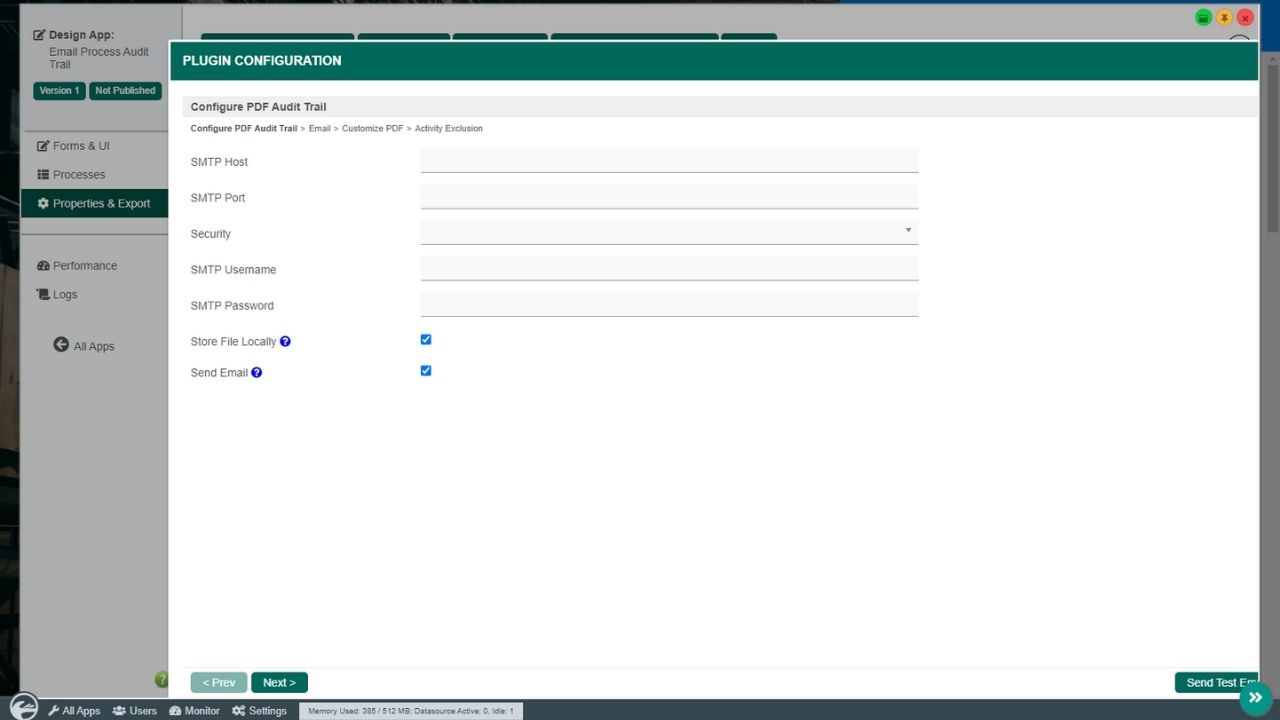
  4. In your app, go to "Properties & Export -> Set Plugin Default Properties" and choose the PDF Audit Trail. Configure the email properties accordingly.
  5. Remember to always uninstall the old plugin before uploading a new version.
  6. The Joget Knowledge Base has more information on managing and developing plugins.